Austin Gallery
Printing & ReproductionJuly 22, 202615 min read

Best Printers for Stickers 2026: Craft-Tested Picks

Eleven verified picks for the people who actually cut what they print: the six-ink Canon that makes sheets look retail, the one machine that prints and kiss-cuts, tank printers that make shop volume profitable, and the media that decides whether your stickers survive a water bottle.

By Justin Park · How we research

What Printer Do You Need to Make Stickers?

Your situationBuy thisPrice
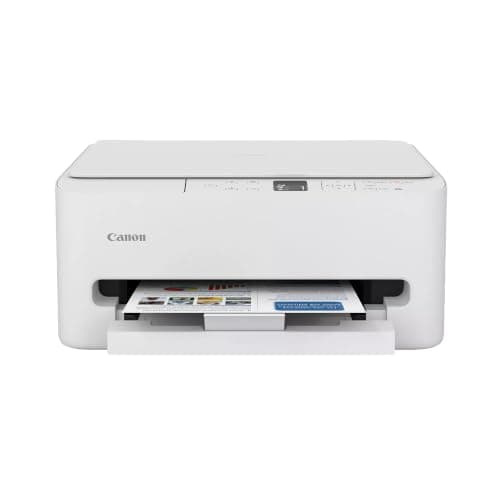
Best print quality for serious sticker sheetsCanon PIXMA TS8820$318.95
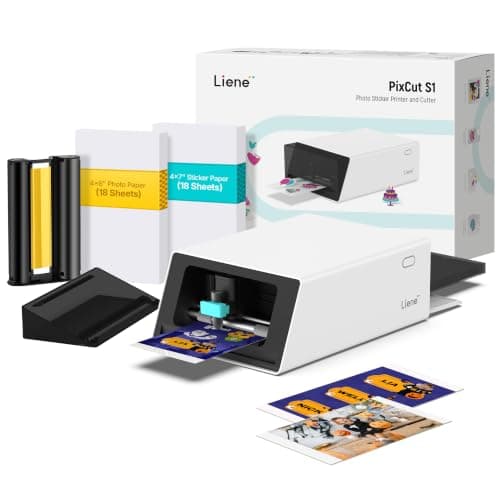
One machine that prints AND cutsLiene PixCut S1$279.99
You craft in 12x12Canon TS9521C$397.95
Etsy-shop volume, pennies-per-sheet inkEpson EcoTank ET-4800$199.99
Just trying the hobbyCanon PIXMA TS6520$74.00
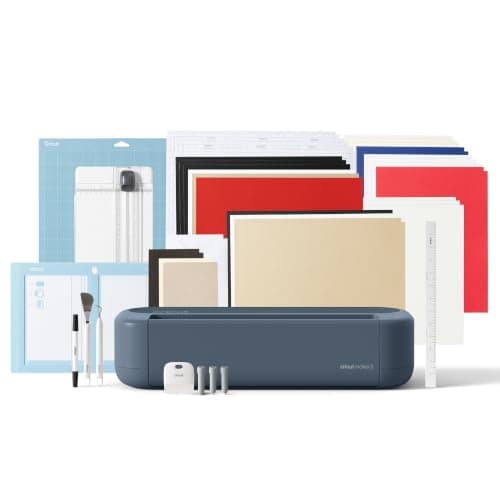
The cutting half of the workflowCricut Maker 4 Sticker Bundle$399.99
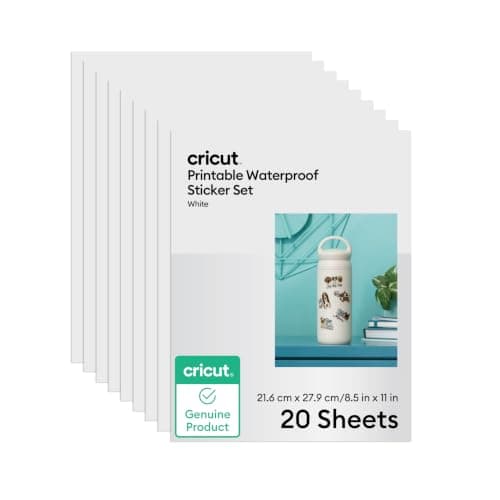
Stickers that survive water bottlesCricut Waterproof Paper$22.98
No printer, no problemXyron Create-a-Sticker$23.85

Sticker makers are their own tribe with their own physics. You are not printing documents; you are laying saturated dye onto coated vinyl that costs a dollar a sheet, then cutting shallow contours through the face layer without touching the backing, and the result has to survive a middle-schooler's water bottle. The gear that does this well is specific: dye-based inkjets with rich color and forgiving feed paths, cutters with camera registration, and media chosen for the destination surface. Office printers and laser printers, whatever their virtues, are the wrong tools, and we explain why in the durability note partway down.

Our top pick, the Canon PIXMA TS8820 ($318.95), is the six-ink sheet-printing standard, and the Liene PixCut S1 ($279.99) is the one-machine alternative that prints and kiss-cuts in a single pass. Around them: tank-ink machines that make shop volume profitable, the only true 12x12 craft printer, both halves of the budget workflow, and the three media picks that matter. Every product verified in stock at a real price at publish time. Every link goes to Amazon with our affiliate tag; we earn a small commission, at no cost to you, when you buy through us.

Adjacent reading: our cutting machine guide goes deep on the cutter half, our art printer guide covers the 13 inch and larger machines for prints rather than stickers, and crafters outfitting a full workspace should see the artists' cutting machine roundup.

In a Hurry?

The 3 picks that cover most readers. Tap to read the full review or buy direct.

Best Overall

Canon PIXMA TS8820

Canon PIXMA TS8820

$318.95

Six-ink color that makes sticker sheets look store-bought.

Print & Cut in One

Liene PixCut S1

Liene PixCut S1

$279.99

Design, press go, finished die-cut sticker. One machine.

Best Under $100

Canon PIXMA TS6520

Canon PIXMA TS6520

$74.00

The try-the-hobby printer that graduates to backup duty.

Best Overall for StickersOur Pick

Inks

6 individual tanks (incl. photo blue)

Max size

Borderless up to 8.5 x 11 sticker sheets

Feeds

Rear tray for thick sticker and vinyl stock

Connectivity

Wi-Fi, AirPrint, Canon app

Pros

  • Six-ink color that makes sticker sheets look retail
  • Handles glossy, matte, holo, and vinyl sticker paper
  • Rear feed path spares thick media the tight bend

Cons

  • Dye ink wants lamination for outdoor or bottle use
  • Per-sheet ink cost adds up at business volume

Ask sticker sellers what actually matters in a printer and the answers are specific: saturation on white vinyl, no banding in flat color fills, and a feed path that does not chew $1-per-sheet media. The TS8820 is Canon's current six-ink photo all-in-one, and it nails all three. The extra photo blue ink visibly smooths the skies and gradients that four-ink printers band, and the rear feed takes thick sticker stock straight in rather than bending it around a roller.

Why six inks matter for stickers specifically: sticker designs lean on flat, saturated fills and clean outlines, exactly where four-ink printers show their banding and where dye-based six-ink systems shine. This is also why we do not recommend laser printers for sticker work; toner sits on top of glossy sticker coatings and cracks along kiss-cut lines.

Pair it with a cutter (the Cricut Maker 4 bundle below, or the machine you already own from our cutting machine guide) and you have the classic two-machine sticker workflow: print the sheet here, kiss-cut it there. If you would rather have one machine do both, that is the PixCut S1, and the head to head below settles the choice.

Our Pick

The sticker maker's inkjet: six individual inks including a dedicated photo blue, borderless printing, and Canon's saturated dye color that makes sticker sheets pop off the backing. It feeds glossy, matte, holographic, and vinyl sticker paper without drama, which is the whole job.

Buy this if stickers are a serious hobby or a shop and you want the best print quality per dollar. The six-ink system is the difference between stickers that look printed and stickers that look manufactured: smoother gradients, richer reds, and clean fine linework on white vinyl. Individual tanks mean you replace only the color you burned through.

What we don't like

Dye ink needs laminate or a waterproof vinyl to survive water bottles and dishwashers; that is true of every printer in this class and we cover the fix in the durability note below. Ink cost per sheet is real at shop volume, which is where the EcoTank picks come in.
Best All-in-One Print & CutThe One-Machine Answer

Type

Integrated color printer + kiss-cutter

Ink

None (thermal color cartridge system)

Workflow

App design library, auto contour cutting

Best for

Die-cut stickers, labels, small batches

Pros

  • Prints and contour-cuts in one pass, one machine
  • No ink cartridges to clog or dry out
  • Easiest workflow of anything in this guide

Cons

  • Locked to its own media sizes and supplies
  • Thermal color trails six-ink inkjet on big art

The honest pitch: every other path to a finished sticker involves two machines and a file format handoff; this one involves a button. The PixCut S1 integrates a thermal color printer with an automatic contour cutter, so the machine that prints your design is the machine that cuts around it, with registration handled internally rather than by you aligning marks.

The trade is control for convenience, and which side of that trade you belong on is the clearest fork in this guide. Batch sellers printing full 8.5 x 11 sheets on specialty vinyl need the TS8820 path; crafters who want stickers this afternoon without learning two ecosystems will be happier here. The head to head below goes deeper, and the Likcut S41 offers a budget riff on the same integrated idea.

The One-Machine Answer

The category's newest idea: one countertop machine that prints the sticker AND kiss-cuts it, no inkjet, no cutting machine, no software relay between them. Thermal color tech means zero ink cartridges, and the app-to-sticker pipeline is the simplest in this guide.

Buy this if the two-machine workflow is the thing stopping you. Design in the app, press go, and a finished die-cut sticker comes out; that is the entire process. For planner stickers, labels, kids' projects, and small-batch Etsy work, the convenience is genuinely transformative, and no ink to dry out means it tolerates being used in bursts.

What we don't like

Print size and media are the machine's own system, so you give up the freedom of 8.5 x 11 sheets and third-party vinyl. Color quality is very good for thermal but does not match the TS8820's six-ink output on large art prints.

Best for 12x12 Craft WorkThe Scrapbook Classic

Max size

True 12 x 12 inch printing

Inks

5 individual tanks

Extras

Built-in craft templates and patterns

Connectivity

Wi-Fi, AirPrint, Canon PRINT app

Pros

  • The only real 12x12 printer for the craft world
  • Pairs perfectly with 12x12 cutting mats
  • Competent sticker output at every standard size

Cons

  • Availability comes and goes; buy when in stock
  • Overkill if you never print beyond letter size

The craft world standardized on 12x12 decades ago, and the printer industry mostly refused to follow; this machine is the exception. The TS9521C exists because Canon noticed millions of scrapbookers and Cricut owners trimming letter-size prints to fit 12x12 layouts and mats. It prints edge to edge at the format the hobby actually uses, which for full-page sticker collages and print-then-cut backgrounds removes a compromise you may have stopped noticing.

For pure sticker-sheet work at letter size, our top pick is the better buy. This one earns its slot the moment your projects, or your cutting mat, measure twelve by twelve.

The Scrapbook Classic

The only mainstream printer built specifically for crafters: it prints true 12x12, the native size of the scrapbook and cutting-machine world, plus every standard sticker sheet size. If your projects live in 12x12 or you feed a Cricut with printed designs, nothing else does this job.

Buy this if 12x12 is your format. Scrapbookers, and crafters who print full-size backgrounds and sticker sheets for 12x12 cutting mats, have exactly one first-party option and this is it. It is also a fully competent 5-ink sticker printer at standard sizes, with built-in craft patterns and templates.

What we don't like

Stock runs thin periodically (it is in stock at $397.95 as we publish, but availability swings; the category has exactly one 12x12 printer and demand shows it). At letter size only, the TS8820 prints slightly better for less.

Best High-Volume ValueThe Tank

Ink

Refillable supertank (bottles, not cartridges)

Colors

4 (CMYK)

Cost per page

Fraction of cartridge printers

Connectivity

Wi-Fi, Epson Smart Panel app

Pros

  • Cheapest cost per sticker sheet in this guide
  • Included ink runs years at hobby volume
  • Flat-color sticker designs print clean

Cons

  • Four-color gradients trail the six-ink Canons
  • Bottle refills are slightly ritual-like

Sticker businesses die on ink math, and the EcoTank rewrites it. A cartridge printer makes every 8.5 x 11 sticker sheet carry a visible ink cost, which quietly taxes test prints and makes you ration experiments. The ET-2800's refillable tanks invert that: ink becomes so cheap per page that you print proofs freely, and proofing freely is how sticker quality actually improves.

The quality trade is smaller than spec sheets imply. Four inks versus six matters on photographic gradients; the bold flat fills of typical sticker art mask it entirely. Volume sellers who also want better paper handling and an ADF for the shop's shipping paperwork should look one shelf up at the ET-4800.

The Tank

The economics machine: refillable ink tanks drop the cost of a printed sticker sheet from dollars-adjacent to pennies-adjacent, which changes what an Etsy shop can charge and still profit. Print quality is honest four-color, and the included ink lasts years of hobby use.

Buy this if you print sticker sheets in volume and the TS8820's per-sheet ink cost made you wince. At shop scale, ink economics beat marginal color quality: the ET-2800's bottles cost a fraction of cartridge ink per page, so test prints, reprints, and big batches stop feeling expensive.

What we don't like

Four-color printing bands slightly on big smooth gradients where six-ink printers glide; simple flat-color sticker designs, which is most of them, hide this completely. No auto-duplex or ADF, irrelevant for stickers.

Best for Sticker BusinessesThe Shop Workhorse

Ink

Refillable supertank (CMYK)

Extras

ADF, fax, ethernet

Cost per page

Same near-zero tank economics

Connectivity

Wi-Fi, ethernet, AirPrint

Pros

  • Tank economics plus real office features
  • Same price as the ET-2800 at publish time
  • Ethernet steadies Wi-Fi-flaky craft rooms

Cons

  • No output quality gain over the ET-2800
  • Physically bigger box on the craft desk

Every sticker shop is secretly two operations: the fun one that makes stickers and the boring one that makes it a business. The ET-4800 is the rare machine that serves both without compromising either. Sticker sheets print on the same near-free tank ink as the ET-2800, and the ADF, fax, and ethernet handle the invoices, forms, and supplier paperwork that pile up around any operation that ships product.

At publish time both EcoTanks verify at $199.99, which makes this the obvious pick of the pair for anyone running a shop; take the ET-2800 only if desk space is tight or the simpler machine appeals.

The Shop Workhorse

The ET-2800's economics plus the small-business extras: an auto document feeder, fax, and ethernet. Same tank-ink sticker printing, but the machine also runs the paperwork side of an Etsy or market-stall operation, at the same $199.99 as we publish.

Buy this over the ET-2800 if the printer serves a business and not just a craft table; at the same verified price, the ADF and ethernet are free capability. Scanning packing slips, supplier docs, and kids' homework through a feeder while the tanks keep sticker costs near zero is a genuinely complete home-business setup.

What we don't like

Identical four-color output to the ET-2800, so the same gradient note applies. The ADF is for documents, not sticker media; sticker sheets still go through the main path one at a time.

Austin Art Insider

Free weekly guide to galleries, exhibitions & collecting in Austin.

Best Budget StarterBest Under $100

Type

Compact wireless inkjet, borderless capable

Colors

Hybrid ink system

Best media

Standard glossy and matte sticker sheets

Connectivity

Wi-Fi, AirPrint, Canon app

Pros

  • Real sticker capability at an impulse price
  • Compact and easy for beginners
  • Graduates gracefully to backup duty

Cons

  • Cartridge ink cost punishes volume
  • Thick vinyl stock pushes its feed limits

The right first sticker printer is the one that answers the only question that matters: do you actually enjoy making stickers? The TS6520 answers it for $74. It prints borderless color on standard sticker sheets, the Canon app makes phone-to-printer painless, and the results on glossy paper are legitimately gift-worthy, not craft-fair-embarrassing.

The math to know going in: cartridge ink means each sheet costs real money, so this is a low-volume machine by design. Hobby confirmed? The EcoTank fixes the ink math and this becomes the document printer. Hobby abandoned? You spent $74 learning something true about yourself, which is a bargain as those lessons go.

Best Under $100

The try-the-hobby printer: a current Canon inkjet that prints borderless sticker sheets on glossy and matte paper for $74. Color is honest, the app is friendly, and if sticker making sticks, it becomes the backup printer when you upgrade.

Buy this if you are sticker-curious and unwilling to spend $300 to find out. It feeds standard sticker paper happily, prints kid-project and planner stickers that genuinely please, and costs less than a big Cricut accessory haul. The upgrade path leaves nothing wasted.

What we don't like

Cartridge ink on a cheap printer is the classic razor-and-blades trap; at steady volume the EcoTank pays for itself quickly. Thick specialty vinyls are more feed-jam-prone than on the rear-fed TS8820.

Best Cutting PartnerThe Print-Then-Cut Standard

Machine

Cricut Maker 4 (flagship cutter)

Key feature

Print Then Cut camera registration

Bundle

Sticker materials, tools, digital content

Cuts

Sticker paper, vinyl, 300+ materials

Pros

  • Camera-registered kiss-cuts on printed sheets
  • Bundle includes the sticker-specific extras
  • Grows into vinyl, iron-on, and every other craft

Cons

  • Design Space subscription upsells
  • Adds real cost on top of the printer

A printer makes sticker sheets; a cutter makes stickers. The difference is the kiss-cut, the shallow cut through the sticker layer that leaves the backing intact, and doing it by hand with scissors is the stage of the hobby everyone remembers leaving. The Maker 4's Print Then Cut closes the loop: print on any inkjet in this guide, feed the sheet to the Cricut, and its camera finds the marks and cuts every contour.

This bundle earns its slot over the bare machine by packaging the sticker-specific materials and tools beginners otherwise buy piecemeal in week one. Full category context, including the smaller Explore and Joy machines that also handle Print Then Cut, lives in our Cricut and cutting machine guide.

The Print-Then-Cut Standard

The other half of the classic sticker workflow: your inkjet prints the sheet, the Maker 4 kiss-cuts every shape with camera-registered precision. This bundle packages the current flagship cutter with sticker-specific materials and tools, aimed exactly at this use.

Buy this if you chose the two-machine path (TS8820 or EcoTank plus a cutter) and do not already own a cutting machine. Print Then Cut is the feature doing the work: the Maker 4's sensor reads registration marks and contour-cuts printed designs cleanly, turning any inkjet in this guide into a sticker production line.

What we don't like

Cricut's Design Space software is subscription-happy and internet-dependent; budget for what you actually need. Total system cost (printer plus cutter) is the price of admission for professional-looking sheets.

Best Budget Print-Then-Cut CutterThe $140 Cutter

Type

Compact vinyl cutter, print-then-cut capable

Software

Likcut app with AI design generation

Subscription

None required

Best for

Printed sticker sheets, paper, standard vinyl

Pros

  • Print-then-cut for a third of Cricut money
  • No subscription to unlock core features
  • Compact enough for a shelf between sessions

Cons

  • Narrow materials range versus the Maker 4
  • Less refined software and community support

The interesting question the S41 asks: how much of a $400 cutting bundle does a sticker maker actually use? For pure sticker work the honest answer is the print-then-cut function and not much else, and that function is exactly what Likcut ships for $139.99. Print your sheet on the TS6520 or EcoTank, register, kiss-cut, done.

The Cricut remains the right buy for anyone whose crafting will sprawl beyond stickers into iron-on, leather, and the whole materials universe. But as the dedicated cutting half of a budget sticker line, the S41 plus an EcoTank lands under $350 total, a genuinely complete setup for less than the Maker 4 bundle alone.

The $140 Cutter

The budget answer to the Maker 4 for sticker work specifically: a compact cutter with genuine print-then-cut registration, its own AI-assisted design app, and no subscription wall, at roughly a third of the Cricut bundle's price.

Buy this if the two-machine workflow appeals but the Cricut's price and subscription posture do not. For kiss-cutting printed sticker sheets, the S41 does the essential job, and its software includes AI image generation that beginners find genuinely fun for one-off designs.

What we don't like

Materials range, cutting force, and ecosystem depth are all far below the Maker 4; this is a sticker-and-paper machine, not a 300-material craft platform. Software polish is a step down from Design Space, subscription complaints aside.

Best Sticker Paper (Waterproof)The Sheet That Survives

Count

20 sheets, 8.5 x 11

Type

Waterproof vinyl-based, inkjet compatible

Works with

Any inkjet + any print-then-cut machine

Finish

White, printable

Pros

  • Water-resistant without a laminate pass
  • Feeds and cuts cleanly in the standard workflow
  • Turns hobby output into sellable product

Cons

  • Premium per-sheet cost
  • Dishwasher duty still wants lamination

Media is half the sticker; the sad peeling smear on a water bottle is almost never the printer's fault. Standard glossy sticker paper takes beautiful ink and dissolves at the first splash. This Cricut vinyl sheet is the mainstream fix: an inkjet-printable waterproof face that keeps dye ink where you put it through rain, spills, and wipe-downs.

Workflow note: proof designs on cheap glossy stock, then commit finals to these sheets. Twenty sheets at $22.98 is not proofing paper, it is product paper, and treating it that way is what the per-sheet math wants.

The Sheet That Survives

The media upgrade that fixes the number-one sticker complaint: printed stickers that smear the first time they meet a water bottle. This vinyl-based inkjet sheet takes dye ink well and shrugs off water without lamination for most uses.

Buy this alongside whichever printer you choose if your stickers will live on bottles, laptops that travel, or anything wiped down. It feeds through every inkjet in this guide, plays perfectly with Print Then Cut registration, and removes the laminate step for everyday durability.

What we don't like

Costs more per sheet than plain glossy paper, so proof on cheap stock and print finals on this. Dishwashers remain the boss fight; laminate for that.

Best Clear Sticker PaperThe Transparent Trick

Count

30 sheets, 8.5 x 11

Type

Clear vinyl, inkjet printable

Best designs

Dark linework, label styles, glass surfaces

Note

No white ink in inkjets; plan designs accordingly

Pros

  • Pro die-cut look with zero cutting precision needed
  • 30 sheets under $10 invites experimentation
  • Perfect for jars, glass, and label work

Cons

  • Colors mute and whites vanish on clear stock
  • Application shows fingerprints and bubbles more

Clear stock is the beginner's shortcut to expensive-looking stickers: no background means no visible cut line, which means nobody sees your imperfect scissors work. Aevdor's sheets are the value bulk-pack of the niche, thirty 8.5 x 11 pages for $9.95, and they feed through household inkjets without ceremony.

Design for the medium and it shines: bold dark outlines, botanical linework, and label typography all look printed-on rather than stuck-on, especially on glass jars and bottles. Just remember the physics: no inkjet prints white, so anything pale needs the white vinyl sheets instead.

The Transparent Trick

The cheap thrill of the sticker world: transparent vinyl sheets that make any design look professionally die-cut because the background simply is not there. Thirty sheets for under ten dollars makes it the easiest experiment in this guide.

Buy this to make label-style stickers, jar and container labels, and designs that float on glass and laptops without a white rectangle around them. It runs through any inkjet here and the clear look reads instantly more expensive than it costs.

What we don't like

Inkjet ink is translucent, so colors print softer on clear stock and whites do not print at all; designs need dark outlines or deliberately transparent aesthetics. Fingerprints show during application.

Best No-Printer Sticker MakerThe Analog Wildcard

Width

Up to 5 inches

Power

None, hand crank

Works on

Paper, photos, drawings, die cuts

Refills

Adhesive cartridge system

Pros

  • Turns literally any flat paper into a sticker
  • Kid-safe, mess-free, no batteries or ink
  • Bridges any printer to sticker output for $24

Cons

  • One sticker per piece, no sheet workflow
  • Adhesive refills are the razor blades

Sometimes the category's best trick is its oldest one. The Xyron has been quietly making stickers since before the word workflow entered crafting: paper goes in the front, adhesive-backed paper comes out the back, and a five-year-old can run it. As a companion to any printer in this guide, it means designs printed on ordinary photo paper, plus drawings, ticket stubs, and pressed-flat ephemera, all become stickers on demand.

It will not replace a printed-and-kiss-cut sheet operation, and it is not trying to. It is $23.85 of pure yes on the craft table, and every household that buys one finds it in use years later.

The Analog Wildcard

No power, no ink, no software: feed anything flat up to five inches wide through the crank and it comes out a sticker. The Xyron turns kids' drawings, printed photos, washi scraps, and die cuts into stickers, which makes it the perfect sidecar to everything else in this guide.

Buy this for the craft table, full stop. It converts anything you already printed or drew into a sticker, which makes it both the cheapest entry into sticker making and the tool that closes workflow gaps: print on plain photo paper with any printer, crank it through, and it is now a sticker.

What we don't like

Edge-to-edge adhesive means no kiss-cut sheets; each piece becomes one sticker. Refill cartridges are the ongoing cost and the thing to remember to reorder.

Head-to-Head

How the top picks compare

The two decisions sticker makers actually agonize over: one machine or two, and which cutter earns the desk space.

Canon TS8820 vs Liene PixCut S1: Two Machines or One?

The six-ink sheet printer against the integrated print-and-cut box.

Canon PIXMA TS8820

Canon

Winner

Canon PIXMA TS8820

Best print quality, any media, any cutter

$318.95
Check Price →
Liene PixCut S1

Liene

Liene PixCut S1

Prints and kiss-cuts in one pass, zero ink

$279.99
Check Price →

Our verdict

Winner: Canon Canon PIXMA TS8820. The TS8820 wins for anyone who will make stickers next year, not just next weekend. Open media means waterproof vinyl, clear sheets, holographic stock, and full 8.5 x 11 batch sheets, and six-ink output is simply the ceiling of this price class; add any cutter later and the system outgrows anything integrated. The PixCut's case is honest and strong: it is the shortest possible path from idea to finished die-cut sticker, with no ink to clog and no second machine to learn, and for planner stickers, labels, and casual making, that convenience will beat quality specs every single session. Committed makers and sellers: Canon. Everyone who wants stickers this afternoon: Liene.

Buy the Canon

you want max quality, open media, and a system that scales into a shop.

Buy the Liene

you want finished stickers with one machine and zero workflow.

Cricut Maker 4 vs Likcut S41: The Cutter Question

The $399.99 flagship bundle against the $139.99 sticker specialist.

Cricut Maker 4 Sticker Bundle

Cricut

Winner

Cricut Maker 4 Sticker Bundle

300+ materials, best registration, huge ecosystem

$399.99
Check Price →
Likcut S41

LIKCUT

Likcut S41

Print-then-cut for a third of the price, no subscription

$139.99
Check Price →

Our verdict

Winner: Cricut Cricut Maker 4 Sticker Bundle. The Maker 4 wins on the long game: cleaner registration on dense sticker sheets, a materials range that follows your crafting wherever it wanders, and an ecosystem of mats, blades, and community fixes for every problem you will ever have. It is the safer $400. The S41 wins the narrower argument it actually makes: if stickers are the job and the budget is real, $139.99 buys the one feature that matters and Likcut does not hold core functions behind a subscription. Buy the Cricut if crafting tends to expand in your house; buy the Likcut if it tends to stay exactly the size you planned.

Buy the Cricut

crafting sprawls beyond stickers and you want the deep ecosystem.

Buy the LIKCUT

stickers are the mission and $260 saved buys a lot of vinyl.

How we
chose

How we picked these eleven, and why you can trust the list:

  • Sticker-specific criteria. We ranked for what sticker output actually demands: color saturation on coated vinyl, banding-free flat fills, feed paths that handle thick media, and clean interplay with print-then-cut registration. Document-printing specs (PPM, duplex, ADF) counted only as bonuses.
  • The whole workflow, honestly. A printer alone makes sheets, not stickers, so the guide covers both halves: printers, the cutters that finish the job, and the three media picks (waterproof, clear, analog) that decide durability and look.
  • Verified live prices and stock. Every product was checked against Amazon's live catalog data at publish time: real price, in stock, real product images. No list-price fiction.
  • Volume economics weighted. Ink cost per sheet is the number that decides whether a sticker shop profits, so tank-ink machines earn their placement on math, not marketing.
  • Distinct jobs, no filler. Six-ink quality, integrated print-and-cut, 12x12 format, tank volume, a $74 starter, two cutters, and three media types: each pick answers a different maker, and the head to heads settle the closest calls.

Share this guide

Share

Common Questions

Frequently Asked Questions

Have art
to sell?

Austin Gallery specializes in selling inherited art, estate collections, and fine art with zero upfront fees. Get a free evaluation today.