Austin Gallery

Printing & Reproduction

8 Best Home Printers for Art & Fine-Art Prints (2026)

A print shop charges $30-60 per giclée. The right home printer makes them for the cost of ink. We tested 8 — from $1,349 pro pigment to a $280 beginner all-in-one — and sorted them by who each is for.

By Austin Gallery EditorsUpdated June 1, 202614 min read
Fine-art giclée prints fresh off a wide-format pigment printer

A single gallery-grade giclée print costs $30-60 at a print shop. Sell or hang a few dozen a year and the math is obvious: the right home printer pays for itself, then makes every print after that for the cost of ink and paper. That's the entire reason an artist buys a serious printer.

But "the right printer" depends entirely on what you make. A photographer selling archival fine-art prints needs a different machine than an illustrator printing vivid letter-size work, who needs something different from a print-on-demand seller drowning in ink costs. We tested across the full range — from $1,349 pro pigment printers down to a $280 beginner all-in-one — and sorted them by exactly who each one is for. Every link goes to Amazon with our affiliate tag; we earn a small commission, at no cost to you, when you buy through us.

In a Hurry?

The 3 picks that cover most readers. Tap to read the full review or buy direct.

Best Overall

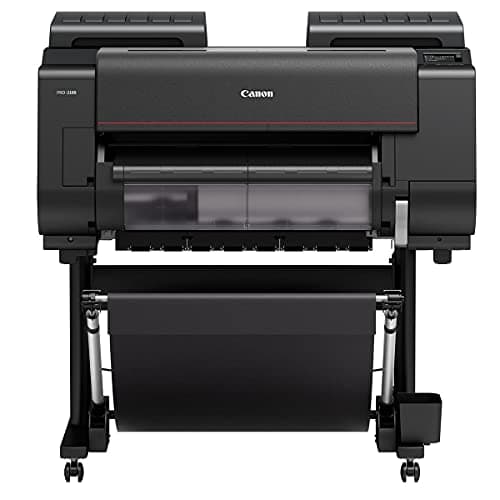
Canon imagePROGRAF PRO-1100

$1,349

17-inch, 12-ink pigment. Gallery-grade giclée at home. What print studios actually buy.

Best Value

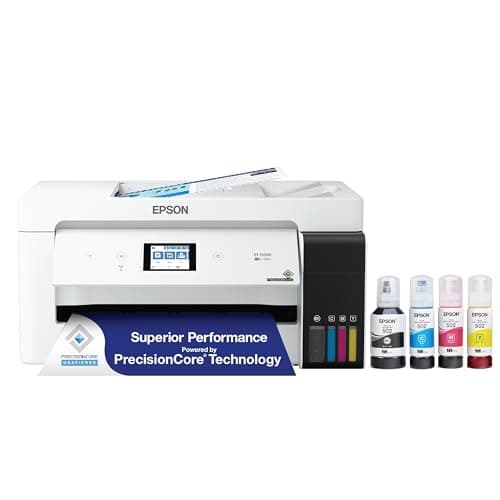
Epson EcoTank Photo ET-8550

$564

Refillable A3+ supertank — slashes cost-per-print ~90%. The high-volume seller's pick.

Best for Beginners

Epson Expression Photo XP-8800

$280

Easy 6-color all-in-one with a scanner. The gentlest, cheapest way to start.

Best OverallOur Pick

Max Width

17 in (A2)

Ink Type

12-ink LUCIA PRO pigment

Archival

100+ year rated

Connectivity

Wi-Fi, USB, Ethernet

Pros

  • 12 pigment inks — widest gamut + deepest blacks in the class
  • 17-inch width prints A2, panoramas, and full-bleed gallery sizes
  • Pigment archival permanence rated past 100 years — sellable giclée
  • Chroma Optimizer eliminates bronzing and gloss differential
  • Borderless printing up to 17 inches wide

Cons

  • Large desktop footprint — needs dedicated space
  • 12-cartridge refills are a meaningful running cost
  • Pigment heads need regular use to avoid clogging

The Canon imagePROGRAF PRO-1100 is the printer that turns a spare room into a print studio. It's the successor to the PRO-1000 that defined the desktop-giclée category, and it's what photographers and painters reach for when the print has to be good enough to sell or hang.

$40+Typical price a print shop charges for a single 16×20 giclée — the PRO-1100 pays back fast if you print volume

The 12-ink LUCIA PRO pigment set is the whole story. Pigment inks sit on top of the paper rather than soaking in like dye, which gives you a wider color gamut, deeper neutral blacks, and — critically for anyone selling work — archival permanence rated past a century. That's the difference between a "photo print" and a giclée a collector will pay for.

What "giclée" actually means: a giclée is simply a high-resolution pigment inkjet print on archival paper. There's no magic — it's a pigment printer like this one, good paper, and a calibrated workflow. A shop charges $30-60 per giclée; the PRO-1100 lets you make them at the cost of ink and paper.

The Chroma Optimizer is the under-appreciated feature: a clear coat that evens out gloss across the print so blacks don't "bronze" and matte and glossy areas read consistently. Cheaper printers skip it, and you can see the difference the moment light hits the print at an angle.

Use it or lose it: pigment printers reward regular printing. Leave a PRO-1100 idle for months and the first session back will burn ink on nozzle cleaning cycles. If you only print a few times a year, a dye or EcoTank printer below will cost you far less in wasted ink.

Our Pick

The desktop printer that makes gallery-grade giclée prints at home. 17-inch (A2) width, a 12-ink LUCIA PRO pigment set, and the Chroma Optimizer that kills bronzing on blacks. This is what small print studios actually buy.

Buy this if you sell prints, reproduce your own paintings as limited editions, or simply refuse to compromise on color and longevity. The PRO-1100 is overkill for casual photos and exactly right for anyone whose name goes on the print.

What we don't like

It's big, it's heavy, and a full 12-cartridge ink refill is a real expense. Pigment ink also needs occasional use — let it sit unused for months and you'll waste ink on nozzle cleaning. This is a working printer, not an occasional one.

Best Pro AlternativeAlso Great

Max Width

17 in (A2)

Ink Type

10-ink UltraChrome PRO10 pigment

Archival

100+ year rated

Display

4.3" color touchscreen

Pros

  • 10 pigment inks with excellent neutral and B&W reproduction
  • Most compact 17-inch pro printer — fits a normal desk
  • Gorgeous 4.3-inch color touchscreen workflow
  • Carbon Black + Matte Black for deep blacks on any paper
  • Often priced below the Canon flagship

Cons

  • 10 inks vs Canon's 12 — slightly narrower gamut
  • Matte/photo black share a channel (small swap cost)
  • Pigment, so same use-it-regularly caveat applies

The Epson SureColor P900 is the printer to buy if the Canon's footprint scares you. Epson engineered the P900 to be the most compact 17-inch pigment printer on the market, and it shows — it fits on a normal desk in a way the Canon really doesn't.

The 10-ink UltraChrome PRO10 set is genuinely pro. Epson's pigment color science leans slightly cooler and is beloved for black-and-white work — if you print monochrome fine art, the P900 is arguably the better tool. For saturated color, the Canon's two extra inks give it a slight edge, but you'd need them side by side to call it.

Canon PRO-1100 vs Epson P900: both are excellent. Choose the Canon for the widest color gamut and the simplest matte/gloss workflow; choose the Epson for a smaller footprint, a better touchscreen, and class-leading black-and-white. You cannot make a wrong choice between these two.

Like every pigment printer here, the P900 wants to be used. If you print weekly, it'll reward you with prints indistinguishable from a pro lab. If you print twice a year, look at the EcoTank or a dye printer below.

Also Great

Canon's only real rival at 17 inches. Epson's 10-ink UltraChrome PRO10 pigment set, a more compact body, and a brilliant touchscreen. The Canon-vs-Epson choice usually comes down to which color science you prefer.

Buy this if you want pro pigment quality in a smaller footprint than the Canon, or you already live in Epson's ecosystem. The P900 is a touch cheaper than the PRO-1100 and noticeably more compact for a 17-inch printer.

What we don't like

10 inks vs Canon's 12 means a marginally smaller gamut on paper, and the carbon/matte black share a line, so deep-matte and glossy workflows involve a small ink-swap cost. Still pro-grade — just a hair behind the Canon on paper.

Best 13-Inch PigmentUpgrade Pick

Max Width

13 in (A3+)

Ink Type

10-ink UltraChrome PRO10 pigment

Archival

100+ year rated

Display

4.3" color touchscreen

Pros

  • Same 10-ink pro pigment set as the 17-inch P900
  • True archival giclée quality at a sub-$700 price
  • Compact — fits a standard desk easily
  • Excellent black-and-white and neutral tones
  • Borderless A3+ (13 × 19) prints

Cons

  • 13-inch max width — no A2 output
  • Pigment maintenance caveat applies
  • Ink cartridges are small vs the supertank options

The Epson SureColor P700 is the most printer most artists actually need. It's the P900's 13-inch sibling — same pigment inks, same archival rating, same touchscreen — at a price that's far easier to justify.

For the vast majority of people selling prints online or framing their own work, A3+ (13 × 19 inches) is plenty. At that size the P700 delivers prints indistinguishable from the 17-inch flagships. You're only paying more for the P900 if you genuinely need A2.

The honest upgrade math: P700 at ~$699 (13-inch) vs P900 at ~$1,029 (17-inch). If your biggest planned print is 13 × 19, the P700 is the smarter buy and the $330 difference goes toward ink and paper. Only step up to the P900 if A2 is on your roadmap.

Upgrade Pick

Pro pigment quality at 13 inches and a friendlier price. The P900's little sibling: same 10-ink UltraChrome PRO10 set, A3+ width instead of A2. The sweet spot for serious artists who don't need 17-inch output.

Buy this if you sell or hang prints but A3+ (13 × 19) is your largest size. You get genuine archival pigment giclée capability without the 17-inch price or footprint — the best value in true pro printing.

What we don't like

Maxes out at 13 inches wide, so anything larger than 13 × 19 has to be tiled or sent out. If you know you'll want A2 prints eventually, buy the P900 now rather than upgrading later.

Best for Vivid ColorAlso Great

Max Width

13 in (A3+)

Ink Type

8-ink dye (ChromaLife100)

Best

Vivid color & glossy photos

Connectivity

Wi-Fi, USB, Ethernet

Pros

  • 8 dye inks deliver intensely saturated, vibrant color
  • Stunning glossy photo prints straight out of the box
  • Fast — a borderless 13 × 19 in well under 2 minutes
  • Cheaper than the pigment pros while still 13-inch
  • Excellent for color photography and digital illustration

Cons

  • Dye is less archival than pigment — frame behind UV glass
  • Not the choice for sellable 'lifetime' giclée
  • 8 cartridges still add up over time

The Canon PIXMA PRO-200S is the printer for color that pops. Where pigment printers prioritize longevity and matte fine-art papers, the PRO-200S is built around dye inks that deliver the most saturated, glossy, eye-grabbing color in this guide.

For color photography, vivid digital art, and illustration destined for glossy or luster paper, dye is often the more beautiful choice — the color sits deeper and reads richer than pigment on the same image. It's also fast and forgiving.

Pigment vs dye, settled simply: pigment (P700/P900/PRO-1100) = maximum archival life + matte fine-art papers + sellable giclée. Dye (PRO-200S) = punchier color + glossy photo pop + lower cost. Many working artists own one of each. If you can only buy one and you sell prints, buy pigment; if you print vivid color for yourself, dye is gorgeous.

Also Great

The dye-ink alternative to pigment: punchier, more saturated color and gorgeous glossy photo prints at 13 inches. The artist's choice when vivid color and photo reproduction matter more than maximum archival life.

Buy this if you print vivid color photography, digital art, or illustration where saturation and glossy pop matter more than 100-year archival ratings. Dye prints look stunning out of the box and the PRO-200S is the best dye photo printer Canon makes.

What we don't like

Dye inks are less fade-resistant than pigment — excellent with the right paper and framing behind UV glass, but not the choice for archival giclée you're selling as 'lasts a lifetime.' For that, step up to a pigment printer above.

Best Value for ArtistsAlso Great

Max Width

13 in (A3+)

Ink Type

6-color refillable supertank

Running Cost

Lowest per print here

Extras

Built-in scanner (all-in-one)

Pros

  • Refillable supertank — by far the lowest cost per print
  • Prints A3+ (13 × 19) wide — real art sizes
  • 6-color ink incl. red & gray for better photo gamut
  • All-in-one with a scanner for copying and digitizing art
  • Ideal for high-volume print-on-demand sellers

Cons

  • Hybrid dye + 1 pigment black — not full archival pigment
  • Higher upfront price than cartridge photo printers
  • Bottle refills, while cheap, are an occasional chore

The Epson EcoTank Photo ET-8550 is the printer that makes high-volume art printing affordable. Cartridge printers punish you on ink — the EcoTank's refillable supertank flips that, dropping your cost-per-print to a small fraction of what cartridges cost.

~90%Typical ink-cost reduction of supertank vs cartridge printing over the printer's life

For anyone selling prints at volume or running a print-on-demand operation, the math is decisive: the ET-8550 costs more upfront and then saves you money on every single print for years. It prints A3+ wide, has a 6-color set with red and gray for a wider photo gamut, and includes a scanner for digitizing original art.

The one caveat: the ET-8550 uses five dye inks plus a single pigment black. That's a fantastic photo-and-art printer, but it isn't a full-pigment archival giclée machine like the SureColor P700/P900. If your whole business is "archival fine-art giclée," buy pigment. If you print high volume and want beautiful prints cheaply, this is the value pick of the guide.

Also Great

The cost-per-print champion. A refillable 6-color supertank that prints A3+ wide for pennies instead of dollars. If you print high volume, this is the printer that stops ink from eating your margins.

Buy this if you print a lot — selling prints, running a print-on-demand side hustle, or just printing constantly. The supertank ink system slashes cost-per-print to a fraction of cartridge printers, and it prints A3+ wide with a scanner built in.

What we don't like

It's a hybrid: five dye inks plus one pigment black, so it's not a true archival-pigment giclée printer like the SureColors. Color is excellent and running costs are unbeatable, but for 100-year sellable giclée, a full-pigment printer wins.

Austin Art Insider

Free weekly guide to galleries, exhibitions & collecting in Austin.

Best Budget Wide-FormatAlso Great

Max Width

13 in (A3+)

Ink Type

6-color Claria Photo HD dye

Best

Budget wide-format entry

Connectivity

Wi-Fi, USB, Ethernet

Pros

  • 13-inch wide-format A3+ printing for around $350
  • 6-color dye set with red & gray for richer photos
  • Compact and quiet for a wide-format printer
  • The lowest-cost real on-ramp to selling A3+ prints
  • Great color straight out of the box

Cons

  • Dye cartridges — not archival pigment
  • Running cost higher than the EcoTank supertank
  • No built-in scanner

The Epson Expression Photo HD XP-15000 is the budget gateway to wide-format art printing. It does the one thing cheap printers can't — print 13 inches wide — for a price that won't scare off a hobbyist testing the waters.

The 6-color Claria Photo HD dye set adds red and gray channels for a wider gamut than a standard 4-ink printer, so photos and digital art look genuinely good. It's not pigment and it's not a supertank, but at ~$350 for A3+ output, it's the most affordable way to find out whether wide-format printing fits your work.

The upgrade path: start on the XP-15000 to learn wide-format printing and test whether prints sell. When ink costs or archival demands push you, graduate to the EcoTank ET-8550 (cheap running cost) or the SureColor P700 (archival pigment). The XP-15000 is the on-ramp, not the destination.

Also Great

The cheapest way into 13-inch wide-format art printing. A 6-color dye printer that does A3+ prints for around $350 — the entry point for artists who need real print sizes on a budget.

Buy this if you want A3+ (13 × 19) wide prints but can't justify a $700 pigment printer yet. The XP-15000 is the budget on-ramp to wide-format art printing — perfect for testing whether selling prints is for you before investing in a SureColor.

What we don't like

Cartridge-based dye, so neither the archival life of pigment nor the cheap running cost of the EcoTank. It's the budget gateway, not the forever printer — but at $350 for 13-inch wide, it's a genuinely good place to start.

Best Budget CanonAlso Great

Max Width

13 in (A3+)

Ink Type

6-ink ChromaLife100+ dye

Type

Single-function (print only)

Connectivity

Wi-Fi, USB

Pros

  • 13-inch wide-format prints for around $313
  • 6 dye inks with strong, vivid Canon color
  • Single-function — small footprint, lower price
  • Borderless A3+ printing
  • Great budget pick for color photo and illustration prints

Cons

  • No scanner or copier (print only)
  • Dye inks — not archival pigment
  • Older platform than the newer Epsons

The Canon PIXMA iP8720 is for artists who only need to print — nothing else. By skipping the scanner and all-in-one features, Canon keeps it cheap and compact while still doing the thing that matters: vivid 13-inch wide color prints.

The 6-ink ChromaLife100+ dye set gives you the punchy, saturated Canon color that's great for color photography and digital illustration. It's an older design and it's dye rather than pigment, but as a sub-$320 wide-format color printer, it's a lot of output for the money.

Who it's for: you want Canon's vivid dye color at 13 inches, you already have a scanner (or don't need one), and you'd rather not pay for all-in-one features you won't use. If you want a scanner built in, the Epson EcoTank or XP-8800 make more sense.

Also Great

A dedicated, no-frills 13-inch wide photo printer. No scanner, no copier — just a 6-ink dye printer focused entirely on putting vivid color onto A3+ paper. Canon's budget answer for artists who only need to print.

Buy this if you want wide-format Canon color and don't need a scanner or all-in-one features. The single-function design keeps it cheap and the desk footprint small — pure print output for under $320.

What we don't like

Single-function means no scanning or copying, the 6-ink dye set isn't archival pigment, and it's an older platform. But for cheap, vivid, 13-inch Canon prints, it punches well above its price.

Best Beginner All-in-OneBudget Pick

Max Width

8.5 in (Letter/A4)

Ink Type

6-color Claria dye

Extras

Scanner + copier (all-in-one)

Best

Beginners & letter-size prints

Pros

  • Affordable, easy all-in-one — the gentle starting point
  • 6-color dye for genuinely nice photo and art prints
  • Built-in scanner to digitize and copy artwork
  • Compact, quiet, and simple to set up
  • Great for testing home printing before going wide-format

Cons

  • Letter/A4 max — no wide-format A3+ output
  • Dye cartridges — not archival, pricier per print at volume
  • You'll outgrow it if you start selling prints seriously

The Epson Expression Photo XP-8800 is the best first printer for art at home. It's cheap, it's simple, and it makes genuinely lovely letter-size photo and art prints with a 6-color dye set — plus it scans and copies, so it earns its place as a household all-in-one.

If you're not yet sure how much you'll print, or you mostly work at 8.5 × 11, there's no reason to spend more. The XP-8800 covers beginners completely and doubles as a everyday scanner and copier.

When to upgrade: the moment you want to print bigger than letter size, or you start selling prints, you'll want wide-format (XP-15000, ET-8550) or archival pigment (P700). Until then, the XP-8800 is the smart, low-risk way to start printing your own art.

Budget Pick

The easiest, cheapest entry point. A 6-color all-in-one with a scanner that makes lovely letter-size photo and art prints at home. The right first printer for a beginner who isn't ready to commit to wide-format.

Buy this if you're just starting out, print mostly letter-size (8.5 × 11) photos and art, and want a do-everything printer that also scans and copies. It's the gentlest, most affordable on-ramp to printing your own work.

What we don't like

Maxes out at letter/A4 size — no wide-format A3+ output — and uses dye cartridges, so it's neither archival nor cheap to run at volume. It's a beginner's printer, and an excellent one, but you'll outgrow it if you get serious about selling prints.

Head-to-Head

How the top picks compare

Three matchups decide most art-printer purchases. Here's who wins each, and exactly when to buy the runner-up instead.

Canon imagePROGRAF PRO-1100 vs Epson SureColor P900 — Which 17-Inch Pro Printer Wins?

The two best desktop pigment printers, head to head.

Canon

Winner

imagePROGRAF PRO-1100

12 inks — widest gamut, deepest blacks

$1,349
Check Price →

Epson

SureColor P900

Most compact, best B&W, lower price

$1,029
Check Price →

Our verdict

Winner: Canon imagePROGRAF PRO-1100. Both are superb and you cannot make a wrong choice. The Canon's two extra inks give it the widest color gamut and the simplest matte/gloss workflow, which edges it ahead for color fine art. The Epson counters with a smaller footprint, a better touchscreen, class-leading black-and-white, and a lower price.

Buy the Canon

you want the widest color gamut and the most future-proof pigment set, and you have the desk space.

Buy the Epson

you print a lot of black-and-white, your desk is tight, or you want to save ~$300.

Pigment vs Dye: Epson P700 vs Canon PIXMA PRO-200S

Archival pigment or vivid dye — the classic art-printer fork at 13 inches.

Epson

Winner

SureColor P700 (pigment)

100+ year archival giclée

$699
Check Price →

Canon

PIXMA PRO-200S (dye)

Punchier, glossier color

$670
Check Price →

Our verdict

Winner: Epson SureColor P700 (pigment). If you sell prints, the P700 wins on the thing that matters most: archival permanence. Pigment giclée is what collectors expect and what 'lasts a lifetime' actually requires. The PRO-200S is the better buy only if your priority is vivid glossy color you're printing for yourself, not selling as archival fine art.

Buy the Epson

you sell prints or want true archival giclée that won't fade.

Buy the Canon

you print vivid color photos/illustration for yourself and glossy pop matters more than archival life.

Value vs Archival: Epson EcoTank ET-8550 vs SureColor P700

Cheapest-per-print supertank or true archival pigment — for the high-volume artist.

Epson

Winner

EcoTank Photo ET-8550

Lowest cost per print, A3+ wide

$564
Check Price →

Epson

SureColor P700

Full archival pigment giclée

$699
Check Price →

Our verdict

Winner: Epson EcoTank Photo ET-8550. For most artists printing at volume, the ET-8550's supertank economics win — it prints A3+ wide for a fraction of the ink cost and includes a scanner. The P700 wins only when archival pigment permanence is the whole point of your business. Buy the EcoTank to print cheaply; buy the P700 to print archival giclée you sell.

Buy the Epson

you print high volume and want the lowest possible running cost.

Buy the Epson

your business is archival fine-art giclée and permanence is non-negotiable.

How we
chose

We evaluated every printer against the criteria that actually matter for printing art — not office-printer specs:

  • Pigment vs dye. The single biggest decision. Pigment inks (SureColor, imagePROGRAF) deliver wider gamut and 100+ year archival permanence — the giclée standard for sellable prints. Dye inks (PIXMA PRO-200S, EcoTank, XP series) deliver punchier glossy color at lower cost, with less archival life. We matched each printer to the work it suits.
  • Color gamut & accuracy. More inks generally means a wider reproducible color range. We weighted 10-12 ink pigment sets and 6-color dye sets above standard 4-ink office printers, which can't render the subtle gradations art demands.
  • Maximum print size. 17-inch (A2), 13-inch (A3+), and letter (A4) are the meaningful tiers. Bigger isn't always better — it's about matching your largest real print to the cheapest printer that handles it.
  • Cost per print. Cartridge printers can quietly cost more in ink than the printer itself. We flagged the supertank EcoTank as the running-cost champion for high-volume sellers.
  • Archival permanence. If you sell prints, fade resistance is non-negotiable. We separated true archival pigment printers from beautiful-but-shorter-lived dye printers so you don't sell a print that fades in a sunny room.

Share this guide

Share

Common Questions

Frequently Asked Questions

Have art
to sell?

Austin Gallery specializes in selling inherited art, estate collections, and fine art with zero upfront fees. Get a free evaluation today.