Austin Gallery
Studio & ToolsSeptember 30, 2026Updated September 30, 202611 min read

Cricut vs Silhouette Cameo 5: Which Cutting Machine to Buy

The Cameo 5 Alpha against the Cricut Explore 5 and Maker 3 on cut force, cut length, matless cutting, and software, plus the Siser Romeo and Brother ScanNCut as alternates.

By Austin Gallery · How we research

★ Our Top Pick

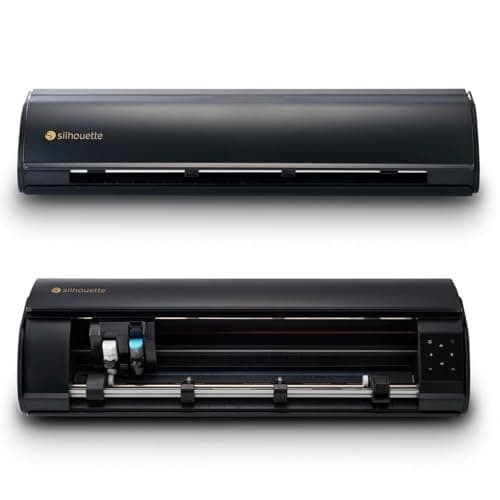
Silhouette Cameo 5 Alpha

Silhouette Cameo 5 Alpha

16 ft matless cuts with any lined vinyl, cross cutter, no subscription.

$299.00rated 4.6/5 in our review

Not sure yet? Compare all 6 picks below ↓

Buy the Silhouette Cameo 5 Alpha if you mostly cut vinyl, heat transfer vinyl, or stickers. At about $299 at the time of writing it cuts up to 16 ft of any lined vinyl without a mat, trims the roll with a built-in cross cutter, and runs on Silhouette Studio with no subscription. Buy a Cricut instead if you want the easiest software (the $249 Explore 5) or need to cut fabric, leather, and thin wood (the Maker 3).

The "Cricut vs Silhouette" question usually hides two separate choices. The first is hardware: cut length, matless cutting, and whether you need specialty blades. The second, and more important, is software: Cricut's Design Space is easier and cloud-first with a subscription upsell, while Silhouette Studio is desktop software you own. Get those two right and the model follows.

Below: the Cameo 5 Alpha against the Explore 5 and the Maker 3, a spec table, the software comparison, and three alternates people ask about in the same breath: the 24 in Siser Romeo, the Brother ScanNCut with its built-in scanner, and the 15 in Cameo 5 Alpha Plus. Our full best cutting machines guide ranks the wider field. Every product link goes to Amazon with our affiliate tag; we earn a small commission, at no cost to you, when you buy through us.

Winner for Vinyl, Stickers, and Print and CutOur Pick

Cut area with mat

12 x 24 in

Max cut length

16 ft (lined material, no mat)

Max thickness

3 mm

Force

Up to 5 kg (tool holder 2, per Silhouette)

Software

Silhouette Studio, no subscription required

Connectivity

USB and Bluetooth

Weight

11.5 lb

Pros

  • Matless cutting with any lined vinyl or HTV, not only branded rolls
  • 16 ft max cut length vs 12 ft on current Cricuts
  • Built-in cross cutter trims the roll when the job ends
  • Silhouette Studio works offline with no subscription

Cons

  • Software takes longer to learn than Design Space
  • No rotary blade option for loose fabric
  • Smaller tutorial and project ecosystem than Cricut

The Cameo 5 Alpha is the machine we would hand someone starting a vinyl or sticker side business. The reason is the roll. Load a roll of any lined vinyl or heat transfer vinyl, set the pinch rollers, and it will cut up to 16 ft without a mat, then trim the finished piece off the roll with its built-in cross cutter. Cricut's matless feed tops out at 12 ft and only works with Cricut Smart Materials, which cost more per foot than generic rolls.

What the "Alpha" update fixed. The Cameo 5 Alpha replaced the original Cameo 5 in late 2025. Silhouette redesigned the pinch rollers (a known wear point on the first Cameo 5), moved Print and Cut to a 4-point registration system for tighter sticker contours, and raised sketch speed to 400 mm/s. Blades, mats, and tools from the Cameo 5 carry over.

Silhouette Studio is the other half of the argument. It installs on your computer, works without internet, and the free version handles cutting your own designs; the Designer, Designer Plus, and Business Edition upgrades are one-time purchases rather than a monthly fee. That matters if you design in Illustrator or Affinity and want to import SVGs cleanly. Where the Cameo loses is fabric and thick craft materials: there is no rotary blade, so quilters and sewists are better served by the Cricut Maker 3 below or the Brother ScanNCut. Our best cutting machines guide ranks the Cameo alongside every major machine.

Our Pick

The Cameo 5 Alpha is the better buy for most people choosing between Cricut and Silhouette. At about $299 at the time of writing it cuts up to 16 ft of lined material without a mat (any brand, not just proprietary rolls), Silhouette lists up to 5 kg of downforce in its second tool holder, it has a built-in cross cutter, and Silhouette Studio is included with no subscription to keep it useful.

Buy the Cameo 5 Alpha if you cut vinyl decals, heat transfer vinyl, or stickers, especially to sell. It is also the machine for anyone who designs their own SVGs and wants desktop software that works offline, and for print and cut sticker makers who want the new 4-point registration.

What we don't like

Silhouette Studio has a steeper learning curve than Cricut Design Space, and there are fewer beginner tutorials. There is no equivalent of Cricut's rotary blade for unbacked fabric, and the pinch rollers need setting for each material width.

Winner for Beginners on a BudgetThe Challenger

Max cut width

11.7 in (Smart Materials)

Max cut length

12 ft (Smart Materials, no mat)

Materials

100+

Tools

Fine point blade, pens, scoring, foil

Software

Design Space (free; Cricut Access optional)

Connectivity

Bluetooth

Pros

  • Easiest software and the biggest project library
  • About $50 less than the Cameo 5 Alpha
  • 12 ft matless cuts with Smart Vinyl and Smart Iron-On
  • Huge community, so answers are one search away

Cons

  • Matless only with Cricut-branded Smart Materials
  • Subscription nudges inside Design Space
  • No knife or rotary blade support

The Explore 5 is the right Cricut if you want to be cutting a decal an hour after opening the box. Design Space walks you through material selection and blade setup, and nearly every beginner project online is written for it. For personal projects that is worth more than raw specs.

The trade-offs show up when you scale. Matless cutting requires Smart Materials, so a shop cutting hundreds of feet of vinyl a month pays Cricut's per-foot price instead of buying bulk rolls. And Design Space leans on its subscription: the software is free and cuts your own uploads, but the image and font library is gated behind Cricut Access. If those two points do not bother you, the Explore 5 is the smoother day-to-day experience. Our best Cricut machines guide covers the full Cricut lineup.

The Challenger

The Explore 5 is the Cricut most people cross-shop against the Cameo 5, and it wins on ease. Design Space is the friendliest cutting software on the market, the tutorial ecosystem is enormous, and the Essential Bundle is about $249 at the time of writing. It cuts Cricut Smart Materials up to 12 ft without a mat and handles 100+ materials.

Buy the Explore 5 if you are new to cutting machines, want to follow step-by-step projects, and mostly cut vinyl, iron-on, and cardstock for your own use rather than volume selling.

What we don't like

Matless cutting only works with Cricut Smart Materials. Design Space is cloud-first and pushes the Cricut Access subscription for images and fonts. No Adaptive Tool System, so no rotary blade, knife blade, or engraving tip.

Austin Art Insider

Free weekly guide to galleries, exhibitions & collecting in Austin.

Best Cricut for Fabric, Leather, and Thin WoodAlso Great

Max cut width

11.7 in (Smart Materials), 12 in on mat

Max cut length

12 ft (Smart Materials, no mat)

Force

About 4 kg (Adaptive Tool System)

Tools

Rotary, knife, engraving, debossing, scoring, and more

Materials

300+

Software

Design Space (free; Cricut Access optional)

Pros

  • Rotary blade cuts unbacked fabric cleanly
  • Knife blade handles basswood, balsa, and chipboard
  • Widest material list of any machine here
  • Same easy Design Space workflow

Cons

  • About $63 more than the Cameo 5 Alpha
  • Matless only with Smart Materials
  • Superseded by the Maker 5 as Cricut's flagship

The Maker 3 is where Cricut beats Silhouette outright. The Adaptive Tool System steers the blade and adjusts pressure, which is what lets it run a rotary blade through cotton without a stabilizer and a knife blade through basswood in multiple passes. Nothing in the Cameo lineup does that.

A note on timing: Cricut launched the Cricut Maker 5 in September 2026 (the Essential Bundle was about $399 on Amazon at the time of writing), with 3 mm clearance and a smaller footprint. The Maker 3 still does everything most crafters need, so buy it only while it sells for less than the Maker 5. If you are cutting HTV for shirts, pair either machine with a real press; our heat press guide explains why an iron is the weak link.

Also Great

If your projects include fabric, leather, basswood, or chipboard, the Maker 3 beats the Cameo. Its Adaptive Tool System takes the rotary blade and knife blade, Cricut rates it at about 4 kg of cutting force (marketed as 10x the Explore line), and it cuts 300+ materials. The bundle was about $362 at the time of writing.

Buy the Maker 3 if you sew, quilt, or cut leather and balsa, and want one machine that does vinyl too. It is the Cricut to get when the Explore's material list is too short.

What we don't like

Same Smart Materials restriction and subscription nudges as the Explore. The knife blade is slow on thick wood. And the Maker 5 (launched September 2026) is now the current flagship, so check both prices before you buy.

The Pricier Alternative: 24 in for Apparel Shops

Max material width

25 in

Max cut length

5 yards with roll holder

Software

Leonardo Design Studio

Connectivity

Wi-Fi and USB

Tools

45 and 60 degree blades, deep cut blade, etch, crease

Pros

  • Twice the width of any 12 in craft cutter
  • Built by the company that makes Siser EasyWeed HTV
  • Wi-Fi connection frees up the desk

Cons

  • Overkill for cards and paper crafts
  • Smaller community than Cricut or Silhouette
  • Needs a long bench

If the Cricut vs Silhouette question is really about starting a shirt business, look at the Romeo. Siser makes EasyWeed, the heat transfer vinyl most shops use, and the Romeo is built around cutting it from the roll at widths a 12 in machine cannot touch. A 25 in material width means full-back designs and two-up layouts without tiling. Its smaller sibling, the 12 in Siser Juliet, exists for crafters, but at the time of writing the Juliet did not show a live price on Amazon, so we left it off.

The Romeo is the step up for anyone selling heat transfer vinyl apparel. It takes material up to 25 in wide, cuts up to 5 yards with its roll holder, connects by Wi-Fi or USB, and ships with Siser's Leonardo Design Studio software. It was about $500 on Amazon at the time of writing.

Buy the Romeo if you are cutting HTV for shirt orders, need wider sheets for full-front designs or banners, and do not need paper crafts or fabric cutting.

What we don't like

It is a roll-fed vinyl cutter, not a craft machine, so paper and card work is less natural than on a Cricut or Cameo. Leonardo has a much smaller tutorial base, and the machine is about 36 in long.

The Scanner Alternative: Brother ScanNCut

Work area

12 x 12 in mat

Scanner

Built-in, up to 600 DPI

Screen

5 in LCD touchscreen

Max thickness

3 mm

Built-in designs

682, plus 9 fonts

Pros

  • Scan and cut hand-drawn art with no computer
  • Automatic blade depth for material thickness
  • No subscription needed for built-in designs

Cons

  • No matless roll cutting
  • Pricier than the Cameo 5 Alpha and Explore 5
  • Basic on-machine editing

The ScanNCut answers a different question: what if the design starts on paper? Lay a sketch on the scanning mat and the machine traces it into a cut line on its own screen. For illustrators who ink by hand and quilters working from printed fabric, that skips the whole vectorizing step. We compare it head to head in Brother ScanNCut vs Cricut Maker 3.

The ScanNCut is the only machine here with a built-in 600 DPI scanner and a 5 in touchscreen, so it can scan a drawing or a fabric motif and cut around it with no computer at all. It auto-detects material thickness and cuts up to 3 mm. It was about $450 at the time of writing.

Buy the ScanNCut if you draw by hand, quilt, or appliqué, and want to scan and cut without a laptop or subscription.

What we don't like

Every cut needs a mat, so long vinyl runs are slower than on a Cameo or Cricut. The on-screen editor is basic, and it costs more than either main contender.

Wider Silhouette: 15 in Cut Width

Operating area with mat

14.6 x 15 in

Max cut length

16 ft (lined material)

Max thickness

3 mm

Software

Silhouette Studio

Pros

  • 15 in material handling
  • Same Studio software and tools
  • Powered lid

Cons

  • About $100 more than the 12 in Cameo
  • Larger footprint

The Plus exists for one reason: 15 in rolls. If your HTV supplier sells 15 in widths, or your decals regularly run past 12 in, the extra width saves tiling. Otherwise the standard Cameo 5 Alpha is the better value.

Same machine as the Cameo 5 Alpha with a 15 in cut width (14.6 in guaranteed operating width), the same 16 ft maximum length, and a powered lid. About $400 at the time of writing, and the middle ground between a 12 in craft cutter and the 24 in Siser Romeo.

Buy the Plus if you want Silhouette's software but regularly cut 15 in HTV rolls or oversized decals.

What we don't like

About $100 more than the 12 in model for 3 in of extra width, and a wider footprint on the desk.

Check the Cameo 5 Alpha Plus on Amazon →$399.99 · Silhouette America

Head-to-Head

How the top picks compare

Two matchups cover almost every Cricut vs Silhouette decision.

Silhouette Cameo 5 Alpha vs Cricut Explore 5

The two machines most people cross-shop: vinyl power and owned software against the easiest beginner experience.

Silhouette Cameo 5 Alpha

Silhouette America

Winner

Silhouette Cameo 5 Alpha

16 ft matless cuts with any lined vinyl, cross cutter, offline software

$299.00
Check Price →
Cricut Explore 5

Cricut

Cricut Explore 5

Easiest software, biggest tutorial library, about $50 less

$249.00
Check Price →

Our verdict

Winner: Silhouette America Silhouette Cameo 5 Alpha. The Cameo 5 Alpha wins for anyone cutting vinyl or stickers regularly. It cuts 4 ft longer without a mat, works with any lined vinyl instead of only Cricut Smart Materials, trims the roll itself, and its software carries no subscription pressure. The Explore 5 is the better pick only if ease of use is the top priority and you will mostly follow ready-made projects.

Buy the Silhouette America

Buy the Cameo 5 Alpha if you cut vinyl, HTV, or stickers often, buy material in bulk, or design your own SVGs.

Buy the Cricut

Buy the Explore 5 if you are a beginner, want guided projects, and prefer the lowest price.

Silhouette Cameo 5 Alpha vs Cricut Maker 3

Vinyl specialist against the do-everything Cricut with fabric and wood tools.

Silhouette Cameo 5 Alpha

Silhouette America

Silhouette Cameo 5 Alpha

Longer matless cuts, cross cutter, no subscription

$299.00
Check Price →
Cricut Maker 3

Cricut

Winner

Cricut Maker 3

Rotary and knife blades for fabric, leather, and basswood

$342.05
Check Price →

Our verdict

Winner: Cricut Cricut Maker 3. If you need to cut fabric, leather, or thin wood, the Maker 3 wins, because the Cameo has no rotary or knife blade equivalent. If you never will, the Cameo 5 Alpha does vinyl better for about $63 less at the time of writing.

Buy the Silhouette America

Buy the Cameo 5 Alpha if your work is vinyl, HTV, stickers, and paper.

Buy the Cricut

Buy the Maker 3 if you sew, quilt, cut leather, or cut basswood and chipboard.

How we
chose

How we built this comparison:

  • Manufacturer specs only. Cut lengths, force figures, thickness limits, and cut areas come from Silhouette America, Cricut, Siser, and Brother. Where a maker does not publish a number (Cricut does not headline a force figure for the Explore line), we say so instead of borrowing a forum estimate.
  • Matless cutting, read carefully. Both brands cut without a mat, but under different rules. Cricut requires its own Smart Materials; Silhouette cuts any lined material. For anyone buying vinyl in bulk, that difference outweighs the headline feet.
  • Software as a cost. We counted subscription pressure and offline use as real factors, because they decide whether a machine stays in use.
  • Current models. We compared the Cameo 5 Alpha (the late 2025 refresh) and noted the Cricut Maker 5 launch in September 2026, so the page reflects what is actually on sale.
  • Verified listings. Every price was checked against the live Amazon listing on the day of publication. Cutting machine prices move often around sales events, so treat them as a snapshot.

Share this guide

Share

Common Questions

Frequently Asked Questions

Have art
to sell?

Austin Gallery specializes in selling inherited art, estate collections, and fine art with zero upfront fees. Get a free evaluation today.