Austin Gallery
Printing & ReproductionOctober 17, 2026Updated October 17, 202610 min read

Epson P900 vs Canon PRO-1100: Which 17 Inch Printer to Buy

The two 17 inch pigment printers artists buy for giclee prints. Ink cost per print with the math shown, roll paper, thick media, footprint, and the 13 inch alternatives.

By · How we research

★ Our Top Pick

Canon imagePROGRAF PRO-1100 17-Inch Pigment Printer

Canon imagePROGRAF PRO-1100 17-Inch Pigment Printer

Cheapest ink per print, 80 ml tanks, no black switching.

$1,299.00rated 4.8/5 in our review

Not sure yet? Compare all 4 picks below ↓

Buy the Canon imagePROGRAF PRO-1100 (about $1,300 on Amazon at the time of writing) if you sell giclee prints on cut sheets: its 80 ml tanks cost about $0.84 per ml, which works out to about $1.69 of ink per 13 x 19 print against about $2.11 on the Epson SureColor P900. Buy the P900 instead if you need roll paper, print on board up to 1.5 mm thick, or cannot fit a 71 lb printer. Neither one makes you swap black inks.

These are the two 17 in pigment printers artists actually buy for print selling. They print the same maximum width, both use archival pigment inks, and both handle matte cotton rag and glossy baryta without an ink swap. The differences are running cost, roll paper, thick media and the size of the box on your table.

Below: both printers head to head, a spec table from Canon's and Epson's published specs, cost per print with the arithmetic shown, a decision table, and two 13 in alternatives (the Epson P700 and Canon PRO-310) if you only print 13 x 19. Every product link goes to Amazon with our affiliate tag; we earn a small commission, at no cost to you, when you buy through us.

Winner for Most Print SellersOur Pick

Max sheet

17 x 22 in and 17 x 25 in (A2+)

Max print length

3,276.7 mm (about 129 in) per Canon

Ink set

LUCIA PRO II, 11 pigment inks plus Chroma Optimizer (12 tanks)

Tank size

80 ml (PFI-4100)

Black ink

Matte Black and Photo Black in separate tanks, no switching

Roll paper

Not supported

Paper paths

Top tray (0.1 to 0.3 mm, up to 300 gsm), rear manual feed (0.1 to 0.7 mm, up to 400 gsm)

Weight

About 71 lb (32.4 kg with head and inks)

Dimensions

About 28.5 x 17.1 x 11.2 in (723 x 435 x 285 mm)

Maintenance cartridge

MC-20

Pros

  • Cheapest ink per ml of any printer on this page
  • 80 ml tanks mean fewer swaps mid-edition
  • Dedicated Matte Black and Photo Black tanks
  • Rear manual feed takes 400 gsm fine art sheets
  • Canon publishes per-tank yields, so you can do real cost math

Cons

  • No roll paper option
  • About 71 lb; plan where it lives before it arrives
  • Thick board (over 0.7 mm) is out

The PRO-1100 is the printer we would buy to sell giclee prints from a home studio. It takes 12 Canon PFI-4100 tanks (11 pigment inks plus a Chroma Optimizer coat for gloss papers), and every tank holds 80 ml. Matte Black and Photo Black each have their own tank, so moving from a cotton rag edition to a baryta proof wastes no ink and no time.

$0.84/mlCanon PFI-4100 ink at $67 per 80 ml tank on Amazon at the time of writing, against about $1.02/ml for the P900

The cost math is unusually transparent. Canon publishes an ISO/IEC 29103 yield for every tank on an A2 print on its Photo Paper Pro Platinum. Add up 80 ml divided by each tank's yield and you get about 3.2 ml of ink per A2 color print, which scales to about 2.0 ml on a 13 x 19 in sheet. At $0.84 per ml that is about $1.69 of ink per 13 x 19 print. The full arithmetic is in the cost section below.

Paper handling suits fine art. Canon rates the top tray for sheets 0.1 to 0.3 mm thick (up to 300 gsm specialty paper) and the rear manual feed for 0.1 to 0.7 mm (up to 400 gsm), which covers essentially every cotton rag and baryta sheet artists use. Red River Paper's setup guide recommends the manual feed for anything 14 mil (about 0.36 mm) and up, and turning on the thick paper head height setting above 12 mil.

The one hole is roll paper. Canon offers no roll unit for the PRO-1100. You can print custom sheet lengths up to about 129 in, but you cut them yourself. If you print long panoramas or want to cut costs by buying rolls, read the P900 section next. Paper choice matters as much as the printer; our archival inkjet paper guide ranks the sheets that run well on both.

Our Pick

The PRO-1100 wins for most artists selling prints because its ink is cheaper per milliliter, its tanks are bigger, and both blacks sit in their own tanks so you never swap anything. Canon's 80 ml PFI-4100 tanks were $67 each on Amazon at the time of writing, about $0.84 per ml against about $1.02 per ml for the P900's 50 ml cartridges. It was about $1,300 on Amazon when we checked.

Buy the PRO-1100 if you print editions on cut sheets up to 17 x 22 in (or 17 x 25 in), you switch between matte rag and glossy or baryta papers, and you have a sturdy table for a 71 lb machine. It is the best overall pick in our home printers for art guide.

What we don't like

No roll paper support at all, so long panoramas mean pre-cut sheets (up to about 129 in long per Canon). It weighs about 71 lb (32.4 kg per Canon) and is bigger in every direction than the P900. The rear manual feed tops out at 0.7 mm, so it cannot take posterboard.

Best for Roll Paper

Max sheet

17 x 22 in

Max print length

Long banners from roll (file-size limited)

Ink set

UltraChrome PRO10, 10 pigment inks incl. Violet

Cartridge size

50 ml (T46Y)

Black ink

Dedicated Photo Black and Matte Black channels, no switching

Roll paper

Optional roll adapter, 8.3 to 17 in rolls, 5 to 27 mil

Paper paths

Top tray, front single-sheet path for thick media, optional roll

Weight

35.3 lb

Dimensions

24.2 x 14.5 x 7.8 in stored; 24.2 x 35.6 x 20.5 in printing

Resolution

5760 x 1440 dpi

Pros

  • Optional roll adapter for 8.3 to 17 in rolls
  • Front path takes posterboard-thick single sheets
  • Half the weight of the PRO-1100
  • No black ink switching
  • Violet ink widens the blue and purple range

Cons

  • Higher ink cost per print than the Canon
  • Main tray feed is fussy with some papers
  • Roll adapter costs extra

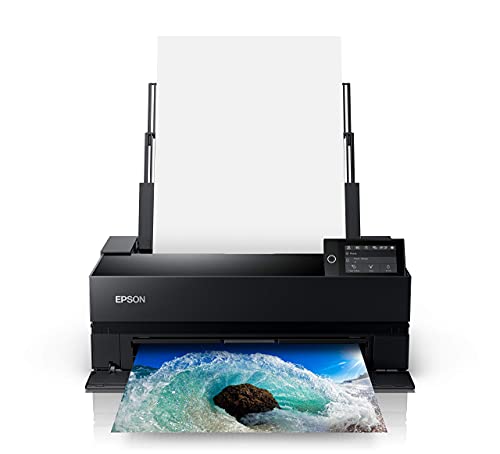
The P900 earns its place on three things the Canon cannot do. First, roll paper: Epson's optional adapter takes rolls from 8.3 to 17 in wide on any core size, and media from 5 to 27 mil thick, per Red River Paper's setup guide. Second, thick media: the front path takes one sheet at a time, and Epson's documentation (as quoted by retailers) rates it for posterboard up to 1.5 mm. Third, size: it stores at 24.2 x 14.5 x 7.8 in and weighs 35.3 lb, about half the Canon.

35.3 lbP900 printer weight, against about 71 lb for the Canon PRO-1100

Ink is where it loses. Epson's UltraChrome PRO10 set is ten 50 ml T46Y cartridges, and genuine ones were $51 each on Amazon at the time of writing (about $1.02 per ml). Red River Paper measured real print runs on the P900 and published a cost of $1.74 of ink per 13 x 19 in print with Photo Black, calculated at $41.99 per cartridge. That works out to about 2.07 ml per print. At today's $51 cartridge it is about $2.11 per print with Photo Black, and about $2.36 with Matte Black.

Black ink switching is gone. Older Epsons in this class (the P800) shared one channel between Photo Black and Matte Black and burned ink every swap. The P900, like the P700, gives each black its own channel, so this is a tie with the Canon.

Feed quirks to know about. In Red River Paper's 200-print cost test the main tray misfed four times (a 2% failure rate), and larger sheets did worse. Feed heavy fine art paper one sheet at a time, and use the front path for anything stiff. Budget for a full ink set early too: the starter cartridges read about one third full after the initial charge.

The P900 is the better pick if you need roll paper, print on posterboard, or simply do not have room for a 71 lb printer. It weighs about 35 lb, adds an optional roll adapter, and its front path takes single sheets up to 1.5 mm thick. Its ink costs more per print. Epson launched it at $1,149, and the Amazon listing showed no price when we checked, so check the current price.

Buy the P900 if you print panoramas or long banners from rolls, if you mount on thick board, or if the printer has to share a desk. It is the runner-up in our home printers for art guide.

What we don't like

Smaller 50 ml cartridges at about $51 each, so ink costs more per print than the Canon. Red River Paper reported a weak main tray feed in its long-term test (4 misfeeds in 200 prints, more on larger sheets). The roll adapter is extra (Red River lists $249 MSRP). The printer ships with ink that reads about one third full after the initial charge.

Austin Art Insider

Free weekly guide to galleries, exhibitions & collecting in Austin.

If You Only Print 13 Inch (Epson)

Max sheet

13 x 19 in

Ink set

UltraChrome PRO10, 10 pigment inks

Cartridge size

25 ml

Black ink

Dedicated channels, no switching

Pros

  • Same ink set as the P900
  • Lowest upfront cost for 10-color pigment
  • Compact enough for a desk

Cons

  • Highest ink cost per print here
  • 13 in max width

The P700 is the P900 at 13 in. Same inks, same black channel layout, a much smaller cartridge. For artists who sell small prints and post cards, the lower entry price wins; for anyone printing 13 x 19 editions every week, the ink math pushes you to a 17 in printer. Our Epson P700 vs Canon PRO-300 comparison covers the 13 in matchup in detail.

If your largest print is 13 x 19 in, the P700 gives you the same UltraChrome PRO10 ink set as the P900 for about $576 on Amazon at the time of writing. The catch is ink: tiny 25 ml cartridges make it the most expensive printer per print on this page.

Buy the P700 if you sell 8 x 10 and 11 x 14 prints, print a few times a week, and want the lowest upfront cost for pigment ink. It wins our P700 vs PRO-300 comparison.

What we don't like

Red River Paper measured $4.03 of ink per 13 x 19 print at $37.99 per 25 ml cartridge (about 2.65 ml). At the $43.99 cartridge price we saw, that is about $4.66 per print, more than double the P900.

If You Only Print 13 Inch (Canon)

Max sheet

13 x 19 in (A3+)

Ink set

LUCIA PRO II, 9 pigment inks plus Chroma Optimizer

Tank size

14.4 ml (PFI-5100)

Weight

14.4 kg (about 32 lb) per Canon

Dimensions

639 x 379 x 200 mm per Canon

Pros

  • Canon pigment ink in a desk-size printer
  • Separate Matte Black and Photo Black tanks

Cons

  • Priced too close to the PRO-1100 right now
  • Small tanks raise cost per print

Canon does not publish a per-tank A2 yield for the PRO-310 in the spec sheet we used, so we did not invent one. If it uses ink at roughly the PRO-1100's rate (about 2.0 ml per 13 x 19 print, a reasonable assumption for the same ink family), the cost is about $2.36 per print at $1.18 per ml. Treat that as an estimate. Watch the price: when the PRO-310 sits well under $700, it is a strong 13 in pick, and our home printers for art guide tracks it.

The PRO-310 is Canon's 13 in pigment printer, with a 10-tank LUCIA PRO II set (9 pigment inks plus Chroma Optimizer) in 14.4 ml PFI-5100 tanks. It was about $972 on Amazon at the time of writing, which is close enough to the PRO-1100 that most print sellers should stretch to the 17 in model.

Buy the PRO-310 if you want the Canon ink look, you never print above 13 x 19 in, and desk space is tight (Canon lists it at 14.4 kg).

What we don't like

At its current Amazon price it costs about 75% of a PRO-1100 for a smaller format and smaller tanks. Canon's PFI-5100 10-pack was $170 for 144 ml, about $1.18 per ml.

Head-to-Head

How the top picks compare

One matchup: the PRO-1100 for most print sellers, the P900 when roll paper, thick board or desk space decides it.

Epson P900 vs Canon PRO-1100

Same 17 in width, pigment ink and no black switching. Canon has cheaper, bigger tanks; Epson has roll paper, a thick media path and half the weight.

Epson SureColor P900

Epson

Epson SureColor P900

Roll adapter, 1.5 mm front path, 35.3 lb

Check price
Check Price →
Canon imagePROGRAF PRO-1100

Canon

Winner

Canon imagePROGRAF PRO-1100

About $1.69 ink per 13 x 19, 80 ml tanks, 17 x 25 in sheets

$1,299.00
Check Price →

Our verdict

Winner: Canon Canon imagePROGRAF PRO-1100. The PRO-1100 wins for most artists selling prints. Its ink is about $0.84 per ml in 80 ml tanks against about $1.02 per ml in the P900's 50 ml cartridges, which by our math is about $1.69 vs about $2.11 per 13 x 19 print. Both keep both blacks loaded. The P900 wins outright on roll paper (the Canon has none), thick board (1.5 mm vs 0.7 mm) and weight (35.3 lb vs about 71 lb).

Buy the Epson

Buy the P900 if you print from rolls, mount on posterboard, or the printer has to fit on a desk.

Buy the Canon

Buy the PRO-1100 if you print editions on cut sheets and want the lowest ink cost per print.

How we
chose

How we built this comparison:

  • Manufacturer specs first. PRO-1100 specs, paper thickness limits and ink yields come from Canon's published specification sheet. P900 specs come from Epson as published by Red River Paper and Imaging Resource. We did not test either printer hands-on.
  • Cost per print from published data. Canon's figure is derived from its own ISO/IEC 29103 per-tank yields. Epson publishes no per-cartridge yields for the P900, so we used Red River Paper's measured cost per print and re-priced it at today's cartridge price. The math is shown on the page.
  • Live prices. Printer and ink prices are the Amazon listings on the day we checked. The P900 listing showed no price, so we say so instead of guessing.
  • Consistent with our rankings. The PRO-1100 is the best overall pick and the P900 the runner-up in our best home printers for art guide. This page explains why, and when the order flips.
  • Prices move. Check the listing before you buy.

Share this guide

Share

Common Questions

Frequently Asked Questions

Have art
to sell?

Austin Gallery specializes in selling inherited art, estate collections, and fine art with zero upfront fees. Get a free evaluation today.