Austin Gallery
Art SuppliesJune 26, 2026Updated June 26, 202612 min read

The Complete Print-Selling Starter Kit (2026): Everything You Need to Sell Art Prints

The exact gear to turn your art into prints you can sell — scanner to shipping mailer, in the order you'll use it. A full pro kit runs about $1,700, or start lean for under $600.

By Justin Park · How we research

Owning your printing is one of the highest-leverage moves an artist can make. Instead of paying a print shop per piece and waiting on turnaround, you print on demand, control the quality, and keep the margin. This is the exact kit to do it — every tool you need to turn your art into prints you can sell, in the order you'll actually use it, from digitizing your work to dropping the package in the mail.

The whole kit runs about $1,700 for a full pro setup — but you don't need all of it on day one. You can start lean for under $600 (printer + paper + sleeves + mailers), start selling, and add the scanner and color-accurate monitor as the prints pay for themselves. Below, every piece is ranked by its role across five stages: capture, color, print, finish, and ship. Once your prices and sizes grow, upgrade the printer using our large-format printer guide, and see the full business side in how to sell your art online. Every link goes to Amazon with our affiliate tag; we earn a small commission at no cost to you.

In a Hurry?

The 3 picks that cover most readers. Tap to read the full review or buy direct.

Top Pick · The Printer

Canon PIXMA PRO-200S

Canon PIXMA PRO-200S
$449.00

Vivid prints up to 13×19" for under $450 — the heart of the kit.

Best Fine-Art Paper

Hahnemühle Photo Rag

Hahnemühle Photo Rag

$44.95

The cotton-rag giclée benchmark that justifies premium pricing.

Best for Shipping

Stay-Flat Rigid Mailers

Stay-Flat Rigid Mailers

$13.99

The packaging consumable you'll reorder with every restock.

The Centerpiece — Best Value PrinterStart Here

Role

The printer (Stage 3)

Max width

13" (up to 13×19")

Inks

8-ink dye-based

Archival

Good indoors; not archival-grade

Best for

Starting out, vivid color work

Pros

  • Stunning vivid color under $450
  • Lowest-cost way to start selling prints
  • Fast and easy on glossy/luster paper
  • Up to 13×19" — the size most buyers want

Cons

  • Dye isn't archival — fades faster in sun
  • 13" max width

The printer is the heart of the kit, and for someone starting out, the Canon PIXMA PRO-200S is the smartest first buy. It's an 8-ink dye printer that produces gorgeous, vivid color up to 13×19" — bold enough for photography, illustration, and poster-style art straight out of the box, for under $450.

Why start here: owning your printing means you print on demand, control the quality, and keep the margin a print shop would take. The PRO-200S is the lowest-cost way to start earning — then you graduate to a pigment machine for true archival "giclée" prints as your prices climb.

It's the printer to learn on and earn with. See the full upgrade path in our large-format printer guide.

What we don't like

Dye inks aren't archival-grade, so don't market these as 100-year prints, and keep them out of direct sun. 13" is the max width.

Stage 1 — Best for Digitizing Your Art

Role

Digitize (Stage 1)

Type

High-speed sheet-fed scanner

Output

High-res, even lighting

Target

~300 DPI at print size

Best for

Reproducing flat work + photo archives

Pros

  • Truer color + detail than a phone
  • Even lighting baked in
  • Fast batch scanning
  • Wireless

Cons

  • Not ideal for heavy texture (use a flatbed)
  • Premium price

Everything downstream depends on the file, and a real scanner beats a phone photo every time. The FastFoto captures your paintings, drawings, and old photographs at high resolution with even, built-in lighting — no glare, no perspective distortion, no color guesswork.

Aim for roughly 300 DPI at your largest print size so the file holds up when you scale it. For the full set of options (including flatbeds for textured originals), see our best scanners for art guide.

What we don't like

It's a sheet-fed scanner, so very thick or heavily textured originals are better on a flatbed. A real investment up front.

Stage 2 — Get the Color Right

Role

Color (Stage 2)

Size

32" 4K UHD

Color

99% sRGB / Rec.709, Delta-E ≤3

Panel

IPS, factory-calibrated

Best for

Trustworthy color before you print

Pros

  • Accurate color = fewer wasted prints
  • Big, sharp 4K workspace
  • Factory-calibrated
  • Mac-ready

Cons

  • Sizeable desk + budget footprint

What you see on a typical screen is not what comes out of the printer — and that gap is where wasted paper and ink live. A color-accurate monitor like the BenQ PD3205U shows you true color (99% sRGB, factory-calibrated), so the print matches your intent the first time.

It's the difference between guessing and knowing, and it pays for itself in saved test prints. More options in our color-accurate monitors guide.

What we don't like

A 32" 4K panel is a real desk and budget commitment — fine to add once the printer is paying for itself.

Stage 3 — Everyday Photo Paper

Role

Everyday paper (Stage 3)

Size

13×19" (50 sheets)

Finish

Pro luster (semi-gloss)

Best for

Photographic & poster prints

Pairs with

The Canon PRO-200S

Pros

  • Rich color, low glare
  • Forgiving everyday surface
  • Low cost per sheet
  • Fits 13" printers

Cons

  • Not a fine-art cotton rag

A cheap print on thin paper undercuts everything your art is worth — the paper is half the product. Canon's LU-101 luster is the everyday workhorse: a semi-gloss finish that makes photographic prints pop with rich color while resisting the harsh glare and fingerprints of high-gloss stock.

It's the safe default for vivid, photographic work, and a 50-sheet box keeps your per-print cost low.

What we don't like

Resin-coated luster isn't the museum-grade surface for true fine-art giclées — pair it with a cotton rag for that work.

Austin Art Insider

Free weekly guide to galleries, exhibitions & collecting in Austin.

Stage 3 — Fine-Art (Giclée) Paper

Role

Fine-art paper (Stage 3)

Size

8.5×11" (25 sheets)

Surface

100% cotton rag, matte

Archival

True giclée-grade

Best for

Fine-art reproductions & editions

Pros

  • Museum-grade, archival surface
  • Justifies premium pricing
  • The giclée benchmark
  • Beautiful in the hand

Cons

  • Higher cost per sheet
  • Matte — not for glossy photo work

This is the paper that lets you honestly charge a premium. Hahnemühle Photo Rag is the benchmark 100% cotton-rag paper for true giclée prints — a soft, matte, museum-grade surface that feels like a gallery piece in the hand and is archival for generations.

Print your highest-value editions on this, sign them, and price accordingly. Buyers feel the difference between a giclée and a photo print the moment they pick it up.

What we don't like

Cotton rag costs more per sheet than luster, and matte paper isn't the pick for ultra-vivid, glossy photographic work.

Stage 4 — Trim to Size

Role

Trim (Stage 4)

Cut length

12"

Capacity

~10 sheets

Cut

Rotary, straight + square

Best for

Sizing prints to standard dimensions

Pros

  • Crisp, square cuts every time
  • Enables cheap standard-size framing
  • Durable rotary mechanism
  • Affordable

Cons

  • 12" max cut — not for big panoramas

Clean, straight edges are the quiet detail that separates a pro print from a home printout. A rotary trimmer cuts prints down to exact standard sizes (8×10, 11×14) with a crisp, square edge a pair of scissors never will — and it does it the same way every time.

Trimming to standard sizes also means your customers can frame the print cheaply off the shelf, which makes it an easier sale.

What we don't like

A 12" cut length covers most prints but not the largest panoramas — those need a wider trimmer or a straightedge and blade.

Stage 4 — Sign & Edition

Role

Sign (Stage 4)

Ink

Archival pigment, fade-proof

Properties

No bleed, no smear

Use

Signing + numbering editions

Best for

Adding value to every print

Pros

  • Archival, won't fade or yellow
  • Turns prints into collectibles
  • Highest ROI in the kit
  • Multiple tip sizes

Cons

  • Choose the right tip size for your hand

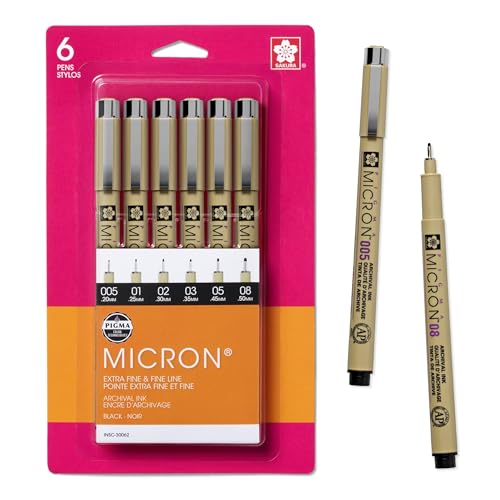
The cheapest upgrade to a print's perceived value: a signature and an edition number. Pigma Micron pens use archival, fade-proof pigment ink that won't bleed, smear, or yellow over time — exactly what you want signing work meant to last on the wall.

Signing and numbering ("12/50") turns a reproduction into a collectible and gives you a reason to charge more. At ten dollars, it's the highest-return item in the whole kit.

What we don't like

Nothing meaningful at this price — just pick an ink size that suits your signature.

Stage 5 — Protect the Print

Role

Protect (Stage 5)

Size

8.5×11" (50 pack)

Material

Acid-free, crystal-clear

Protects

Fingerprints, dust, moisture

Best for

Presentation + storage

Pros

  • Instantly more professional
  • Acid-free, archival-safe
  • Cheap per unit
  • Great for fairs + shipping

Cons

  • Match the size to your print

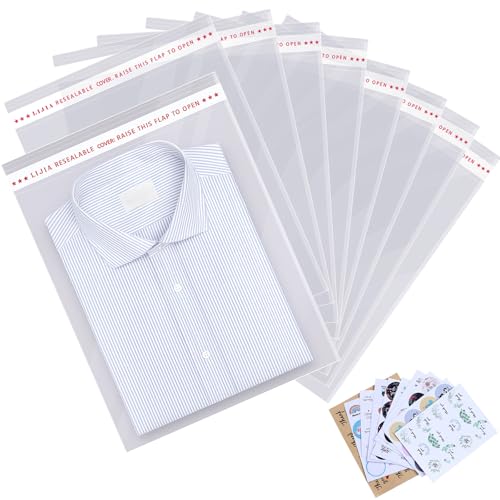
Presentation is part of the product. Sliding each print into an acid-free, crystal-clear sleeve protects it from fingerprints, dust, and moisture — and signals "professional" the instant a buyer opens the package. It's the cheapest way to make a $30 print feel like a $60 one.

These are a consumable: buy them by the pack and reorder with every restock.

What we don't like

Sized for 8.5×11 prints — buy the matching size for your larger formats.

Stage 5 — Keep It Flat

Role

Backing (Stage 5)

Size

11×14" (25 pack)

Material

Rigid, acid-free

Function

Stops bending + curling

Best for

Flat storage + shipping

Pros

  • Keeps prints dead flat
  • Acid-free, archival-safe
  • Pairs with sleeves + mailers
  • Reusable at fairs

Cons

  • Size up for larger prints

A bent print is a refund. Rigid acid-free backing boards pair with the clear sleeve to keep prints dead flat in storage and transit — the second layer of the pro three-layer packaging system (sleeve + board + rigid mailer).

They also make prints easier to display at fairs and hand to customers without creasing.

What we don't like

11×14 is sized for smaller prints — size up for larger formats.

Stage 5 — Ship It FlatRestock Often

Role

Ship (Stage 5)

Size

~9.25×11.5" (22 pack)

Construction

Rigid stay-flat cardboard

Use

Mailing flat prints

Best for

Undamaged delivery

Pros

  • Keeps prints flat in transit
  • What buyers expect from a pro
  • The packaging you'll reorder monthly
  • Bulk-friendly cost

Cons

  • Flat prints only — tubes for big rolled posters

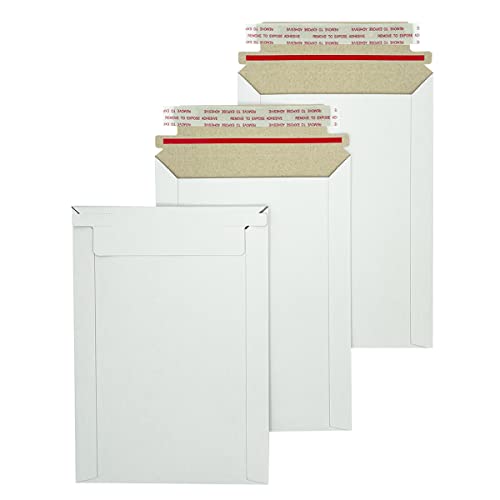
The final layer, and the one you'll reorder forever. Stay-flat rigid cardboard mailers keep prints dead flat through the mail — mark them "Do Not Bend," and they hold up where a flimsy envelope folds. Sleeve, board, mailer: that three-layer system is exactly what buyers expect from a professional seller.

This is the pure consumable of a print business — every order you ship uses one, so buy in bulk and keep them stocked.

What we don't like

Sized for ~9×11.5 prints — use mailing tubes for large rolled posters instead.

How we
chose

We built this kit the way an actual print business comes together — by stage, not by spec sheet:

  • The printer first. It's the heart of the kit, so we led with the best-value starting printer and pointed to the pigment upgrade path for archival "giclée" work.
  • Quality in, quality out. A great printer can't fix a bad file or a mis-judged color, so a scanner and a color-accurate monitor earn their place — they're what make prints match your intent.
  • Paper is half the product. We picked two papers on purpose: a luster for vivid photographic prints and a cotton rag for fine-art giclées you can price up.
  • Finishing sells. A clean trim and an archival signature turn a printout into a collectible — small costs, big effect on perceived value.
  • Packaging is non-negotiable. The sleeve + board + rigid mailer system is what gets prints to buyers undamaged, and the consumables you'll reorder with every restock.
  • Lean-start honesty. We flag exactly which pieces you can skip on day one so you can start selling for under $600 and scale up.

Share this guide

Share

Common Questions

Frequently Asked Questions

Have art
to sell?

Austin Gallery specializes in selling inherited art, estate collections, and fine art with zero upfront fees. Get a free evaluation today.