Austin Gallery
Printing & ReproductionSeptember 30, 2026Updated September 30, 202610 min read

Epson P700 vs Canon PRO-300 (and PRO-310): Which 13-Inch Printer to Buy

The two 13-inch pigment printers artists buy to sell giclee prints, compared on ink sets, roll feed, black switching and running costs, with the 17-inch step up and a dye budget option.

By Austin Gallery · How we research

★ Our Top Pick

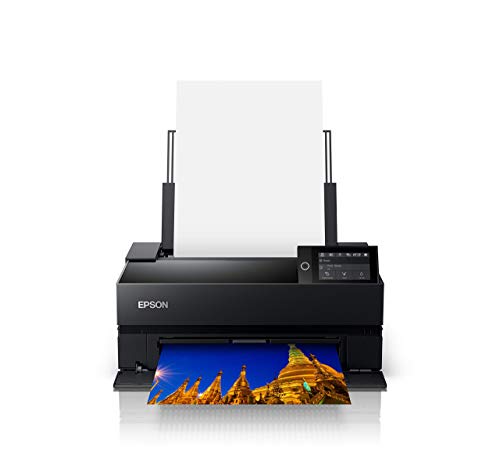
Epson SureColor P700 13-Inch Pigment Printer

Epson SureColor P700 13-Inch Pigment Printer

Roll feed, 25 ml cartridges, 10 pigments, about $123 less than the Canon.

$649.99rated 4.7/5 in our review

Not sure yet? Compare all 4 picks below ↓

Buy the Epson SureColor P700 if it is in stock. At about $576 at the time of writing it costs roughly $123 less than Canon's current 13-inch pigment printer, it feeds roll paper, and its 25 ml cartridges hold nearly twice the ink of Canon's 14.4 ml. Buy the Canon if you switch between matte and glossy papers constantly, or if the P700 is out of stock again.

One thing to know first: the Canon PRO-300 is no longer listed new on Amazon. Canon replaced it with the imagePROGRAF PRO-310, which keeps the 13-inch format and cartridge size and adds the LUCIA PRO II inks from the PRO-1100 and support for longer sheets. So this page compares the P700 with both, and the PRO-310 is the Canon you will actually buy.

Both are pigment printers, which is what you want for giclee prints you sell: pigment sits on the paper surface and lasts far longer than dye. Below: the head-to-head, a spec table, the 17-inch P900 vs PRO-1000 question, and the dye PRO-200S for readers who do not need archival output. If you are still setting up the capture side, our scanners for art guide covers digitizing originals. Every product link goes to Amazon with our affiliate tag; we earn a small commission, at no cost to you, when you buy through us.

Winner for Selling PrintsOur Pick

Max width

13 in (13 x 19 sheets, 13 in roll)

Inks

10-color UltraChrome PRO10 pigment (incl. violet, gray, light gray)

Cartridges

25 ml

Blacks

Photo and matte black both installed, auto switching

Roll paper

Yes, 13 in roll on 2 in core

Thick media

Up to 1.5 mm via front path

Display

4.3 in touchscreen

Connectivity

Wi-Fi, Ethernet, USB

Pros

  • Roll feed for long prints and editions
  • 25 ml cartridges, nearly double the Canon's
  • About $123 less than the PRO-310 at the time of writing
  • Violet and two grays for strong color and B&W
  • Front path takes board up to 1.5 mm

Cons

  • One black prints at a time; switching papers costs a changeover
  • No gloss optimizer
  • Amazon stock has been inconsistent

For a print business, the P700's advantages are the boring ones, and boring is what you want. Roll feed means you can print a 13 x 39 panorama or a stack of 13 x 19 editions without babysitting sheets. The 25 ml cartridges mean fewer interruptions mid-run. And at about $576 when we checked, it undercuts the current Canon.

25 mlP700 cartridge size, against 14.4 ml for Canon's PRO-300 and PRO-310

The ink set is the other reason. UltraChrome PRO10 uses ten pigments including violet, gray and light gray. Epson's grays are why photographers print monochrome on Epsons, and painters reproducing graphite, charcoal or ink wash benefit the same way. Color is excellent; the Canon's Chroma Optimizer gives it an edge on glossy and luster papers, where it evens out gloss and reduces bronzing in the blacks.

On black ink switching: both blacks sit in the P700 at once and it switches automatically, which is a large improvement over older Epsons like the P800 that purged ink on every swap. It is still one black at a time. If most of your work goes on matte fine art paper, you will rarely notice. If you alternate matte and glossy all day, the Canon is smoother.

Cost per print tendencies: Red River Paper's testing (reported by Printerville) put P700 ink at about $4.00 for a 13 x 19 in high quality mode. Small-cartridge printers, Canon included, cost more per milliliter than the 17-inch models; the P900's 50 ml cartridges cost about 45 percent less per milliliter in the same testing. If you print large volumes, that is the argument for going to 17 inches. Our best home printers for art guide ranks the full range.

Our Pick

The P700 wins for an artist selling prints because it does three practical things the Canon does not: it feeds 13-inch roll paper, its cartridges hold 25 ml against Canon's 14.4 ml, and at about $576 at the time of writing it costs roughly $123 less than the PRO-310. Its 10-color UltraChrome PRO10 set, with violet and two grays, is excellent for both color and black and white. The one caveat is stock: it was unavailable on Amazon earlier this month, so check before you plan around it.

Buy the P700 if you print editions, panoramas or long runs on roll paper, if you want fewer cartridge swaps, or if you print a lot of black and white. It is the 13-inch printer we would put in a studio that sells prints every week.

What we don't like

Epson installs both photo and matte black, but only one black prints at a time, so jumping between glossy and matte papers costs a short changeover. There is no gloss optimizer like Canon's Chroma Optimizer. And Amazon stock has come and gone this year.

The Challenger (PRO-300 Successor)Also Great

Max width

13 in (13 x 19 sheets)

Inks

9 LUCIA PRO II pigments + Chroma Optimizer

Cartridges

14.4 ml

Blacks

Photo and matte black on dedicated channels

Roll paper

No; custom sheet length up to about 70 in

Thick media

Up to 0.6 mm via rear manual feed

Display

3 in color LCD

Connectivity

Wi-Fi, Ethernet, USB

Pros

  • Both blacks on dedicated channels, no changeover
  • Chroma Optimizer evens gloss and reduces bronzing
  • LUCIA PRO II ink: more scratch resistant than the PRO-300's
  • Long custom sheets up to about 70 in

Cons

  • No roll feed
  • Smaller 14.4 ml cartridges
  • About $123 more than the P700 when we checked
  • Thinner maximum media than the P700

If you searched for the PRO-300, this is the printer you will find. Canon's 13-inch pigment printer now ships as the PRO-310, and the changes are mostly improvements: the LUCIA PRO II ink from the 17-inch PRO-1100, which reviewers found slightly deeper in the blacks and more resistant to scuffing, a reformulated Chroma Optimizer, and support for much longer custom sheets. The body, the 3 in screen and the 13 x 19 maximum sheet are the same idea as before.

Where Canon has a clean win is black ink. Photo black and matte black each have their own channel, so a glossy print followed by a matte one costs nothing and waits for nothing. If your shop sells both luster photo prints and matte fine art giclees, that convenience adds up.

Already own a PRO-300? It is still a fine printer and there is no reason to replace it. Keep buying PFI-300 ink; the PRO-310's cartridges are a different part.

Also Great

The PRO-300 is no longer listed new on Amazon; Canon replaced it with the PRO-310, which is what you will actually buy. It keeps the PRO-300's 13-inch format and 14.4 ml cartridge size, moves to the LUCIA PRO II inks from the PRO-1100 with a reformulated Chroma Optimizer, and raises the maximum custom paper length from about 39 in to about 70 in. About $699 at the time of writing.

Buy the PRO-310 if you switch between matte and glossy papers often, if you print mostly on glossy or luster stock where the Chroma Optimizer shows, or if the P700 is out of stock. It is the 13-inch pick in our home printers for art guide for exactly that last reason.

What we don't like

No roll paper support. Smaller 14.4 ml cartridges mean more frequent swaps. The rear manual feed tops out at 0.6 mm media, so thick board is out. And the PRO-310 cartridges do not fit the PRO-300, or vice versa.

Austin Art Insider

Free weekly guide to galleries, exhibitions & collecting in Austin.

The 17-Inch Step Up

Max width

17 in (A2)

Inks

11 LUCIA PRO II pigments + Chroma Optimizer

Blacks

Photo and matte both loaded

Connectivity

Wi-Fi, Ethernet, USB

Pros

  • 17 in wide for A2 prints
  • Widest ink set in this comparison
  • No black switching

Cons

  • About $1,299
  • Needs a dedicated table

The honest upgrade question is 13 in vs 17 in, not Epson vs Canon. A 16 x 20 or 17 x 22 print sells for meaningfully more than a 13 x 19, and neither 13-inch printer can make one. See the 17-inch section below for how the PRO-1100 compares with Epson's P900.

If you already know you will sell prints larger than 13 x 19, skip both 13-inch printers. The PRO-1100 (the successor to the PRO-1000) prints 17 in wide with 11 LUCIA PRO II inks plus Chroma Optimizer and both blacks loaded. About $1,299 at the time of writing, and our top pick in the home printers for art guide.

Buy it if A2 prints are part of your plan, or if you print enough volume that larger cartridges matter for running cost.

What we don't like

Large and heavy, and a full ink refill is a real expense. It needs regular printing to keep the heads healthy.

Dye Budget Alternative

Max width

13 in

Inks

8-color dye

Display

3 in color LCD

Pros

  • Vivid color on glossy and luster papers
  • Cheapest 13-inch option here
  • More forgiving of irregular use

Cons

  • Dye, not pigment: not for archival sales
  • Weaker on matte fine art papers

Dye vs pigment is a bigger decision than Epson vs Canon. If you are selling prints, the buyer is paying for longevity, and pigment is the standard. The PRO-200S makes lovely glossy prints; just do not label them archival giclees. Our what is a giclee explainer covers the distinction.

The PRO-200S (the current version of the PRO-200) is Canon's 13-inch dye printer: 8 dye inks, vivid glossy prints and about $549 at the time of writing. It is the right printer for proofs, photos and personal prints, and the wrong one for giclees you sell as archival.

Buy it if you print vivid glossy photos, make proofs before sending files to a lab, or print occasionally. Dye printers tolerate idle weeks better than pigment printers.

What we don't like

Dye ink fades faster than pigment and is not what buyers expect when they pay for a giclee. Matte fine art papers look flatter with dye.

Head-to-Head

How the top picks compare

One matchup, one verdict: the P700 for most print sellers, the Canon for constant paper switching and glossy work.

Epson P700 vs Canon PRO-300 / PRO-310

Both are 13-inch pigment printers. Epson adds roll feed, bigger cartridges and a lower price; Canon adds dedicated black channels and a gloss optimizer.

Epson SureColor P700

Epson

Winner

Epson SureColor P700

Roll feed, 25 ml cartridges, thick media, lower price

$649.99
Check Price →
Canon imagePROGRAF PRO-310

Canon

Canon imagePROGRAF PRO-310

Both blacks on dedicated channels, Chroma Optimizer

$699.00
Check Price →

Our verdict

Winner: Epson Epson SureColor P700. The Epson P700 wins for artists selling prints. It was about $123 cheaper when we checked, it feeds 13-inch roll paper, its 25 ml cartridges hold nearly twice the ink of Canon's 14.4 ml, and its front path takes board up to 1.5 mm. Its ten pigments, including violet and two grays, are superb for both color and monochrome. The Canon (the PRO-300, now sold as the PRO-310) is the better choice if you alternate glossy and matte papers all day, since both blacks have their own channels, or if you print mostly glossy, where the Chroma Optimizer shows. If the P700 goes out of stock again, buy the PRO-310.

Buy the Epson

Buy the P700 if you print editions or panoramas, want roll feed and fewer cartridge swaps, or print a lot of black and white.

Buy the Canon

Buy the Canon PRO-310 if you switch between matte and glossy papers constantly, print mostly glossy or luster, or the P700 is out of stock.

How we
chose

How we built this comparison:

  • Current models only. We checked which printers are actually for sale new. The PRO-300 and PRO-1000 have been replaced by the PRO-310 and PRO-1100, and the P900 had no available offer on Amazon when we checked, so we say so rather than linking dead listings.
  • Manufacturer and lab-tested specs. Ink sets, cartridge sizes, media paths and roll support come from Epson and Canon documentation and from detailed reviews by Northlight Images and Printerville. Cost per print figures are Red River Paper's, as reported by Printerville.
  • The print seller's job. We weighted the things that matter when you sell prints every week: roll feed, cartridge size, media thickness and ink cost, alongside image quality.
  • Consistent with our printer rankings. The PRO-310 is the 13-inch pick in our home printers for art guide because the P700 was unavailable when that guide was updated. With the P700 back in stock at a lower price, it takes the head-to-head here.
  • Prices are a snapshot. Printer prices and stock on Amazon move. Check the listing before you buy.

Share this guide

Share

Common Questions

Frequently Asked Questions

Have art
to sell?

Austin Gallery specializes in selling inherited art, estate collections, and fine art with zero upfront fees. Get a free evaluation today.