Austin Gallery
Studio & ToolsSeptember 8, 202612 min read

Best Printer Scanner Combos for Artists (2026)

Almost every inkjet is a printer scanner combo, and almost none are built for artists. We found the all-in-ones whose flatbed is actually good enough to scan artwork, whose ink can print it with real color, and, in one case, whose bed goes beyond letter size, then ranked them by ink type, scanner bed, borderless size, and cost per print.

By Austin Gallery · How we research

★ Our Top Pick

Epson EcoTank Photo ET-8550 Wide-Format All-in-One

Epson EcoTank Photo ET-8550 Wide-Format All-in-One

Six inks, refillable tanks, borderless 13 x 19, and a flatbed good enough to scan the work.

$595.23rated 4.5/5 in our review

Not sure yet? Compare all 7 picks below ↓

"Printer scanner combo" describes almost every inkjet sold, and almost none of them are built for artists. The scanner on a typical all-in-one is an afterthought tuned for documents, the ink is a black and a tri-color cartridge, and the paper path stops at letter size. This guide finds the exceptions: all-in-ones whose flatbed is actually good enough to scan a drawing or a painting for reproduction, whose ink set can print that scan with real color, and, in one case, whose bed is larger than letter. If you already own a scanner you like, our home printers for art guide covers dedicated print-only machines; if the scanner is the priority, start with the main art scanner guide.

Four things separate an artist's combo from an office one. Ink type: pigment inks last for decades and resist water, dye inks give smoother gradients and fade sooner, and the best combos mix a pigment black with dye colors. Ink count: five or six inks smooth gradients that four-ink printers step through visibly. Flatbed size: letter is standard; an 11 x 17 flatbed is rare on a combo and changes what you can scan in one pass. Cost per print: refillable tank printers cost more up front and pennies per print; cartridge printers are the reverse, and the crossover comes fast if you sell. Borderless printing size is the fifth question, and it tracks the paper path: letter, 12 x 12, or 13 x 19. Every link goes to Amazon with our affiliate tag; we earn a small commission, at no cost to you, when you buy through us.

Pick Your Combo by What You Scan and Sell

The right all-in-one depends on which side of the machine you use more, how large your originals are, and how many prints you make. Find your case in the table and jump to the pick.

Your situationWhat mattersJump to the pick
Selling prints and cards from home, up to 13 x 19Tanks plus six inksEpson EcoTank Photo ET-8550
Cards, stickers, and 8 x 10s in volumeLowest cost per printCanon PIXMA G620
Square 12 x 12 prints and scrapbook pages12 x 12 paper pathCanon PIXMA TS9521Ca
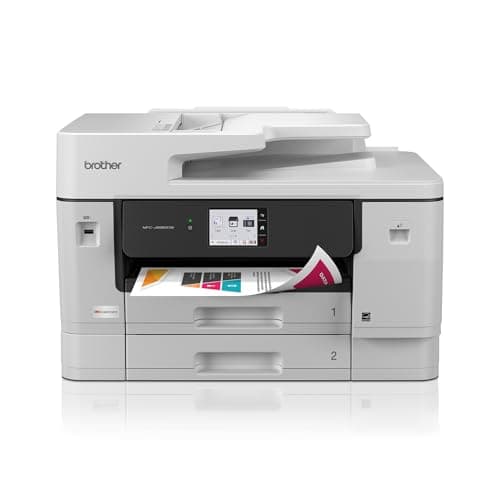
Comics pages, 11x17 drawings, posters on matte paper11 x 17 scanning and printingBrother MFC-J6960DW
Occasional 13 x 19 photo-grade prints, small deskCompact wide-formatEpson Expression Photo XP-970
First printer, letter-size, under $150Five inks with a photo blackEpson Expression Premium XP-7100
Simple home printer that also scans sketchesEase of ownershipHP Envy Photo 7975

The practical rule: if you sell prints, buy tanks and six inks; if you scan large, buy the machine with the big glass and accept its ink; if you are starting out, buy the cheapest five-ink Epson and upgrade when the volume justifies it.

Best Printer Scanner Combo for ArtistsOur Pick

Verified price

$660.00 (Sep 8, 2026)

Print

Up to 13 x 19 in, borderless

Ink

6-color tank system, pigment black plus dye colors

Scanner

Letter-size flatbed

Pros

  • 13 x 19 borderless prints from a combo
  • Refillable tanks: very low cost per print
  • Six inks including a pigment black
  • Scanner bed is clean enough for reproduction

Cons

  • Letter-size flatbed only
  • Color inks are dye, not pigment
  • Large footprint and a real price

Most all-in-ones are office printers with a scanner lid; the ET-8550 is a photo printer with a scanner lid, and that is the difference artists feel. It prints with six inks from refillable tanks, including a pigment black for text and line work and five dye inks for smooth color, and it goes borderless up to 13 x 19 inches, which is the size most print buyers ask for after 8 x 10. Because the ink comes in bottles rather than cartridges, the cost of a 13 x 19 print is a fraction of what a cartridge printer charges, and that is the number that decides whether selling prints from home makes money.

Pigment versus dye, in one paragraph: pigment inks sit on the paper surface as particles and resist fading and water for decades on the right paper; dye inks soak in and give slightly smoother gradients but fade sooner. The ET-8550 uses a pigment black and dye colors, which is a sensible middle: sharp line work, rich color, and good longevity on quality photo paper, short of the all-pigment claims a dedicated art printer makes. If you sell prints as archival, our home printers for art guide covers all-pigment machines; for cards, small editions, and portfolio prints, this is enough.

The scanner is a letter-size flatbed, which is the one real limit. It scans a watercolor sketch or an ink drawing cleanly at the resolutions reproduction needs, but an 11x17 original has to go through in two passes and be stitched, or onto a separate A3 bed from our A3 scanner guide. Its near-twin the ET-8500 has the same ink and scanner but tops out at letter-size prints for nearly the same money; unless the desk is genuinely too small, buy the 8550.

Our Pick

The one all-in-one that behaves like an art printer. Six-color Claria ET Premium ink with a pigment black, borderless printing up to 13 x 19, refillable tanks that turn cost per print into pennies, and a flatbed that is good enough to scan the work you will print. For an artist who wants one machine, this is it.

Buy this if you sell prints, cards, or small editions from home and want to scan originals and print them on the same desk. The 13 x 19 borderless size covers most print-shop orders, and the tank system means a run of fifty prints does not cost a set of cartridges.

What we don't like

The flatbed is letter-size, not wide-format, so 11x17 originals still have to be stitched. The color inks are dye, not pigment, which puts it a step below a dedicated pigment printer for archival claims.

Best Value Photo Combo (Cost Per Print)Value Pick

Verified price

$299.00 (Sep 8, 2026)

Print

Up to 8.5 x 11 in, borderless

Ink

6-color dye, refillable tanks

Scanner

Letter-size flatbed

Pros

  • Lowest cost per print here
  • Six dye inks for smooth color
  • Half the price of the ET-8550

Cons

  • Letter-size prints only
  • All-dye ink set
  • Wants regular use

If the ET-8550 is the artist's all-in-one, the G620 is the small-shop version. It uses six dye inks from refillable MegaTank reservoirs, so a run of greeting cards or 8 x 10 prints costs a few cents each in ink, and the extra inks over a standard four-color printer show up as smoother skin tones, cleaner gradients in a watercolor scan, and less visible grain in flat color. The flatbed on top scans letter-size originals cleanly, which for most card and sticker sellers is every original they have.

The limits are real ones. Dye ink throughout means prints will fade faster than pigment on the same paper, so sell them as prints, not as archival editions. The paper path stops at letter size. And like every tank printer, it wants to be used; the artist who prints every week will love it, and the one who prints twice a year will meet its cleaning cycle. For sticker sheets and small paper goods, our sticker printer guide compares it against the cutters and papers that go with it.

Value Pick

Canon's answer to the EcoTank Photo at half the price: six dye inks from refillable tanks, letter-size borderless prints, and a flatbed. Cost per print is the lowest on this page, and photo and color-illustration output is a clear step above four-color combos.

Buy this if your prints are letter-size or smaller, you sell cards, stickers sheets, and 8 x 10s in volume, and the price of ink is what has stopped you. It scans originals well enough for reproduction and prints them for pennies.

What we don't like

All six inks are dye, so it is not an archival printer, and it stops at 8.5 x 11. Ink-tank printers also need regular use; leave it idle for weeks and you will spend a morning clearing heads.

Best for 12 x 12 Prints (Crafters and Scrapbookers)Square Print Pick

Verified price

$229.99 (Sep 8, 2026)

Print

Up to 12 x 12 in

Ink

5 cartridges, pigment black plus dye colors

Scanner

Letter-size flatbed (8.5 x 11.7 in, per Canon)

Pros

  • Prints borderless square 12 x 12
  • Pigment black for crisp line work
  • Under $250 when we checked

Cons

  • Scanner glass is letter-size, not 12 x 12
  • Cartridge ink: high cost per print
  • Home-photo color, not fine-art

The TS9521Ca is here for its paper path. Canon designed it for the scrapbooking market, where 12 x 12 inch pages are the standard, so it prints borderless at 12 x 12, a size most letter-class printers cannot touch. Do not confuse that with the scanner: Canon's specifications list the flatbed at 8.5 x 11.7 inches, so a 12 x 12 original, a 9 x 12 watercolor block, or an open sketchbook spread has to be scanned in two passes and stitched, as on any letter-size combo.

As a printer it is a competent home photo machine: five cartridges, a pigment black for text and lines, dye colors for images, borderless at 12 x 12. Cartridges mean each print costs several times what a tank printer charges, so it is the wrong choice for someone selling prints in volume. It is the right choice for someone who wants square prints from a compact home machine. For bound sketchbooks specifically, our drawings and sketchbooks guide compares it against dedicated book-edge scanners.

Square Print Pick

The combo for square prints. Canon built the TS9521C line for scrapbookers, so it prints borderless up to 12 x 12 inches. Note that the 12 x 12 applies to printing only: Canon lists the flatbed scanner at 8.5 x 11.7 inches, so a 12 x 12 original or an open sketchbook spread still needs two passes and stitching.

Buy this if you sell or make square prints and scrapbook pages: 12 x 12 is the standard square print size, and this is the cheapest combo here that prints it. If you need to scan originals larger than letter size, look at the Brother MFC-J6960DW's 11 x 17 scanning instead.

What we don't like

It is a five-ink dye-plus-pigment-black cartridge printer, so cost per print is far higher than the tank machines, and its color output is home-photo grade rather than fine-art grade.

Austin Art Insider

Free weekly guide to galleries, exhibitions & collecting in Austin.

Best 11x17 Scanner Bed

Verified price

$389.99 (Oct 7, 2026)

Print

Up to 11 x 17 in, auto duplex

Ink

4 cartridges (black, cyan, magenta, yellow)

Scanner

Scan and copy up to 11 x 17 in, 50-page ADF

Paper

Two trays, 500 sheets, plus 100-sheet multipurpose tray

Pros

  • 11 x 17 scanning, the largest here
  • Two trays plus a multipurpose tray for art paper
  • Wireless, Ethernet, and USB

Cons

  • Four-color ink limits gradients
  • No 13 x 19 printing
  • Office styling and size

This Brother is here for its scanner. It is one of few all-in-ones that scans and copies at 11 x 17 inches, which means a full comics page, a tabloid poster, or a large drawing comes back as one file with no stitching. Two paper trays, a 100-sheet multipurpose tray, and a 50-page document feeder round it out. Dedicated A3 scanners cost more than this whole machine.

Where a four-ink office printer fits: it produces sharp line art, flat color, and proofs, but it lacks the light inks and photo black that six-ink photo printers use to smooth gradients and deepen glossy blacks. Ink drawings and graphic work print well; soft watercolor and photography print acceptably.

If you draw large, this is the scanner. If you paint soft and print glossy, the ET-8550 is the better printer and you will stitch on its letter-size bed. Either way, the 11 x 17 scanning is most of what you pay for here, and it pairs naturally with the printers in our large format printer guide when the printing side outgrows it.

An office machine with the one thing tabloid-format artists need most: it prints, copies, and scans on paper up to 11 x 17 inches. Its four-cartridge ink set will not match a six-ink photo printer on gradients, but for scanning comics pages, large drawings, and posters in one pass, it is the most useful machine on this page.

Buy this if your originals are 11x17 (comics pages, large drawings, posters) and you want to scan them without stitching and print proofs at size. Illustrators and designers who work in tabloid formats are the core buyers.

What we don't like

Four inks means visible steps in smooth color gradients and no photo black, so photographic prints and soft watercolor washes look a grade below the ET-8550. It tops out at 11 x 17 paper, and it is a big office box with office-machine styling.

Best 13 x 19 Photo Combo (Cartridge)

Verified price

$398.00 (Sep 8, 2026)

Print

Up to 13 x 19 in, borderless

Ink

6-color Claria Photo HD dye cartridges

Scanner

Letter-size flatbed

Pros

  • Photo-grade 13 x 19 from a compact body
  • Six dye inks for smooth gradients
  • Cheaper up front than the ET-8550

Cons

  • Cartridge cost per print
  • All-dye ink set
  • Letter-size scanner

The XP-970 is the ET-8550's older, smaller cousin: same wide-format ambition, cartridges instead of tanks, and a body that fits on a bookshelf. Its six Claria Photo HD inks are dye throughout, which gives it very smooth photo and watercolor gradients, and it prints borderless up to 13 x 19 for the buyer who wants that size a few times a month rather than a few times a day.

The economics are the whole story. Up front it cost about $260 less than the ET-8550 when we checked; over a year of regular printing, cartridges erase that gap and keep going. Our rule for readers: if you will print more than a couple of 13 x 19s a week, the tank printer pays for itself inside the year. If you will not, the XP-970's smaller footprint and lower entry price are worth more than the ink savings you will never collect.

Six-color Claria Photo HD ink in a compact wide-format all-in-one. It prints borderless 13 x 19 with photo-printer color, scans letter-size originals, and takes up far less desk than the tank machines. Cartridges make each print pricier, which is the trade for the smaller box.

Buy this if you want 13 x 19 photo-grade color but print occasionally rather than in volume, or if the ET-8550 will not fit where you work. It is the compact route to large borderless prints.

What we don't like

Cartridge ink at 13 x 19 adds up fast, all six inks are dye, and the rear feed for large sheets is fussier than a front tray.

Best Budget Combo with a Photo BlackBudget Pick

Verified price

$149.99 (Sep 8, 2026)

Print

Up to 8.5 x 11 in, borderless

Ink

5 Claria Premium cartridges, pigment black plus photo black

Scanner

Letter-size flatbed

Pros

  • Pigment black plus photo black around $150
  • Clean letter-size scans
  • Small footprint

Cons

  • Small cartridges, high cost per print
  • Letter-size only
  • Slow at best quality

Five inks at around $150 is the reason the XP-7100 makes the list. Most printers at this price use a black and a tri-color cartridge; the XP-7100 uses a pigment black for text and ink lines, a photo black for deep shadows on glossy paper, and three dye colors. That is the ink set of a printer costing twice as much, and it shows on a scanned pencil drawing printed on matte paper, where the pigment black holds a crisp edge instead of feathering.

What you get at this price is a starter. The cartridges are small, so cost per print is the highest on the page, and the paper path stops at letter size. But the flatbed scans a drawing or a small painting cleanly, and the prints are good enough to sell at markets while you find out whether printing is a part of your practice. When it is, the G620 or the ET-8550 is the upgrade, and our print selling starter kit covers what else to buy along the way.

Budget Pick

The cheapest all-in-one here that prints like it cares about images. Five Claria Premium inks, including a pigment black for line work and a separate photo black for glossy prints, a letter-size flatbed, and borderless 8.5 x 11, for about $150 at the time of writing.

Buy this if you are starting out, print letter-size or smaller, and want a scanner and a printer that both do justice to a drawing without spending $300. Students and first-time print sellers start here.

What we don't like

Cartridges are small and cost per print is high, so it is a starter, not a production machine. The paper path stops at letter size.

Best Cheap Photo Combo

Verified price

$159.89 (Sep 8, 2026)

Print

Up to 8.5 x 11 in, borderless

Ink

2 cartridges (black plus tri-color)

Scanner

Letter-size flatbed

Pros

  • Easy setup and app
  • Borderless letter prints
  • Compact home footprint

Cons

  • Two-cartridge ink limits color
  • High cost per print, subscription nudges
  • Not a print-selling machine

The Envy Photo 7975 is on this page as the baseline: what an ordinary home photo printer gives an artist, and what it does not. It sets up from a phone in minutes, prints borderless at letter size, and scans a sketch well enough for a portfolio site. For a household that draws and occasionally prints, it is easy to own.

What it lacks is the ink system that makes prints worth selling. A black and a tri-color cartridge produce acceptable snapshots and noticeably coarser gradients than the five- and six-ink Epsons and Canons above, and each color print costs more, which is why HP sells ink by subscription. If you are choosing between this and the XP-7100 for the same money, the Epson's five inks are the better buy for artwork. If you want the simplest possible machine and printing is a side note, this one is fine.

HP's photo-oriented all-in-one for the home: borderless letter-size prints, a flatbed, easy app setup, and optional Instant Ink billing. It is the simplest machine here to live with and the least suited to selling prints, because its two-cartridge system cannot match a five- or six-ink printer on color or cost.

Buy this if you want a dependable home printer that also scans your sketches and occasionally prints a card or a photo, and you value setup and app convenience over print economics. It is not the pick for anyone selling prints.

What we don't like

Two cartridges (black and tri-color) mean limited gradients and expensive color, and HP's subscription model is designed around that. The scanner is fine for reference, not the best here for reproduction.

How we
chose

We ranked printer scanner combos for artists by the things that decide whether a scan and a print of artwork come out well, not by page-per-minute or fax support:

  • Scanner bed first. We checked bed size (letter or 11 x 17) and whether the flatbed is good enough for reproduction rather than just documents.
  • Ink set. Number of inks, pigment or dye, and whether there is a pigment black for line work and a photo black for glossy shadows.
  • Borderless size. Letter, 12 x 12, or 13 x 19, since that sets the largest print you can sell without trimming.
  • Cost per print. Tank versus cartridge, and how quickly the crossover comes for an artist who prints to sell.
  • Clear positioning. We said which machines are print-selling tools, which are scanner-first, and which are simple home printers, so nobody buys an office box expecting a giclée.
  • Verified listings. Every pick links to a live Amazon listing with a price verified on the date shown. Specifications come from the manufacturer or the listing; we do not report measurements we did not make.

Share this guide

Share

Common Questions

Frequently Asked Questions

Have art
to sell?

Austin Gallery specializes in selling inherited art, estate collections, and fine art with zero upfront fees. Get a free evaluation today.