Austin Gallery
Studio & ToolsSeptember 30, 2026Updated September 30, 202610 min read

Brother ScanNCut vs Cricut Maker 3: Which One to Buy

A built-in scanner and computer-free cutting against Cricut's rotary and knife blades. We compare them spec by spec, with the Maker 5, ScanNCut SDX325, and Cameo 5 Alpha as alternates.

By Austin Gallery · How we research

★ Our Top Pick

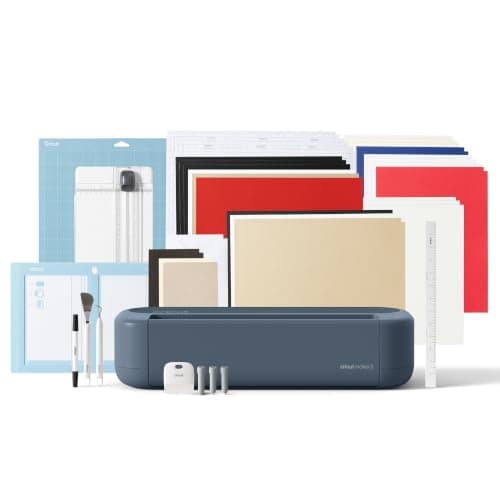
Cricut Maker 3 (Digital Content Bundle)

Cricut Maker 3 (Digital Content Bundle)

Rotary and knife blades, 12 ft matless cuts, about $87 less.

$342.05rated 4.6/5 in our review

Not sure yet? Compare all 5 picks below ↓

Buy the Cricut Maker 3 for most people. At about $362 at the time of writing it cuts fabric with a rotary blade, basswood with a knife blade, and vinyl up to 12 ft without a mat, and it costs about $87 less than the Brother ScanNCut SDX125E. Buy the ScanNCut if your designs start on paper or printed fabric: its built-in 600 DPI scanner and 5 in touchscreen let you scan and cut with no computer, app, or subscription.

Brother and Cricut built these machines around different ideas. Cricut made a cutter that does almost any material if you design on a device. Brother made a cutter that sees: it scans what you put on the mat and cuts around it by itself. Neither is strictly better; the right one depends on where your designs come from and what you cut.

Below: the head-to-head, a spec table, a who-should-buy-which breakdown, and three alternates: the loaded ScanNCut SDX325, the new Cricut Maker 5, and the Silhouette Cameo 5 Alpha for anyone asking about Brother vs Silhouette. Every product link goes to Amazon with our affiliate tag; we earn a small commission, at no cost to you, when you buy through us.

Winner for Most CraftersOur Pick

Max cut width

11.7 in (Smart Materials), 12 in on mat

Max cut length

12 ft (Smart Materials, no mat)

Force

About 4 kg

Tools

Rotary, knife, engraving, debossing, scoring, and more

Materials

300+

Controls

Design Space app on phone, tablet, or computer

Pros

  • Rotary blade cuts unbacked fabric with no stabilizer
  • Knife blade handles basswood, balsa, and chipboard
  • 12 ft matless cuts with Smart Materials
  • Biggest tutorial and project library of any brand

Cons

  • No scanner
  • Always needs a connected device
  • Subscription nudges in Design Space

The Maker 3 is the more capable cutter; the ScanNCut is the more independent one. Cricut's Adaptive Tool System is the difference. The machine steers the blade and controls pressure, which lets the rotary blade roll through cotton and felt like a rotary cutter on a mat, and lets the knife blade work through basswood in repeated passes. Add Smart Materials for 12 ft vinyl runs without a mat and it covers more of a typical crafter's week than any Brother.

Where the Cricut falls short: it cannot start from paper. If you draw with pen and ink, you will scan on a flatbed, vectorize in Design Space or another app, then cut. That works, and our scanners for art guide covers the flatbeds that do it well, but it is three steps the ScanNCut does in one.

Timing note: Cricut released the Maker 5 in September 2026. Buy the Maker 3 while it sells for less; if the prices converge, take the Maker 5 below. Both appear in our best Cricut machines guide.

Our Pick

The Maker 3 wins for most people because it does more jobs well. Its Adaptive Tool System runs a rotary blade for fabric, a knife blade for basswood and chipboard, plus engraving, debossing, and scoring tips; it cuts Cricut Smart Materials up to 12 ft with no mat; and it costs about $87 less than the ScanNCut SDX125E at the time of writing.

Buy the Maker 3 if you want one machine for vinyl, iron-on, paper, fabric, and thin wood, and you are happy designing on a phone, tablet, or computer.

What we don't like

It cannot scan anything; artwork has to become a digital file first. It needs Design Space on a connected device for every cut, and that app pushes the Cricut Access subscription. Matless cutting only works with Cricut Smart Materials.

Winner for Scanning Art and Computer-Free CuttingThe Challenger

Work area

12 x 12 in mat

Scanner

Built-in, up to 600 DPI

Screen

5 in LCD touchscreen

Max thickness

3 mm, auto blade sensor

Built-in designs

682 designs, 9 fonts

Connectivity

Wireless network ready, USB

Pros

  • Scan and cut on the machine itself, no computer
  • Auto blade height for each material
  • No account or subscription needed
  • Fabric mat included in the listed kit

Cons

  • No matless roll cutting
  • Basic on-screen editing
  • About $87 more than the Maker 3

The ScanNCut is built around one trick nobody else offers. Put a sketch, a coloring page, or a printed fabric panel on the scanning mat, and the machine scans it, finds the outlines, and shows cut lines on its own screen. Tap to trim the selection, press go. For illustrators who ink by hand, and for quilters fussy-cutting motifs from printed fabric, that removes the whole vectorizing step.

It is also genuinely standalone. There is no app to log into and no cloud; designs load from the built-in library, a USB stick, or Brother's free CanvasWorkspace software when you want more control. The auto blade reads material thickness, so you are not dialing blade depth by hand. What you give up is the Cricut's range: no rotary blade for loose fabric (you use a fabric support sheet or the fabric mat instead), no knife blade for wood, and no long matless vinyl runs. If you sew, the ScanNCut sits naturally next to a machine from our best sewing machines guide.

The Challenger

The ScanNCut is the only mainstream cutter with a built-in scanner (up to 600 DPI) and a 5 in touchscreen, so you can scan a drawing, fabric print, or stencil and cut it with no computer, phone, or account. Its auto blade senses material thickness up to 3 mm. About $450 at the time of writing.

Buy the ScanNCut if your designs start on paper or printed fabric, you quilt or appliqué, you want a machine that works without Wi-Fi or an app, or you are tired of subscription prompts.

What we don't like

Every job needs a mat, so long vinyl runs are slower. The on-screen editor is basic compared with Design Space. It costs more than the Maker 3, and there is no rotary or knife blade equivalent.

Austin Art Insider

Free weekly guide to galleries, exhibitions & collecting in Austin.

The Pricier Alternative: More Designs, Wider Library

Scanner

Up to 600 DPI, 11.7 in max scan width

Screen

5 in LCD touchscreen

Built-in designs

1,435 (140 quilt designs)

Fonts

17

Max thickness

3 mm

Weight

12.79 lb

Pros

  • Largest built-in design library
  • Same scanner and auto blade
  • Wireless

Cons

  • About $450 more than the SDX125E
  • Same cutting hardware class

The SDX325 is for quilters who will use the library. The scanner, screen, and auto blade are the same class as the SDX125E, so buy it for the 1,435 built-in designs and bundle, not for better cuts.

The SDX325 is the loaded ScanNCut: 1,435 built-in designs (140 of them quilt designs), 17 fonts, the same 600 DPI scanner and 5 in touchscreen, wireless, and 3 mm cutting with the auto blade. About $900 at the time of writing.

Buy the SDX325 if you are a quilter who wants the larger built-in quilt library and extras, and the SDX125E's design set feels thin.

What we don't like

Twice the price of the SDX125E for mostly the same cutter and scanner; the premium is content and accessories, not a stronger machine.

The Newer Cricut: Maker 5

Max cut width

12 in

Max cut length

12 ft (Smart Materials)

Clearance

3 mm

Tools

13, including rotary and knife blades

Materials

300+

Pros

  • 3 mm clearance
  • Smaller footprint
  • Full adaptive tool range

Cons

  • No scanner
  • Costs more than the Maker 3 bundle today

If you are buying a Maker today and the prices are within about $40, get the Maker 5. The extra clearance matters for thicker chipboard and leather, and the smaller body is easier to live with. The Brother comparison does not change: it still cannot scan.

Cricut's September 2026 flagship: 3 mm clearance (up from 2.4 mm on the Maker 4), a body Cricut says is 30 percent more compact than the Maker 4, 13 compatible tools including the rotary and knife blades, and 12 ft matless cuts. The Essential Bundle was about $399 at the time of writing.

Buy the Maker 5 over the Maker 3 when the price gap is small, or if you want the 3 mm clearance for thicker materials.

What we don't like

Same top cutting speed as the Maker 4, still no scanner, and still Design Space with its subscription nudges.

The Cheaper Alternative: Silhouette Cameo 5 Alpha

Max cut length

16 ft (lined material, no mat)

Cut area with mat

12 x 24 in

Max thickness

3 mm

Software

Silhouette Studio

Pros

  • Cheapest machine here
  • Longest matless cuts
  • No subscription needed

Cons

  • Needs a computer
  • No scanner or fabric blade

ScanNCut vs Cameo comes down to where your designs start. Paper and fabric favor the Brother; digital files and vinyl favor the Silhouette. Our Cricut vs Silhouette Cameo 5 comparison covers the Cameo in depth.

For readers asking Brother ScanNCut vs Silhouette Cameo: the Cameo 5 Alpha is the cheaper, vinyl-focused option at about $299, cutting up to 16 ft of any lined vinyl without a mat, with a built-in cross cutter and Silhouette Studio (no subscription required). It has no scanner, but its 4-point print and cut handles printed stickers.

Buy the Cameo if you mostly cut vinyl, HTV, and stickers and design on a computer.

What we don't like

No scanner and no standalone screen, so it needs a computer. No rotary blade for fabric.

Head-to-Head

How the top picks compare

One matchup, decided by where your designs start.

Cricut Maker 3 vs Brother ScanNCut SDX125E

Cricut's tool ecosystem against Brother's built-in scanner and standalone screen.

Cricut Maker 3

Cricut

Winner

Cricut Maker 3

Rotary and knife blades, 300+ materials, 12 ft matless cuts

$342.05
Check Price →
Brother ScanNCut SDX125E

Brother

Brother ScanNCut SDX125E

600 DPI scanner, 5 in touchscreen, no computer or subscription

$449.99
Check Price →

Our verdict

Winner: Cricut Cricut Maker 3. The Maker 3 wins for most crafters. It cuts a wider range of materials, handles fabric without a stabilizer and basswood with its knife blade, runs long vinyl jobs without a mat, and costs about $87 less at the time of writing. The ScanNCut wins a narrower but real case: if you draw by hand, fussy-cut printed fabric, or want a cutter that never needs an app, its scanner and touchscreen are worth the premium.

Buy the Cricut

Buy the Maker 3 if you design on a device and want the widest material range, including fabric and thin wood.

Buy the Brother

Buy the ScanNCut if your designs start on paper or fabric, or you want to cut with no computer, account, or subscription.

How we
chose

How we built this comparison:

  • Manufacturer specs. Scanner resolution, screen size, thickness limits, design counts, and cut lengths come from Brother and Cricut. Brother does not publish a cutting force figure for the ScanNCut, so we did not invent one.
  • Workflow over specs. The real difference is how a design gets from your hands to the blade. We walked through the same jobs (a hand-drawn sticker, a fabric appliqué, a vinyl decal, a basswood ornament) on each machine's workflow.
  • Software cost. We counted the need for an app and account, and subscription prompts, as real costs.
  • Current lineup. The Cricut Maker 5 launched in September 2026, so we included it as the newer Cricut option and noted when the Maker 3 still makes sense.
  • Verified listings. Every price was checked against the live Amazon listing on the day of publication.

Share this guide

Share

Common Questions

Frequently Asked Questions

Have art
to sell?

Austin Gallery specializes in selling inherited art, estate collections, and fine art with zero upfront fees. Get a free evaluation today.