Austin Gallery
Art SuppliesJune 27, 2026Updated June 27, 202618 min read

Color Management for Artists (2026): Make Your Prints Match Your Screen

The wrong-colored print is a color-management failure — and it's fixable. Here's the chain of tools, in priority order, that makes the color you see match the color you print and share.

By Justin Park · How we research

Every artist who's ever printed their work knows the gut-punch: the print comes out and the colors are wrong — duller, warmer, off in some way the screen never showed. That's a color-management failure, and it wastes paper, ink, and faith in your own work. Color management is simply the practice of making the color you see match the color everywhere else — on your screen, in your print, and on a buyer's device.

It's a chain, and it's only as strong as its weakest link. You need an accurate monitor (the foundation), a calibrator to keep it honest (the single highest-impact tool), a way to capture true color when you photograph artwork, a consistent light to judge prints under, and a glare-free view of your screen — with a pro printer-profiling upgrade for high-volume sellers. Below, each link in that chain, in priority order. Selling what you make? See our guide to selling art online and the print-selling starter kit. Every link goes to Amazon with our affiliate tag; we earn a small commission at no cost to you.

In a Hurry?

The 3 picks that cover most readers. Tap to read the full review or buy direct.

Top Pick · The Monitor

BenQ PD3205U

BenQ PD3205U

$549.99

A screen that tells the truth — the foundation of color.

Don't Skip · Calibrator

Calibrite Display Pro HL

Calibrite Display Pro HL

$299.00

The tool that actually makes color accurate — and keeps it.

Best Budget · Glare Hood

Monitor Glare Hood

Monitor Glare Hood

$33.99

Blocks stray light that distorts the color you see.

The best color-accurate monitorTop Pick

Role

Accurate display

Color

99% sRGB, Delta-E ≤3

Panel

32" 4K IPS, factory-calibrated

Why

The starting point everything depends on

Next

Pair with a calibrator

Pros

  • Factory-calibrated wide gamut
  • Big, sharp 4K workspace
  • Trustworthy starting color
  • Mac-ready

Cons

  • Drifts over time — needs a calibrator

Color management starts with a screen that tells the truth. A normal monitor shows oversaturated, inconsistent color, so what you approve on it looks wrong on paper and on a buyer's device. A factory-calibrated, wide-gamut designer monitor like the BenQ PD3205U covers 99% sRGB with low Delta-E, giving you a trustworthy starting point.

Why it's the foundation: every other tool here refines the color on your screen — but if the screen itself is inaccurate, nothing downstream can fix it. Get an accurate display first. See our full monitor guide.

What we don't like

Even a great panel drifts over months and needs a calibrator (below) to stay accurate — the monitor is the start, not the whole solution.

Best monitor calibratorDon't Skip

Role

Calibrate the display

Type

Colorimeter + ColorChecker target

Does

Builds a corrective monitor profile

Cadence

Re-run every few weeks

Impact

Highest after the monitor

Pros

  • Genuinely accurate, not just 'close'
  • Profiles screen + camera
  • Quick 5-minute calibration
  • Corrects drift over time

Cons

  • A habit you must keep
  • Slight software learning curve

This is the device that actually does color management. A colorimeter sits on your screen, reads the colors it displays, and builds a profile that corrects the monitor to a known standard — so the color is genuinely accurate, not just "factory close." Every display drifts over time; re-calibrating every few weeks keeps it honest.

This kit pairs the Display Pro HL colorimeter with a ColorChecker target, so you can profile both your screen and your camera/photos of artwork. It's the single highest-impact color-management purchase after the monitor.

What we don't like

Calibrating is a 5-minute habit you have to actually keep up. The software has a small learning curve the first time.

Best for capturing accurate color

Role

Capture true color

Use

Photograph the target in your light

Does

Builds a camera color profile

Best

Digitizing original artwork

Pairs

With your camera + scanner

Pros

  • True-color reproduction of originals
  • Custom profile for your lighting
  • Portable, durable
  • Pro-standard tool

Cons

  • Adds a workflow step
  • Re-shoot when light changes

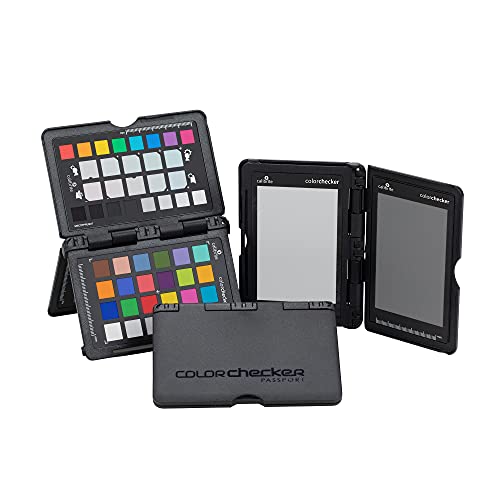
If you photograph your art to make prints or list it online, this is how you capture the real colors. Shoot the ColorChecker target once in your lighting, and its software builds a custom profile that corrects your photos to true color — so the reproduction matches the original painting, not your camera's guess.

It's the difference between a print that's faithful to your work and one that's subtly off in every hue. Indispensable for anyone digitizing physical artwork; pair it with a good scanner for flat work.

What we don't like

Adds a step to your photo workflow, and you should re-shoot the target whenever your lighting changes.

Best viewing light (judge prints right)

Role

Evaluate prints

Light

Full-spectrum, daylight-balanced

Why

Prints shift color under warm light

Closes

The last gap in the chain

Bonus

Doubles as studio lighting

Pros

  • Consistent daylight to judge prints
  • Closes the viewing-light gap
  • Doubles as task light
  • Affordable

Cons

  • Not a certified D50 viewing booth

You calibrated your screen — now you have to judge your prints under the right light too. A print looks completely different under warm household bulbs than under daylight, so without a consistent, daylight-balanced viewing light you can't tell whether a print is accurate or just lit flatteringly.

A full-spectrum daylight lamp gives you a neutral, repeatable light to evaluate prints against your screen — closing the last gap in the color chain. (It doubles as great studio task lighting.)

What we don't like

Not a certified D50 print-viewing booth (those cost far more) — but it's a huge step up from judging prints under a random lamp.

Best for blocking glare (under $35)Best Budget

Role

Block stray light

Fits

17–27" monitors (adjustable)

Why

Reflections distort perceived color

Used by

Pro retouchers + color studios

Cost

Under $35

Pros

  • Shades screen from glare
  • Truer perceived color
  • Pro-studio standard
  • Cheap

Cons

  • Bulky on the desk
  • Match to monitor size

The cheapest color-management upgrade, and a surprisingly effective one. Stray light and reflections hitting your screen throw off how you perceive color — washing out shadows and shifting your sense of contrast. A monitor hood shades the panel from overhead and window light so you see the calibrated color as it actually is.

It's what pro retouchers and color-critical studios use, and at under $35 it's an easy final touch on a color-managed setup. Round out the desk with a glare-free monitor light bar and a screen cleaning kit so nothing distorts the color you've worked to get right.

What we don't like

It's a bit bulky on the desk, and you'll want to match the size to your monitor.

Austin Art Insider

Free weekly guide to galleries, exhibitions & collecting in Austin.

Best pro upgrade (profile your printer too)Pro Upgrade

Role

Profile printer + paper

Type

Spectrophotometer

Builds

Custom ICC printer/paper profiles

Level

Professional print-lab grade

Best

High-volume print sellers

Pros

  • Profiles printer + every paper
  • Lab-grade, repeatable prints
  • Eliminates paper-stock guesswork
  • Also profiles displays

Cons

  • Very expensive
  • Overkill for occasional printing

For the serious print business, this is the endgame: profile your printer and paper, not just your screen. A spectrophotometer measures the actual color a specific printer-and-paper combination produces and builds a custom ICC profile, so prints come out exactly as intended on every paper you use — the level of control a professional print lab runs on.

It's a major investment and overkill for occasional printing, but for a high-volume print seller it eliminates guesswork and wasted paper across every paper stock you offer. Pair it with a pigment large-format printer for a true print-lab setup.

What we don't like

Genuinely expensive and far beyond what most artists need — the colorimeter above covers screen calibration for a fraction of the cost.

Best calibrator upgrade (adds video)

Role

Upgrade calibrator

Type

Colorimeter + ColorChecker

Adds

High-luminance / HDR + video

Best

Bright HDR displays

vs Pro HL

+$80 for HDR headroom

Pros

  • Reads bright HDR screens accurately
  • Handles photo + video
  • Includes ColorChecker target
  • Most future-proof colorimeter

Cons

  • Overkill for standard photo/print work

The step up from the standard calibrator, for people who also care about very bright screens and video. The "Plus HL" colorimeter reads higher-luminance HDR displays accurately — the Pro HL most artists buy tops out lower — and the kit still includes a ColorChecker target for camera profiling.

If you're calibrating a bright HDR monitor, grade video, or just want the most future-proof colorimeter, this is the one. For straight photo/print work, the standard Display Pro HL kit covers you for $80 less.

What we don't like

Most photo/print artists don't need the extra HDR headroom — the standard Pro HL kit does the job for less.

Best budget capture tool (under $10)Best Budget

Role

Budget color capture

Use

Set neutral white balance

Fixes

Warm/cool color casts

Best

Starting out / on a budget

Cost

Under $10

Pros

  • Fixes the most common color cast
  • Dead simple to use
  • Pairs with any camera
  • Under $10

Cons

  • White balance only — not a full profile

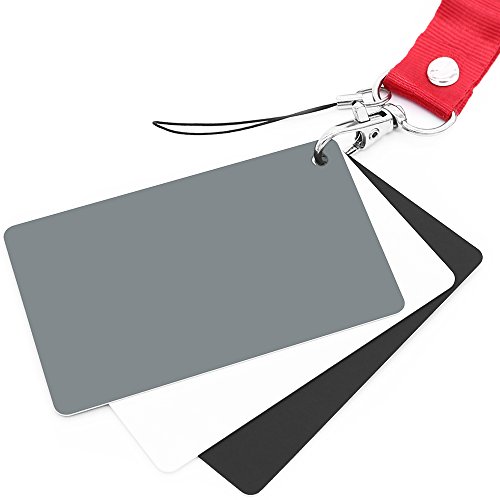
The cheapest first step toward accurate color capture. Photograph an 18% gray card in the same light as your artwork, then click it with the eyedropper in your editor to set a neutral white balance — instantly removing the warm or cool color cast your camera guessed wrong.

It won't build a full camera profile the way a ColorChecker Passport does, but at $8 it fixes the single most common capture error and is the perfect way to start before you invest in the full target.

What we don't like

Sets white balance but doesn't build a full color profile — step up to a ColorChecker Passport for true reproduction accuracy.

Head-to-Head

How the top picks compare

Two questions everyone asks when they start spending on color. Here's the honest answer to each.

Calibrate Your Screen vs. Buy a Pre-Calibrated Monitor

If you can only spend on one, which fixes your color faster?

Calibrite Display Pro HL Kit

Calibrate what you have

Winner

Calibrite Display Pro HL Kit

Makes any screen accurate — and keeps it that way as it drifts.

$299.00
Check the Calibrator →
BenQ PD3205U Designer Monitor

Buy accurate hardware

BenQ PD3205U Designer Monitor

Factory-calibrated wide gamut — a trustworthy starting point.

$549.99
Check the Monitor →

Our verdict

Winner: Calibrate what you have Calibrite Display Pro HL Kit. Spend on the calibrator first. Even a great monitor drifts out of accuracy within weeks, and a colorimeter makes your current screen genuinely accurate today — for less than a new display. Ideally you own both, but the calibrator delivers accurate color on whatever you already have.

Buy the Calibrate what you have

you already have a decent screen and want accurate color now.

Buy the Buy accurate hardware

your current display is genuinely bad and you're due an upgrade anyway.

ColorChecker Passport vs. an $8 Gray Card

Both fix your photo color. One does far more — is it worth 15×?

ColorChecker Passport Photo 2

Full color profile

Winner

ColorChecker Passport Photo 2

Builds a custom camera profile — true reproduction of the original.

$119.00
Check the Passport →
18% Gray Card

White balance only

18% Gray Card

Fixes the color cast in seconds — the cheapest accuracy win.

$7.99
Check the Gray Card →

Our verdict

Winner: Full color profile ColorChecker Passport Photo 2. If you sell prints of your work, the Passport wins — a true camera profile reproduces the actual colors of the original painting, not just a neutral white balance. The gray card is the perfect $8 starting point and fixes the most common error, but it can't profile color the way the target does.

Buy the Full color profile

you sell prints and need faithful reproduction of originals.

Buy the White balance only

you're starting out and want the biggest fix for the least money.

How we
chose

We ordered these by where they sit in the color chain — because a later link can't fix an earlier one:

  • Accurate display first. If the screen lies, nothing downstream can be trusted, so a color-accurate monitor leads.
  • Calibration is the highest-impact buy. Every display drifts; a colorimeter is what turns "factory close" into genuinely accurate, and keeps it that way.
  • Capture and viewing count too. Color management isn't only the screen — capturing true color when you photograph art, and judging prints under consistent daylight, close the gaps most people miss.
  • Cheap wins included. A glare hood is under $35 and removes a real, sneaky source of error, so it earned a spot.
  • Pro ceiling, clearly flagged. Printer profiling with a spectrophotometer is the professional endgame — we mark it as the upgrade it is, not a day-one buy.

Share this guide

Share

Common Questions

Frequently Asked Questions

Have art
to sell?

Austin Gallery specializes in selling inherited art, estate collections, and fine art with zero upfront fees. Get a free evaluation today.