Austin Gallery

Printing & Reproduction

8 Best Color-Accurate Monitors for Art & Photo Editing (2026)

Your prints only match your screen if your screen tells the truth. We tested 8 color-accurate monitors — from a $200 factory-calibrated ASUS ProArt to a $1,500 self-calibrating Eizo reference — ranked by what decides color truth: gamut, Delta-E, and calibration.

By Austin Gallery EditorsUpdated June 2, 202614 min read
A color-accurate monitor on an artist's desk showing a vivid painting being edited

Here's the problem almost every artist hits: you spend hours perfecting the color of a piece, send it to print, and the print looks wrong. Usually the culprit isn't the printer — it's the monitor, showing you colors that aren't true. A color-accurate monitor is the link that makes everything downstream trustworthy, from editing to soft-proofing to the final print.

But "color accurate" is a spec, not a marketing word, and most monitors fail it. We tested across the full range — from a $200 factory-calibrated ASUS ProArt to a $1,500 self-calibrating Eizo reference — and ranked them by what actually determines color truth: gamut coverage, Delta-E accuracy, and calibration. Every link goes to Amazon with our affiliate tag; we earn a small commission, at no cost to you, when you buy through us.

In a Hurry?

The 3 picks that cover most readers. Tap to read the full review or buy direct.

Best Overall

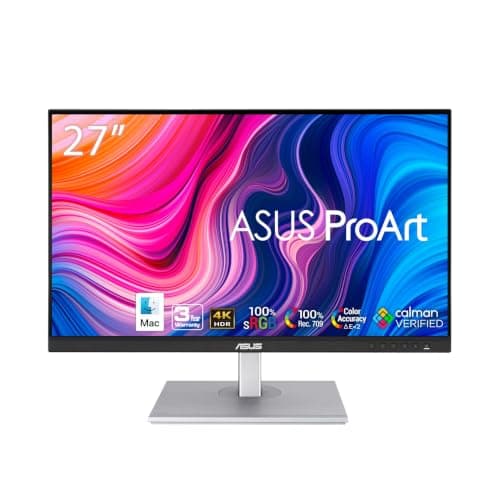
ASUS ProArt PA279CV

$299

27-inch 4K, 100% sRGB, factory-calibrated ΔE<2. Pro accuracy for under $300.

Best Pro Reference

Eizo ColorEdge CG2700S

$1,500

Built-in self-calibration sensor + 99% Adobe RGB. The studio reference that never drifts.

Best Budget

ASUS ProArt 24"

$200

Factory-calibrated 100% sRGB accuracy for ~$200. Color truth on a budget.

Best OverallOur Pick

Size

27 in, 4K UHD

Gamut

100% sRGB / Rec.709

Accuracy

Factory ΔE < 2

Ports

USB-C (65W)

Pros

  • Factory-calibrated to Delta-E < 2 — accurate out of the box
  • 27-inch 4K resolution for detailed editing
  • 100% sRGB / Rec.709 coverage
  • USB-C with power delivery — one-cable laptop setup
  • Exceptional color accuracy per dollar

Cons

  • sRGB-only — no wide Adobe RGB gamut
  • No built-in self-calibration sensor
  • Stand is functional, not premium

For the vast majority of artists and photographers, this is the monitor. Color accuracy used to mean spending $1,000+; the ASUS ProArt line collapsed that, and the PA279CV is the pick — 4K, factory-calibrated, and genuinely accurate for under $300.

ΔE < 2Factory-calibrated color accuracy. Delta-E under 2 means color differences are imperceptible to the human eye — the threshold pros require

The spec that matters is Delta-E — how far the monitor's colors deviate from true. Under 2 is the professional threshold (differences become invisible), and the PA279CV ships factory-calibrated below it with a report in the box. Pair that with full sRGB coverage and 4K resolution, and you have a screen you can trust for color decisions.

The color workflow: a calibrated monitor is the middle link between scanning your art and printing it. If your screen lies about color, your prints won't match what you approved. See our scanner and printer guides linked below — the monitor is what ties accurate capture to accurate output.

Our Pick

The color-accuracy sweet spot. A 27-inch 4K IPS panel, 100% sRGB / Rec.709, factory-calibrated to Delta-E < 2, with USB-C — for under $300. The monitor most artists and photographers should actually buy.

Buy this if you edit digital art, prep prints, or retouch photos and want genuinely accurate color without spending four figures. The factory calibration report (ΔE < 2) means what you see is true out of the box, and 4K gives you the resolution for detailed work.

What we don't like

It covers 100% sRGB but not the wider Adobe RGB gamut that demanding print photographers want — for that, step up to the BenQ SW272Q. And it lacks built-in hardware self-calibration (the Eizo's party trick), though it holds calibration well.

Best Pro ReferenceUpgrade Pick

Size

27 in, WQHD

Gamut

99% Adobe RGB

Calibration

Built-in self-calibration sensor

Use

Pro reference / repro

Pros

  • Built-in sensor self-calibrates — never drifts, no colorimeter needed
  • 99% Adobe RGB for print-critical work
  • Exceptional panel uniformity edge-to-edge
  • The trusted reference in pro print studios
  • Hardware calibration with Eizo ColorNavigator

Cons

  • ~$1,500 — a professional investment
  • WQHD, not 4K — fidelity over resolution
  • Overkill for hobby editing

When color is the product, you buy an Eizo. The ColorEdge line is the reference monitor in professional print and photo studios, and the headline feature is the built-in calibration sensor: it swings out and recalibrates the screen on a schedule, automatically, so the display never drifts out of accuracy.

That matters because every monitor drifts over time — colors shift as the backlight ages. Most pros fix this with an external colorimeter; Eizo builds one in. Combined with 99% Adobe RGB coverage and class-leading uniformity, it's the screen you buy when a wrong color costs you a reprint or a client.

Upgrade Pick

The reference standard, with a built-in calibration sensor. Eizo's ColorEdge is what print studios and pro photographers trust — 99% Adobe RGB, hardware calibration, and a self-calibration sensor that recalibrates the screen automatically so it never drifts.

Buy this if color is your livelihood — you sell prints, do client retouching, or run a repro workflow where a wrong color costs money. The built-in sensor recalibrates on a schedule with no external colorimeter, guaranteeing the screen stays true for years.

What we don't like

At ~$1,500 it's a pro investment, and it's WQHD (1440p) rather than 4K — Eizo prioritizes color fidelity and uniformity over pixel count. If you need 4K resolution more than a built-in calibrator, the ASUS or Dell give you that for less.

Best High-End OLEDAlso Great

Size

32 in, 4K

Panel

QD-OLED

Gamut

Wide DCI-P3, HDR

Use

Digital art, video, HDR

Pros

  • 32-inch 4K QD-OLED — perfect blacks, per-pixel contrast
  • Wide DCI-P3 gamut with HDR
  • Big canvas for digital painting and video timelines
  • Stunning image quality across stills and motion

Cons

  • OLED burn-in risk with static UI over time
  • ~$1,690 flagship price
  • Less specialized for print than the Eizo

If your work spans digital painting, photography, and video, the QD-OLED ProArt is the do-it-all flagship. QD-OLED delivers per-pixel contrast and infinite blacks an IPS panel can't match, plus a wide DCI-P3 gamut and HDR for motion work.

At 32 inches and 4K, it's a genuine pro canvas. The trade-offs are OLED's long-term burn-in risk from static interface elements and the flagship price — for pure print-photo color, the Eizo is the more specialized tool, but for a large, gorgeous all-rounder, this is hard to beat.

Also Great

A 32-inch 4K QD-OLED flagship for color work that also wants perfect blacks and HDR. Wide DCI-P3 gamut, per-pixel contrast, and the size to work big — for digital artists and motion/video creatives, not just stills.

Buy this if you want a large, do-everything pro display — color-critical stills work plus HDR video, with OLED's infinite contrast and the 32-inch real estate for detailed digital painting and timelines.

What we don't like

OLED panels carry burn-in risk with static UI over years, and at ~$1,690 it's a flagship price. For pure print/photo color, the Eizo's self-calibration and Adobe RGB focus are arguably the safer pro choice.

Best for MacAlso Great

Size

27 in, 5K Retina

Gamut

P3 wide color

Brightness

600 nits

Ports

Thunderbolt / USB-C

Pros

  • Gorgeous 5K Retina sharpness (218 ppi)
  • Accurate P3 wide color, 600 nits
  • Seamless single-cable Mac integration
  • Premium build that matches Apple hardware

Cons

  • No hardware calibration / built-in sensor
  • P3 gamut, not Adobe RGB for print
  • Premium price for the ecosystem fit

For Mac creatives, the Studio Display is the path of least resistance. 5K Retina resolution is sharper than 4K at 27 inches, P3 color is accurate for digital and web work, and it integrates with macOS the way only Apple's own hardware does — plug in one cable and it just works.

It's not a print-calibration specialist — no built-in sensor, P3 rather than Adobe RGB — so dedicated print photographers may prefer the Eizo or BenQ. But for digital artists and Mac-based studios who want premium simplicity and Retina sharpness, it's the obvious choice.

Also Great

The seamless Mac choice. A 27-inch 5K Retina panel with P3 wide color and 600 nits — the display Apple built for its own ecosystem. For Mac-based artists who value plug-and-play and that signature Retina sharpness.

Buy this if you work on a Mac and want the cleanest, sharpest integration — 5K Retina resolution, accurate P3 color, single-cable Thunderbolt, and the build quality to match your machine. The no-fuss premium pick for Apple creatives.

What we don't like

It's expensive, has no built-in calibration sensor or hardware-calibration support like the Eizo, and the gamut is P3 (great for digital/web, less Adobe-RGB for print). You're partly paying for design and ecosystem fit.

Best for Photographers (Adobe RGB)Also Great

Size

27 in, QHD (1440p)

Gamut

99% Adobe RGB / 98% DCI-P3

Calibration

Hardware calibration + hotkey puck

Use

Photography / print prep

Pros

  • 99% Adobe RGB — the gamut for print photography
  • Hardware calibration support with a hotkey puck
  • AQCOLOR factory accuracy
  • The natural companion to a pigment printer

Cons

  • QHD, not 4K — less sharp at 27 inches
  • ~$800 step up from value monitors
  • Wide gamut wasted if you only work in sRGB/web

If you print photographs, gamut is the whole game — and the SW272Q delivers the wide one. Pigment printers can reproduce colors that fall outside the sRGB gamut most monitors show; an Adobe RGB monitor like this lets you see and edit those colors before they hit paper.

BenQ built the SW line for exactly this: 99% Adobe RGB, hardware calibration, and a hotkey puck for switching color modes. It's QHD rather than 4K, a fair trade for the wide-gamut accuracy that print photographers actually need. Pair it with a pigment printer and you can soft-proof with confidence.

Also Great

Purpose-built for photographers who print. 99% Adobe RGB and 98% DCI-P3 coverage, hardware calibration, and a hotkey puck — the wide-gamut accuracy that matters when your work goes to a pigment printer.

Buy this if you print photographs or art and need the wide Adobe RGB gamut that pigment printers can reproduce but sRGB monitors can't show. The hardware calibration and dedicated photo features make it the printer's companion monitor.

What we don't like

It's 2K (1440p) rather than 4K at 27 inches, so it's less sharp than the 4K picks for fine detail. And at ~$800 it's a step up from the value monitors — worth it specifically if Adobe RGB and printing matter to you.

Austin Art Insider

Free weekly guide to galleries, exhibitions & collecting in Austin.

Best Prosumer 4KAlso Great

Size

27 in, 4K UHD

Panel

IPS Black (high contrast)

Gamut

98% DCI-P3

Hub

USB-C, ethernet, KVM

Pros

  • IPS Black doubles contrast for deeper blacks
  • 4K with 98% DCI-P3 coverage
  • Best-in-class USB-C hub, ethernet, and KVM
  • Refined build and daily-driver versatility

Cons

  • DCI-P3/sRGB focus, not Adobe RGB
  • Not factory ΔE-documented like the ProArt
  • Aimed at prosumers more than color purists

The Dell UltraSharp is the monitor you buy when you want one screen to do everything well. The IPS Black panel is the standout — it roughly doubles the contrast ratio of standard IPS, giving deeper blacks that make editing in a normally-lit room far easier on the eyes.

Add 4K resolution, 98% DCI-P3, and the best connectivity in this guide (a full USB-C hub with ethernet and KVM), and you have a refined daily driver that's also genuinely color-capable. For print-critical Adobe RGB work, the BenQ wins; for a do-it-all 4K screen, this is the one.

Also Great

The polished all-rounder. Dell's IPS Black panel doubles contrast over standard IPS for deeper blacks, with 98% DCI-P3, 4K resolution, and a superb USB-C hub — a refined daily-driver that's also color-capable.

Buy this if you want one excellent monitor for everything — color work plus everyday productivity — with the best connectivity here (USB-C hub, ethernet, KVM). IPS Black's deeper contrast is a real upgrade for editing in normal room light.

What we don't like

It's sRGB/DCI-P3 focused rather than Adobe RGB, so dedicated print photographers want the BenQ. And it's not factory-calibrated to the ProArt's documented ΔE — excellent, but aimed at prosumers more than color purists.

Best Value QHDAlso Great

Size

27 in, QHD (1440p)

Refresh

120Hz

Panel

IPS, color-capable

Best

Value all-rounder

Pros

  • UltraSharp build and color at a QHD price
  • Smooth 120Hz everyday experience
  • Plenty of resolution for most editing
  • Reliable Dell color tuning

Cons

  • QHD, not 4K — less fine detail
  • sRGB/DCI-P3, not Adobe RGB
  • No documented factory ΔE

Not everyone needs 4K — and the U2724D is the smart QHD value. It carries the UltraSharp line's refined build and color-capable IPS panel down to a 1440p price, adding a 120Hz refresh that makes everyday use feel notably smoother.

At 27 inches, QHD resolution is comfortable for most digital art and photo editing; you only really miss 4K when working with very fine detail or lots of text. For an accurate, well-built all-rounder under $400, it's the value pick.

Also Great

UltraSharp quality at a QHD price. The same refined build and color-capable IPS as its 4K sibling, at 1440p and 120Hz — a smooth, accurate all-rounder for artists who don't need 4K's pixel density.

Buy this if you want trustworthy UltraSharp color and build without paying for 4K. QHD at 27 inches is plenty for most digital art and editing, and the 120Hz panel makes everyday use feel fluid. The value sweet spot in Dell's lineup.

What we don't like

QHD is lower resolution than the 4K picks — fine detail and fine type are less crisp. And like the other UltraSharps, it's tuned for sRGB/DCI-P3, not Adobe RGB print work.

Best Budget Color-AccurateBudget Pick

Size

24 in, WUXGA (1920×1200)

Gamut

100% sRGB / Rec.709

Accuracy

Factory calibrated

Tier

Budget color-accurate

Pros

  • Genuine factory-calibrated sRGB accuracy for ~$200
  • 100% sRGB / Rec.709 coverage
  • 16:10 ratio gives extra vertical workspace
  • Far better for color than generic monitors at the price

Cons

  • Lower WUXGA resolution, 24-inch size
  • sRGB-only, no wide gamut
  • Tight for detailed pro work

The myth that color accuracy requires a big budget ends here. The 24-inch ProArt brings the line's factory-calibrated sRGB accuracy down to about $200 — the cheapest honest color monitor we'd recommend for art and photo work.

You're trading size and resolution: it's 24 inches at WUXGA, fine for learning, light editing, or a calibrated second screen, but tight for detailed professional work. As an entry into accurate color — or a trustworthy companion display — nothing at the price competes.

Budget Pick

Real color accuracy for $200. A 24-inch WUXGA ProArt with 100% sRGB / Rec.709 and factory calibration — proof you don't need to spend big to stop your monitor from lying about color.

Buy this if you're starting out, on a tight budget, or want an accurate second screen. It delivers the ProArt line's factory-calibrated sRGB accuracy in a smaller, cheaper package — far better for color work than any generic office monitor at the price.

What we don't like

It's 24-inch WUXGA (1920×1200), so lower resolution and smaller than the rest — fine for learning and light editing, tight for detailed pro work. sRGB-only, no wide gamut. But for $200, the accuracy is remarkable.

Head-to-Head

How the top picks compare

Two questions decide most monitor purchases. Here's the call, and when the runner-up is right.

ASUS ProArt PA279CV vs Eizo ColorEdge — Value or Reference?

Factory-accurate 4K for $299, or a self-calibrating pro reference for $1,500?

ASUS

Winner

ProArt PA279CV

4K, factory ΔE<2, unbeatable value

$299
Check Price →

Eizo

ColorEdge CG2700S

Self-calibrating, 99% Adobe RGB

$1,500
Check Price →

Our verdict

Winner: ASUS ProArt PA279CV. For the vast majority of artists, the ASUS wins on sheer value — genuine factory-calibrated 4K accuracy for a fifth of the Eizo's price. The Eizo earns its cost only when color is your livelihood: the built-in self-calibration sensor and Adobe RGB gamut guarantee accuracy that never drifts, which matters when a wrong color costs a reprint or a client.

Buy the ASUS

you want excellent, trustworthy color accuracy at the best possible price.

Buy the Eizo

color is your business and you need self-calibrating, Adobe RGB reference accuracy.

sRGB vs Adobe RGB: ASUS ProArt vs BenQ SW272Q

Do you actually need the wide Adobe RGB gamut? It depends on whether you print.

ASUS

Winner

ProArt PA279CV (sRGB)

100% sRGB — perfect for screen/web

$299
Check Price →

BenQ

SW272Q (Adobe RGB)

99% Adobe RGB — for pigment printing

$800
Check Price →

Our verdict

Winner: ASUS ProArt PA279CV (sRGB). For digital art, web, and screen-only work, the sRGB ProArt is the smarter buy — you'd be paying for Adobe RGB you can't use. Choose the BenQ specifically if you print photographs or art on a pigment printer: those printers reproduce colors outside sRGB, and only a wide-gamut Adobe RGB monitor lets you see and edit them before they hit paper.

Buy the ASUS

your work is digital/web or you don't print on a wide-gamut pigment printer.

Buy the BenQ

you print photos/art on a pigment printer and need to edit in Adobe RGB.

How we
chose

We judged monitors by the specs that decide whether the color on screen is true — not by brightness or refresh-rate hype:

  • Delta-E accuracy. The single most important number. Delta-E measures how far the monitor's colors deviate from true; under 2 is the professional threshold where differences become invisible to the eye. We prioritized monitors that ship factory-calibrated with a documented ΔE.
  • Gamut coverage. How much of a color space the monitor can display. 100% sRGB is the baseline for digital/web; wide Adobe RGB matters for print photographers (pigment printers reproduce colors sRGB can't show); DCI-P3 spans digital and video. We matched gamut to use.
  • Calibration. Every monitor drifts over time. We weighted hardware-calibration support, and the Eizo's built-in self-calibration sensor, since holding accuracy is as important as starting accurate.
  • Resolution & panel. 4K/5K for fine detail, IPS Black/OLED for contrast. We balanced resolution against color fidelity rather than chasing pixels alone.
  • Workflow fit. A monitor is the middle of the scan → edit → print chain. We favored accurate color and good connectivity over gaming features irrelevant to art and photo work.

Share this guide

Share

Common Questions

Frequently Asked Questions

Have art
to sell?

Austin Gallery specializes in selling inherited art, estate collections, and fine art with zero upfront fees. Get a free evaluation today.