Austin Gallery
Photography GearJune 29, 2026Updated June 29, 202615 min read

How to Photograph Your Artwork: The Best Gear & Setup

From a gallery that looks at a lot of art photos: the difference between a piece that sells online and one that scrolls past is almost never the art — it's the photograph. The gear and setup that get color, glare, and detail right, from a $6 gray card to a $290 calibrator.

By Justin Park · How we research

As a gallery, we look at a lot of artwork photographs — and the difference between a piece that sells online and one that scrolls past is almost never the art. It's the photograph. Bad art photography shows up as color that's off (a blue or yellow cast), glare across the surface, uneven brightness, or soft detail. The frustrating part is that all four are solved problems, with inexpensive, specific gear and a repeatable setup.

This guide covers the best gear for photographing your own artwork in 2026 — for prints, portfolios, consignment, and online sales — from a $6 gray card to a $290 monitor calibrator. We walk through the copy-photography setup the way a gallery does it: even, high-CRI lighting; a polarizer to kill glare on glass and glossy paint; color-reference targets for true hues; and a calibrated screen so what you edit is what prints. Every pick is verified and linked to Amazon with live pricing.

In a Hurry?

The 4 picks that cover most readers. Tap to read the full review or buy direct.

Our Pick

Neewer LED Panel Kit

Neewer LED Panel Kit

$139.99

Even, high-CRI two-light cross-lighting.

Best Value

18% Gray Card Set

18% Gray Card Set

$5.98

Perfect white balance for $6.

Best Color Target

ColorChecker Classic

ColorChecker Classic

$99.00

True, verified color for prints.

Best Glare Fix

K&F Circular Polarizer

K&F Circular Polarizer

$58.49

Removes glare on glass and gloss.

Best Lighting for Art CopyOur Pick

Type

LED panel kit (2)

Color

Bi-color, CRI 96+

Setup

45° cross-lighting

Best for

Even, glare-free copy

Pros

  • Two lights for balanced 45° cross-lighting — no shadows or hot spots
  • High CRI (96+) reproduces colors faithfully
  • Adjustable color temperature to set one consistent white point
  • The single biggest factor in a clean art copy

Cons

  • You provide the room and the technique
  • Stands take up space in a small studio
Photographing art well is, more than anything, a lighting problem — and two lights solve it. Place these high-CRI panels at roughly 45 degrees on either side of the piece, matched in brightness, and you get flat, even illumination with no glare and no falloff across the surface. The bi-color control lets you fix one consistent color temperature, which is half the battle for accurate reproduction. A single light leaves a gradient across the canvas; this two-panel setup is the foundation every other tool here builds on.

Our Pick

Even, high-CRI two-light cross-lighting — the foundation of any accurate art copy. Start here.

Check Price on Amazon →$139.99 · Neewer
Best Budget EssentialBest Value

Type

18% gray + white balance

Use

Exposure & white balance

Price

Under $10

Best for

Everyone, every shoot

Pros

  • Sets perfect neutral white balance in one reference frame
  • Nails exposure with the 18% gray standard
  • Costs almost nothing and lasts forever
  • The cheapest accuracy upgrade you can make

Cons

  • A reference tool, not a magic fix — you still edit
  • Easy to forget to shoot the reference frame
Before you spend on anything else, spend $6 here. Shoot one frame of the gray card in your exact lighting, and in editing you click it to set a perfectly neutral white balance — no more color casts turning your whites cream or blue — while the 18% gray gives you a true exposure reference. It's a reference tool, not a cure-all, but for the price it removes the single most common art-copy error (wrong color cast) in seconds. No copy setup should be without one.
Check Price on Amazon →$5.98 · Macolink
Best Color Reference TargetPro Pick

Type

Color reference target

Patches

24 known colors

Workflow

Match in editor

Best for

True, repeatable color

Pros

  • 24 scientifically known color patches to match against
  • Your editor maps every hue to a verified standard
  • The professional standard for accurate reproduction
  • Repeatable results across shoots and lighting

Cons

  • Requires an editing step to use
  • More than a gray card (and worth it for color-critical work)
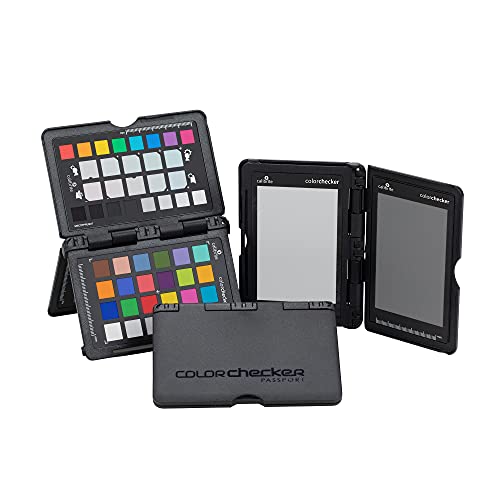
When the colors in a reproduction have to be right — for prints you sell, or a portfolio a buyer judges — the ColorChecker Classic is how pros guarantee it. Photograph the 24-patch target in your setup, and your editing software uses those known colors to correct your image to a verified standard, so a red is the true red and skin tones in a portrait painting read correctly. It's a step beyond the gray card: where the card fixes white balance, this aligns your entire color rendition. The reference target serious reproduction relies on.
Check Price on Amazon →$99.00 · Calibrite
Best for Glare & Glossy Art

Type

Circular polarizer

Thread

67mm (check your lens)

Effect

Removes reflections

Best for

Glass, varnish, glossy paint

Pros

  • Removes reflections from glass, varnish, and glossy surfaces
  • Lets you photograph framed work without removing it
  • Rotate to dial glare in and out
  • Deepens color saturation on shiny art

Cons

  • Costs about a stop of light (use more light or a tripod)
  • Must match your lens's filter thread size
Glossy paint, varnished surfaces, and glass over framed work throw reflections that no lighting position fully defeats — and that's exactly what a circular polarizer fixes. Thread it onto your lens, rotate it, and watch the glare melt away, leaving deep, clean color. It's the tool that lets you photograph a framed piece without taking it apart, and it makes oil and acrylic surfaces read true instead of shiny. It eats about a stop of light, so pair it with your two-light setup or a tripod — and double-check it matches your lens's thread size (commonly 67mm).
Check Price on Amazon →$58.49 · K&F Concept
Best Monitor Calibrator

Type

Monitor calibrator

Job

True color on screen

Use

Editing & printing

Best for

Prints that match

Pros

  • Makes your screen show accurate, true-to-life color
  • What you edit becomes what actually prints
  • Quick, repeatable calibration
  • The step most people skip and most need

Cons

  • Pricier than the in-camera tools
  • Helps editing/printing, not the capture itself
Here's the trap: you can light and shoot your art perfectly, then ruin it editing on an uncalibrated screen that shows colors wrong — so you 'correct' to match a lie, and the print comes back off. The SpyderX calibrates your monitor to a true standard, so the color you see while editing is the color that prints. It's the most-skipped step in the whole chain and, for anyone making prints of their work, often the most important. Capture tools get the photo right; this makes sure you don't undo it in front of the screen.
Check Price on Amazon →$290.00 · Datacolor

Austin Art Insider

Free weekly guide to galleries, exhibitions & collecting in Austin.

Head-to-Head

How the top picks compare

The two color questions that decide where to put your money.

Gray Card vs. Color Target

Fix the white balance vs. align every hue.

18% Gray Card Set

Macolink

Winner

18% Gray Card Set

Cheap, instant white balance

$5.98
Check Price →
ColorChecker Classic

Calibrite

ColorChecker Classic

True, verified color across all hues

$99.00
Check Price →

Our verdict

Winner: Macolink 18% Gray Card Set. Start with the gray card — for $6 it removes the single most common error (a color cast) by setting a neutral white balance in one click, and every art photographer should own one. Step up to the ColorChecker color target when color must be verifiably accurate, not just neutral: for prints you sell or a portfolio a buyer scrutinizes, it maps every hue to a known standard so reds, blues, and skin tones in the work read true. They're complementary, not either/or — the card is the essential everyone needs; the target is the upgrade for color-critical reproduction.

Buy the Macolink

Buy the gray card first — essential, cheap white-balance accuracy.

Buy the Calibrite

Buy the color target when prints and portfolios demand verified hues.

Color Target vs. Monitor Calibrator

Get color right in the photo vs. right on the screen.

ColorChecker Classic

Calibrite

Winner

ColorChecker Classic

Accurate color in the capture

$99.00
Check Price →
SpyderX Pro

Datacolor

SpyderX Pro

Accurate color on your screen

$290.00
Check Price →

Our verdict

Winner: Calibrite ColorChecker Classic. These fix different ends of the same chain, and you ideally want both. The color target makes the color accurate in the photograph itself — the capture side. The monitor calibrator makes the color accurate on the screen where you edit and judge it — so you don't undo good color by 'fixing' it on a display that's lying. If you're choosing one to start, get color right at capture (the target plus a gray card) first, since a bad capture can't be fully rescued. Add the calibrator the moment you start making prints, because that's where an uncalibrated screen quietly wrecks your results.

Buy the Calibrite

Buy the color target first — fix color at the source, in the photo.

Buy the Datacolor

Buy the calibrator once you print — so edits and prints match.

How we
chose

Every tool here is genuinely available on Amazon with verified live pricing and real product imagery, chosen for the four things that make or break an art reproduction: even light, no glare, accurate color, and a screen you can trust.

  • Lighting first — two matched, high-CRI lights at 45° give flat, glare-free, color-true illumination. It's the biggest single factor; everything else refines it.
  • Color accuracy is a chain — a gray card sets white balance, a color target aligns every hue, and a calibrated monitor makes sure your edits and prints match what you shot.
  • Glare needs a polarizer — for varnished, glossy, or glass-framed work, no light position alone removes reflections; a circular polarizer does.
  • Pair with a tripod and your camera — square-on framing on a tripod keeps the piece undistorted and sharp; see our camera and tripod guides for the body and support.

Austin Gallery may earn a commission from purchases made through links on this page, at no cost to you. It never changes our rankings.

Share this guide

Share

Common Questions

Frequently Asked Questions

The Full Guide

The Complete Art-Photography Gear Guide

Every tool we recommend for copying art — sorted by lighting, color accuracy, glare control, monitor calibration, budget, and pro color. Build the setup a gallery would.

Have art
to sell?

Austin Gallery specializes in selling inherited art, estate collections, and fine art with zero upfront fees. Get a free evaluation today.