Austin Gallery

Photography

Best Gimbals 2026: Phone and Camera Stabilizers, Ranked

The cheapest professional upgrade in video: motors that erase the walking bob no phone or camera can fix in software. We ranked twelve stabilizers across both halves of the market, phone gimbals from $52 and mirrorless rigs to $469, with the honest routing between them.

By Justin ParkJuly 20, 202616 min readHow we research

The short answer: the best gimbal of 2026 is the DJI Osmo Mobile 8 ($92) if you shoot on a phone, and the DJI RS 4 Mini Combo ($369) if you shoot on a mirrorless camera. iPhone-native shooters should look hard at the Insta360 Flow 2 Pro ($159.99), whose Apple DockKit tracking works inside 200-plus apps, and the tightest budget is covered by the Hohem iSteady X3 SE ($51.98). Twelve stabilizers, both categories, ranked below.

Best Gimbals 2026: Which Should You Buy?

Your situationBuy thisPrice
Phone shooter, want the best all-aroundDJI Osmo Mobile 8$92.00
Record in TikTok, IG, or the native app, need tracking thereOsmo Mobile 8 Advanced Combo$125.00
iPhone-first, stock camera app loyalistInsta360 Flow 2 Pro$159.99
First gimbal, tightest budgetHohem iSteady X3 SE$51.98
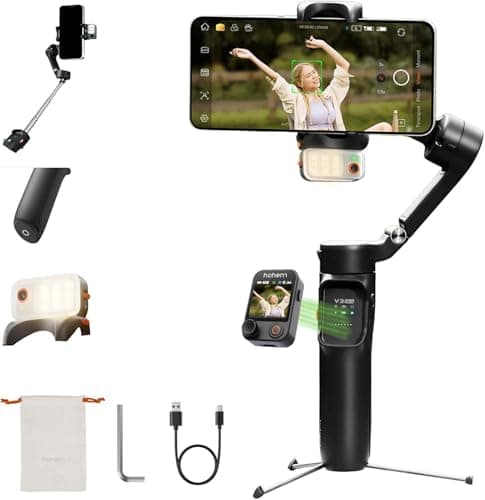
Solo creator, wants tracking + remote controlHohem iSteady V3 Ultra$134.99
Phone filmmaking with lenses, cages, and micsZhiyun Smooth 5S AI Pro$199.00
Mirrorless camera, standard lensesDJI RS 4 Mini Combo$369.00
Full-frame kit, paid video workDJI RS 4$469.00
Camera gimbal on a value budgetZhiyun Weebill 3S$271.00
One gimbal for camera, phone, and action camFeiyuTech SCORP Mini-3-Pro$198.14

A gimbal is the cheapest professional upgrade in video. Phones and cameras have gotten brilliant at removing small shakes electronically, and remain helpless against the big movement, the bob of a walking stride, the sway of a reach, the drift of tired arms, because software cannot subtract motion the whole body of the camera makes. Motors can. A three-axis gimbal floats the camera on brushless motors that cancel your movement in real time, and footage crosses the invisible line between home video and cinematography.

This guide covers both halves of the market, phone gimbals from $52 to $199 and mirrorless camera stabilizers from $198 to $469, because the buying logic differs and most creators eventually shop both. Every link goes to Amazon with our affiliate tag; we earn a small commission, at no cost to you, when you buy through us. The cameras these gimbals carry live in our beginner mirrorless guide and vlogging cameras guide, and the wider kit in our photography gear hub.

In a Hurry?

The 3 picks that cover most readers. Tap to read the full review or buy direct.

Best for Phones

DJI Osmo Mobile 8

DJI Osmo Mobile 8

$92.00

Magnetic mounting, built-in tripod and rod, DJI tracking. The default phone gimbal.

Best for Cameras

DJI RS 4 Mini Combo

DJI RS 4 Mini Combo

$369.00

Auto-locking axes and easy balancing for the mirrorless kits people actually own.

Best Budget

Hohem iSteady X3 SE

Hohem iSteady X3 SE

$51.98

True 3-axis stabilization plus a detachable remote, under $52.

Best Phone Gimbal OverallOur Pick

Axes

3-axis mechanical

Mount

Magnetic phone clamp

Built-in

Extension rod + tripod

Tracking

AI subject tracking

Design

Folds to pocket size

Pros

  • Magnetic clamp: phone mounted and balanced in seconds
  • Built-in tripod and extension rod, nothing extra to carry
  • DJI's tracking is mature and reliable
  • Folds small enough to actually come along

Cons

  • Best tracking lives inside DJI's own app
  • Folding joints demand a little care

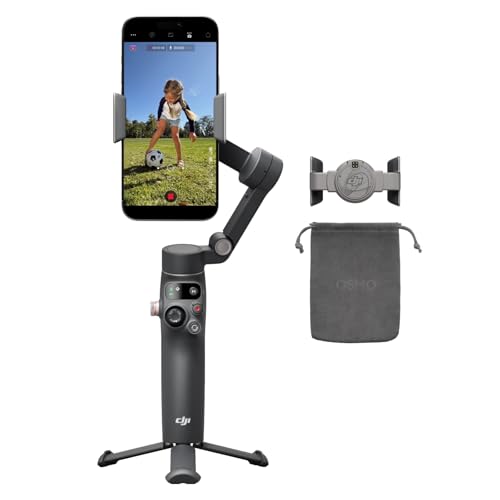
Phone gimbals had two historical problems: setup friction killed spontaneity, and the good ones cost real money. The Osmo Mobile 8 ends both. The magnetic clamp system, snap the plate on your phone, click it to the gimbal, shooting in five seconds, removed the balancing ritual that made older gimbals stay home. And at $92, the price undercuts what previous flagship phone gimbals asked while adding the extension rod and tripod into the body itself. Unfold it at a farmers market and you have a stabilized camera crane; stand it on a cafe table and you have a locked-off tracking camera for a talking-head clip.

What a gimbal actually fixes: your phone already stabilizes the small shakes electronically, by cropping in and eating image quality. What it cannot fix is the walk: the rhythmic bob and handheld drift that scream amateur. A mechanical 3-axis gimbal erases the walk at the physics level, full sensor quality intact, which is why gimbal footage reads as professional even to viewers who cannot say why.

DJI's software maturity is the quiet advantage over the budget field. Tracking holds subjects through occlusions that confuse cheaper gimbals, gesture controls actually work for solo shooting, and modes like timelapse-with-motion produce results that look storyboarded. The honest caveat: the deepest features live in the Mimo app, and if your workflow depends on the native camera app, the Insta360 Flow 2 Pro below has a structural advantage on iPhone. For everyone else, this is the category's default answer, and it pairs naturally with the phone-first kit in our vlogging cameras guide.

Our Pick

The best phone gimbal for most people, from the company that has led the category since it existed. The Osmo Mobile 8 folds to pocket size, extends a built-in tripod and rod, magnetically grabs your phone in one motion, and runs DJI's matured AI tracking, at $92. It makes phone footage look tripod-and-dolly professional with zero setup ceremony.

Buy this if your camera is your phone and your footage moves: walking tours, kid chasing, house tours, event coverage, Reels. The magnetic clamp means the phone mounts in a second instead of a balancing ritual, the built-in tripod turns any table into a locked-off camera position, and tracking keeps you framed while you work solo.

What we don't like

Native in-app tracking works best inside DJI's Mimo app, so shooters married to their phone's stock camera app or specific third-party apps should compare the Insta360 Flow 2 Pro's DockKit approach, and the fold-out design has more joints to baby than a rigid gimbal.

Best Tracking KitAlso Great

Axes

3-axis mechanical

Module

Multifunctional tracking + fill light

Tracking

Works in third-party and native apps

Mount

Magnetic phone clamp

Built-in

Extension rod + tripod

Pros

  • Subject tracking in any app, not just DJI's
  • Integrated fill light earns its place at dusk
  • Mic-workflow friendly for interview and vlog setups
  • Still pocket-folding, still one-hand operable

Cons

  • $33 premium wasted if you live in the Mimo app anyway
  • Another module to not lose

The dirty secret of smart gimbals has always been that the smartest features only worked inside the maker's own app, and creators do not live there. They live in TikTok's camera, Instagram's live studio, the native app whose ProRes toggle they paid a phone premium for. DJI's multifunctional module is the fix: it does the subject detection on its own hardware and steers the gimbal directly, so tracking follows you regardless of which app is recording. If you have ever set a phone down to film yourself demonstrating anything, that one sentence either means nothing or everything.

The module's fill light is better than the throwaway spec it sounds like, adding a genuinely useful key light for dusk shooting and product close-ups, and the mic-receiver compatibility tightens a solo interview kit into one handheld object. Whether to spend the extra $33 over the standard combo is refreshingly answerable: if your recording happens inside social apps or the native camera, yes, without hesitation; if you happily shoot in DJI's Mimo app, the standard combo tracks just as well there and saves the money for a tripod or card. Either configuration is the best phone gimbal made; this one just refuses to care where you press record.

Also Great

The Osmo Mobile 8 with its tracking superpower unlocked everywhere. The Advanced Combo adds DJI's multifunctional module, which brings native tracking to any camera app plus a fill light and wireless mic receiver hookup, turning the gimbal into a one-hand production rig for $125.

Buy this if you shoot in apps DJI does not control: the native iPhone camera, Instagram live, TikTok's in-app camera, filming apps with your paid presets. The module makes tracking work there too, which for solo creators is the difference between a stabilizer and a camera operator.

What we don't like

It is $33 over the standard combo for a module casual shooters may never attach, and one more small part to keep track of in the bag.

Best Budget DJIBest Value

Axes

3-axis mechanical

Mount

Magnetic phone clamp

Built-in

Tripod

Tracking

AI tracking (Mimo app)

Design

Folding, pocketable

Pros

  • DJI stabilization and tracking under $60
  • Magnetic clamp and folding design carry over
  • The safest cheap gimbal purchase there is

Cons

  • No multifunctional module compatibility
  • Availability comes and goes

The best budget move in any DJI category is buying the thing they just replaced, and phone gimbals are the purest case. The Osmo Mobile 7 was the class leader until the 8 arrived; nothing about its stabilization, magnetic clamp, or folding convenience expired that day. At $58.99 it now sits in the price band previously occupied by gimbals with wobbly motors and abandoned apps, while carrying the software DJI still actively maintains.

The generational gap is real but narrow: the OM8's multifunctional module (tracking in any app, fill light) and its integrated extension rod are genuine improvements that heavy users will feel weekly. Casual shooters, the person stabilizing vacation walks, kid soccer, and the occasional Reel, will not touch the difference. Our guidance is a clean price ladder: at $58.99 the OM7 is the best value in phone stabilization, the $92 OM8 is the best overall, and the $125 Advanced Combo is the best tool. Climb exactly as high as your shooting justifies and not a rung more; every level of that ladder outperforms the non-DJI budget field, with only Hohem's picks below making a real counterargument.

Best Value

Last generation's DJI flagship phone gimbal at a $58.99 price that embarrasses the budget brands. The Osmo Mobile 7 keeps the folding design, magnetic clamp, built-in tripod, and DJI's tracking, and skips only the newest module tricks. For most first-time gimbal buyers, this is the value answer.

Buy this if you want DJI polish at the price the no-name gimbals charge. The core experience, magnetic mounting, reliable stabilization, tracking in the Mimo app, folding portability, is intact, and the savings against the OM8 buys your microSD card or half a phone mic.

What we don't like

No module path to third-party-app tracking, and stock has been tight; if it is unavailable, the OM8 standard combo is the same idea one generation newer.

Best for iPhoneAlso Great

Axes

3-axis mechanical

Tracking

Apple DockKit, 200+ apps

Pan

Infinite 360-degree rotation

Built-in

Tripod + extension rod

Multi-person

Tracking supported

Pros

  • Native tracking in the stock iPhone camera app
  • Infinite 360 pan follows circling subjects
  • Works as a tracking dock for video calls
  • Multi-person tracking for group content

Cons

  • DockKit advantages vanish on Android
  • Priced above the excellent OM8

Apple quietly settled the phone-gimbal app war with DockKit, and the Flow 2 Pro is the gimbal that collects the winnings. DockKit certification lets iOS itself steer the gimbal's motors during any compatible camera session, which in practice means you open the regular camera app, or FaceTime, or TikTok, and the gimbal just tracks you, no companion app, no module, no workflow change. For the enormous population whose entire filming life happens in Apple's own camera and three social apps, this is the feature DJI answers with extra hardware, delivered invisibly.

The infinite pan is the second act: the Flow 2 Pro's motor rotates without end stops, so it can follow a subject orbiting the camera completely, keep a runner in frame as they lap you, or execute endless spin timelapses. Add multi-person tracking and it doubles as the family's video-call camera operator between shoots. The decision against our top pick is mercifully platform-shaped: iPhone shooters who live in native and social apps should pay the premium for the Flow 2 Pro; Android shooters get no DockKit benefit and should buy the Osmo Mobile 8; and DJI-app-comfortable shooters on either platform save money with DJI. Pair either with the pocket cameras in our vlogging guide for a two-tool kit that covers nearly everything.

Also Great

The iPhone shooter's gimbal. Apple DockKit certification means the Flow 2 Pro tracks subjects natively inside 200-plus apps including the stock camera, no companion app required, and its infinite 360-degree pan tracking follows action in circles no other phone gimbal can complete. For iPhone-first creators it beats even DJI.

Buy this if you shoot on iPhone and want tracking in the apps you actually use: the native camera with its ProRes and cinematic modes, FaceTime, Zoom, TikTok, Instagram. DockKit does at the OS level what DJI needs a hardware module for, and the built-in tripod and extension rod match the convenience checklist.

What we don't like

Android owners lose the DockKit magic and should buy DJI, it costs $68 more than the OM8 standard combo, and Insta360's Mimo-equivalent app is a step behind DJI's in polish.

Best AI Gimbal Under $100Also Great

Axes

3-axis mechanical

Tracking

AI tracking (app-based)

Built-in

Tripod + extension rod

Design

One-hand fold-out

Platform

iOS and Android

Pros

  • Complete tripod-and-rod hardware under $100
  • Deep tracking that survives brief occlusions
  • Comfortable one-hand grip and controls

Cons

  • No DockKit native-app tracking
  • OM8 undercuts it while being newer

Before the 2 Pro collected Apple's blessing, the original Flow earned Insta360 its seat at the phone-gimbal table, and it still holds that seat honorably. The hardware formula, tripod in the handle, extension rod in the neck, magnetic quick mounting, one-hand fold-out, arrived here first, and the AI tracking that made the brand's name follows subjects through crowds and brief obstructions with real tenacity inside the companion app.

Its 2026 problem is family competition and DJI pricing: the newer OM8 costs $8 less, and the 2 Pro's DockKit advantage justifies its premium for iPhone users, leaving the original Flow a narrower lane. It remains the right buy in two cases: Android shooters drawn to Insta360's tracking behavior, which some prefer to DJI's for erratic subjects like kids and pets, and anyone finding it discounted below its listed price, where it becomes a plain bargain. Otherwise, read our top three picks first. Whichever gimbal wins your cart, our SD card guide and camera straps guide cover the small kit that rides along.

Also Great

The original Flow remains a complete, polished phone gimbal at $99.95: strong AI tracking in the Insta360 app, built-in tripod and extension rod, and the free-tilt design that made it a creator favorite. It lacks only the 2 Pro's DockKit trick, which is precisely what its price reflects.

Buy this if you want Insta360's tracking pedigree and all-in-one hardware without flagship spend, and you do not need native-app tracking. It is a particularly good match for Android users eyeing the Flow line, since DockKit was never going to help them anyway.

What we don't like

Tracking lives in the companion app, the OM8 at $92 is newer hardware for less money, and the accessory ecosystem is thinner than DJI's.

Best Under $60Budget Pick

Axes

3-axis mechanical

Remote

Detachable wireless remote

Built-in

Extension rod

Design

Foldable

Platform

iOS and Android

Pros

  • Real 3-axis stabilization for $51.98
  • Detachable remote: a feature flagships skip
  • Extension rod built in
  • Light and genuinely pocketable

Cons

  • App polish and tracking trail DJI and Insta360
  • Struggles with heavy phone-plus-lens setups

Hohem's strategy is charming and effective: undercut the giants, then include one feature they forgot. On the X3 SE that feature is the detachable remote, a thumb-sized controller that pops out of the handle and steers pan, tilt, and record from meters away. Set the gimbal on its tripod, walk into frame, and direct the shot from where you stand. DJI and Insta360 route this through gestures and apps; Hohem gives you buttons, and buttons work every time, including when your hands are floury or gloved.

The stabilization itself is honest 3-axis smoothing that removes the walking bob and handheld drift, which is 90 percent of what anyone buys a gimbal for. What the missing $40 to DJI buys is everything around that core: a slicker app, smarter tracking, magnetic clamps, better motor headroom for big phones in cases. Our placement is deliberate: the X3 SE is the floor price of a phone gimbal we can recommend without wincing, the right gift-budget and first-gimbal choice, and the remote makes it the sleeper pick for a few solo-creator niches even against pricier hardware. If the budget can stretch to the OM7 or OM8, stretch; if it cannot, this is the good cheap one.

Budget Pick

The budget phone gimbal that fights above its weight. At $51.98 the iSteady X3 SE delivers true 3-axis stabilization, a built-in extension rod, and a party trick the flagships lack at any price: a detachable remote that lets you steer the gimbal and trigger recording from across the room.

Buy this if the budget is $60 and the footage still has to look stabilized, or if the detachable remote solves your specific problem: solo creators framing themselves at a distance, families taking group shots with the phone on the gimbal's tripod, teachers recording demonstrations.

What we don't like

The app and tracking are serviceable rather than DJI-polished, motor headroom suits phones without heavy cases or lenses, and build plastics feel their price.

Austin Art Insider

Free weekly guide to galleries, exhibitions & collecting in Austin.

Best App-Free TrackingAlso Great

Axes

3-axis mechanical

Tracking

On-gimbal AI vision sensor, any app

Remote

Detachable touchscreen remote

Extras

Fill light options via sensor module

Platform

iOS and Android

Pros

  • Hardware tracking works in every app, every platform
  • Touchscreen remote is a mini director's monitor
  • Undercuts DJI's module-equipped combo
  • Gesture control that reliably responds

Cons

  • Chunkier in the pocket than rivals
  • Companion app is functional, not delightful

Give Hohem credit: they identified the moat, universal tracking, and simply built a bridge over it. The V3 Ultra mounts its own AI camera sensor on the gimbal body, so subject detection happens in dedicated hardware and the motors follow you whether the phone is recording in TikTok, the native app, a filmmaking app, or nothing at all. Apple users get this via DockKit on the Flow 2 Pro, DJI users via the OM8's add-on module; Hohem hands it to everyone, Android included, as the base feature, and then throws in the detachable touchscreen remote that has become the brand's signature.

In use, the combination reshapes solo shooting. The gimbal sits on its tripod tracking you around a workshop or kitchen while the remote in your pocket starts, stops, and reframes; no walking back to the phone between takes, no gesture failing because the app lost focus. Against the DJI OM8 Advanced Combo at $125, the Hohem costs $10 more, tracks equally universally, adds the remote, and gives back some app polish and pocketability; we call that matchup a genuine toss-up decided by whether the remote or the refinement matters more to you. Against everything else under $150, the V3 Ultra simply offers more machine. It is the strongest non-DJI, non-Insta360 product in the phone half of this guide.

Also Great

Hohem's flagship answer to the app-tracking problem: a dedicated AI vision sensor on the gimbal itself tracks subjects in any app, any platform, no module purchase or DockKit required, plus a detachable touchscreen remote. At $134.99 it is the most tracking per dollar in the guide.

Buy this if universal tracking is the mission and you want it on Android as much as iPhone. The AI sensor sees and follows you regardless of what app records, gestures control framing from in front of the lens, and the touchscreen remote runs the whole rig from across the room, a legitimately unmatched combination at the price.

What we don't like

It is bulkier folded than the DJI and Insta360 slimline designs, the app remains the weakest link for firmware and editing, and brand resale value trails the big two.

Best for Phone FilmmakersAlso Great

Axes

3-axis, high-torque motors

Tracking

AI module, app-independent

Light

Magnetic fill light included

Controls

Physical wheel and mode buttons

Payload

Handles phone + lens + case rigs

Pros

  • Motor headroom for heavy phone rigs
  • Physical controls suit deliberate filmmaking
  • AI module tracks outside the app
  • Fill light integrates cleanly

Cons

  • Big: this is a bag item, not a pocket item
  • App trails DJI in polish

There is a population the folding gimbals quietly fail: people whose phones stopped being phones. A pro-tier phone in a case with a clip-on anamorphic lens and a shotgun mic is a legitimate cinema rig, and it weighs enough to make pocket gimbals sag, drift, and vibrate at the motors' limits. The Smooth 5S AI Pro is built for exactly that load: big motors, rigid arms, and the balance adjustability to trim an asymmetric rig properly, plus a control wheel for focus-pull-style moves that touchscreen sliders cannot replicate.

The AI tracking module answers the universal-app question the same way Hohem does, with dedicated hardware, and the magnetic fill light is the most usable of the built-in lights in this guide, positionable and bright enough for close work. What you pay is portability: this does not fold into a jacket pocket and never pretends to; it lives in the camera bag next to the tripod. Our recommendation is correspondingly specific: casual and travel shooters should stay with the folding picks above, while phone filmmakers, the music-video-on-iPhone, short-film, wedding-second-angle crowd, will find the 5S AI Pro the only phone gimbal here that treats their rig with appropriate seriousness. It is also the natural stepping stone to the camera gimbals below.

Also Great

The phone gimbal built like a camera gimbal. The Smooth 5S AI Pro trades folding-pocket convenience for full-size motors that shrug at big phones with lenses and cages, an AI tracking module, and a magnetic fill light, aimed squarely at people making films on phones rather than clips.

Buy this if your phone rig has outgrown pocket gimbals: pro phone bodies in cases, clip-on lenses, mounted mics. The oversized motors keep authority over that weight where folding gimbals stutter, and the physical control layout, wheel included, mirrors cinema gimbal ergonomics for deliberate, repeatable moves.

What we don't like

It is large and does not fold flat, overkill for caseless-phone casual shooting, and Zhiyun's app ranks below DJI's for stability.

Best Mirrorless Gimbal for MostOur Camera Pick

Payload

Up to ~2 kg class (listed)

Axes

3-axis, automated locks

Balancing

Fine-tune knob, quick-release plates

Combo

Briefcase handle + tracking module

Weight

Light enough for all-day handheld

Pros

  • Carries the kits most mirrorless shooters actually own
  • Auto-locking axes make setup and travel painless
  • Combo's briefcase handle unlocks low-mode shots
  • DJI's gimbal software is the most mature in class

Cons

  • Not for heavy pro body + telephoto rigs
  • Real learning curve, like every camera gimbal

Camera gimbals used to be a pro purchase with a pro's patience requirement; the RS 4 Mini is the one that made the format civilian. The automated axis locks are the emblematic feature: power on and the arms unlock and position themselves, power off and they fold and lock for the bag, removing the fiddly ritual that made older stabilizers stay home. Balancing, the other historical hazing, takes minutes with the fine-tune knob and quick-release plate, and DJI's app walks first-timers through it without jargon.

In the field it does what mechanical stabilization uniquely does for a real camera: walking shots become dolly shots, stair climbs become crane moves, and the footage gains the floating authority that separates hired-videographer work from uncle-with-a-camera work. Our pairing advice: this gimbal plus any body from our beginner mirrorless guide is a complete indie video rig for under $1,500. Choose the Combo over the base unit for the briefcase handle alone, which turns low-mode and reveal shots from wrist torture into technique, with the phone-holder tracking module as the bonus. If your lens ambitions run heavier than a standard zoom, step up to the full RS 4 below; everyone else should buy this and spend the difference on practice time and a good bag to carry it.

Our Camera Pick

The right camera gimbal for almost every mirrorless shooter. The RS 4 Mini carries the sub-2kg body-and-lens combos that real people actually own, borrows the automated axis locks and fast balancing of DJI's big rigs, and weighs little enough to still be holding it at hour three. The Combo adds the briefcase handle and phone-holder tracking module.

Buy this if you shoot video on any mainstream mirrorless body with standard zooms or primes: wedding b-roll, real estate walkthroughs, travel films, gallery and event coverage. It stabilizes all of it with capacity to spare, sets up in a fraction of the time older gimbals demanded, and packs down to carry-on friendly size.

What we don't like

Heavy full-frame bodies with fast telephotos exceed its comfort zone (that is the full-size RS 4's job), and like all camera gimbals it asks for a few evenings of practice before it stops feeling like exercise equipment.

Best Full-Size Camera GimbalUpgrade Pick

Payload

~3 kg class (listed)

Axes

3-axis, automated locks

Compatibility

Canon/Sony/Nikon/Fujifilm systems

Ecosystem

Focus motors, briefcase handles, plates

Best for

Full-frame video kits

Pros

  • Payload for real working camera builds
  • Same painless auto-lock setup as the Mini
  • Deep professional accessory ecosystem
  • The industry-standard choice at this tier

Cons

  • Arm fatigue is real on long days
  • Unnecessary spend for light mirrorless kits

Somewhere above a two-kilogram camera build, gimbal shopping stops being about features and starts being about honesty: will it carry your kit on its worst day? The RS 4's answer covers the builds that working video actually uses: a full-frame body, the fast standard zoom that lives on it, a shotgun mic, sometimes a monitor or transmitter. Rigs like that push small gimbals into motor strain, vibration, and the dreaded mid-shot sag; the RS 4 treats them as a Tuesday.

The professional case compounds from there. The automated axis locks and quick balancing that make the Mini friendly matter even more on paid time, where setup minutes are billable. The ecosystem, focus motors for pull-focus moves, briefcase handle, extended plates for long lenses, grows with the business rather than capping it. And DJI's dominance at this tier means every rental house, second shooter, and YouTube tutorial speaks its controls. Our guidance is the same threshold in both directions: if your camera and lens kit lives under two kilograms and there is no paid work on the calendar, the Mini saves you $100 and arm fatigue; the moment heavy glass or clients enter the picture, the RS 4 is the buy-once answer, and its resale market treats it kindly if your path changes. Round the working kit out from our photography gear hub.

Upgrade Pick

The working videographer's default. The RS 4 hoists roughly 3kg of camera, meaning full-frame bodies with serious glass, mics, and monitors, balances them with automated locks and a fine-tune 4th-axis-ready design, and runs the mature ecosystem of focus motors and accessories that paid shoots accumulate.

Buy this if your camera earns money or intends to: event and wedding videographers, commercial shooters, documentarians. When the client asks for the 24-70 f/2.8 look with a mounted mic and monitor, payload headroom stops being a spec and becomes the difference between working and improvising.

What we don't like

It is heavier than the Mini in the hand and the bag, meaningful overkill for compact bodies with small primes, and the accessory rabbit hole (focus motors, extended plates) adds up fast.

Best Value Mirrorless GimbalAlso Great

Payload

Mirrorless + standard zoom class (listed)

Grip

Sling grip + wrist rest design

Light

Built-in fill light

Axes

3-axis, manual locks

Compatibility

Canon/Nikon/Sony/Fujifilm

Pros

  • Near-RS 4 capability for $271
  • Sling grip meaningfully fights fatigue
  • Fill light built into the body
  • Proven platform videographers have used for years

Cons

  • Manual axis locks feel dated next to DJI
  • Weaker app and resale value

Zhiyun has spent a decade as the value conscience of the gimbal market, and the Weebill 3S is that role executed at its best. The headline is arithmetic: mirrorless-plus-zoom stabilization comparable to rigs costing $200 more. The substance is ergonomic: the sling grip, a second angled handle that lets the gimbal hang from a relaxed underhand carry, plus the wrist rest, spreads load across the forearm instead of stacking it on a clenched fist. On paper it is a minor feature; at minute ninety of a wedding reception it is the whole product.

What the savings cost you is convenience and ecosystem. Balancing and locking are manual rituals DJI has automated, the companion app earns its middling reputation, and when you sell, the DJI badge holds value in ways Zhiyun's does not. None of that touches the footage, which floats exactly as physics promises. Our verdict lands where value verdicts usually do: for budget-conscious solo shooters and long-session event workers, the Weebill 3S is the smart $271 and the fatigue argument is real; for anyone building toward professional work with focus motors and rental-house compatibility, the extra money toward the RS 4 buys the safer long game. Either way, this is the pick that keeps DJI's camera-gimbal pricing honest, exactly as a strong second brand should.

Also Great

The strongest non-DJI case in camera stabilization. The Weebill 3S undercuts the RS 4 by nearly $200 while carrying comparable mirrorless payloads, and its signature sling grip plus wrist rest genuinely reduces the arm fatigue that ends gimbal days early. A built-in fill light sweetens an already sharp deal.

Buy this if you want full-size stabilization on a mid-size budget, or if long handheld sessions are your reality: the sling-grip ergonomics distribute weight in ways DJI's traditional handle does not, and event shooters with three-hour receptions notice by hour two.

What we don't like

No automated axis locks, so setup and pack-down stay manual, the app is the ecosystem's weak point, and resale value trails DJI's noticeably.

Best Hybrid GimbalAlso Great

Compatibility

Compact mirrorless, phones, action cams

Tracking

Built-in AI sensor, 18m range (listed)

Payload

Compact camera class

Axes

3-axis

Best for

Mixed-device creators on one budget

Pros

  • One purchase stabilizes three device types
  • Hardware tracking works with any mounted device
  • Undercuts buying separate phone + camera gimbals

Cons

  • Compact payloads only; big kits need not apply
  • Software polish trails DJI, Insta360, and Zhiyun

The gimbal industry would prefer you buy one stabilizer per device; FeiyuTech built the counterargument. The SCORP Mini-3-Pro's mounting system takes a compact mirrorless body, a phone in its included clamp, or an action camera, and its on-board AI tracking sensor, being hardware, follows subjects identically no matter which is riding. For the creator whose gear closet holds one of each and whose budget holds one gimbal, that versatility is not a gimmick; it is the entire purchase logic, and at $198.14 it costs less than a mid-tier phone gimbal plus any camera gimbal separately.

The honest ceiling: compact means compact. An APS-C body with a kit zoom balances happily; a full-frame body with a fast zoom does not, and pushing payload is how gimbal footage gets the micro-vibrations that ruin otherwise good takes. Software is workmanlike, firmware updates arrive on FeiyuTech time, and the tracking, while genuinely useful, hunts more than DJI's in busy scenes. Our recommendation is narrow and sincere: mixed-device owners with compact kits get unique value here that the specialists above cannot match at the price; single-device owners should buy the specialist for their device and skip the compromise. It is a good tool for exactly the person it was designed for, which is more than most do-everything products manage.

Also Great

One gimbal for the whole drawer. The SCORP Mini-3-Pro stabilizes compact mirrorless bodies, phones, and action cameras on a single platform with built-in AI tracking, at $198.14. Jack of all trades applies, in both its flattering and cautionary senses.

Buy this if your kit is genuinely mixed and your budget covers one stabilizer: a compact mirrorless for planned shoots, a phone for the rest, maybe an action cam. It carries all three competently, and its hardware AI tracker works regardless of which is mounted, a spread no DJI product covers in one unit.

What we don't like

Heavier mirrorless kits exceed its comfort zone quickly, the software is a tier below the big three, and for single-device owners a specialist gimbal serves better.

Head-to-Head

How the top picks compare

The two matchups that settle most gimbal carts: the phone-gimbal title fight, and the camera-gimbal value question.

Osmo Mobile 8 vs Insta360 Flow 2 Pro: The Phone Gimbal Title Fight

DJI's polish against Apple-blessed native tracking.

DJI Osmo Mobile 8

DJI

Winner

DJI Osmo Mobile 8

Best app, best value, magnetic quick mounting

$92.00
Check Price →
Insta360 Flow 2 Pro

Insta360

Insta360 Flow 2 Pro

DockKit tracking in 200+ apps, infinite 360 pan

$159.99
Check Price →

Our verdict

Winner: DJI DJI Osmo Mobile 8. The Osmo Mobile 8 takes the overall decision on the strength of the whole package at the price: $92 buys stabilization indistinguishable from the Insta360's, the fastest mounting system in the category, a companion app a clear tier more polished than anyone else's, and, via the $33 Advanced Combo step-up, tracking in third-party apps that closes most of the DockKit gap for less total money. For Android users the verdict is unanimous, since DockKit does nothing for them. But the Flow 2 Pro wins a real and populous niche: the iPhone shooter who records in Apple's own camera app for its ProRes and cinematic modes, or live inside TikTok and Instagram, gets native OS-level tracking with zero workflow change, and no DJI hardware replicates that exact grace. Add the infinite 360-degree pan, which enables orbiting-subject shots no end-stopped gimbal can complete, and the premium becomes defensible art rather than tax. Buy the DJI unless the sentence 'I shoot iPhone-native and want tracking there' describes you; if it does, the Insta360 is worth every dollar of the difference.

Buy the DJI

you want the best overall package and value, on either platform.

Buy the Insta360

you shoot iPhone-native apps and want tracking without changing workflow.

DJI RS 4 Mini vs Zhiyun Weebill 3S: The Camera Gimbal Value Question

Automated convenience against a $98 discount and better ergonomics.

DJI RS 4 Mini Combo

DJI

Winner

DJI RS 4 Mini Combo

Auto-locking axes, fastest setup, best software and resale

$369.00
Check Price →
Zhiyun Weebill 3S

ZHIYUN

Zhiyun Weebill 3S

Comparable stabilization, sling grip, fill light, $98 less

$271.00
Check Price →

Our verdict

Winner: DJI DJI RS 4 Mini Combo. The RS 4 Mini wins on the factor that decides whether camera gimbals get used at all: friction. Its automated axis locks position and stow themselves at power on and off, balancing takes minutes with guided help from the class-best app, and the whole rig packs smaller, which compounds into the only metric that matters at month three, the gimbal actually leaving the house. DJI's resale strength and rental-house ubiquity add quiet long-term value the spec sheet never shows. The Weebill 3S's counterargument is substantial, though: the stabilized footage itself is comparable, the sling grip and wrist rest genuinely outlast DJI's traditional handle on multi-hour shoots (event shooters swear by it for reason), the built-in fill light is a working feature rather than a gimmick, and $98 of savings buys a spare battery and a quick-release plate with change. Manual locks and a middling app are the honest price. Our ruling: first-time camera-gimbal buyers and anyone allergic to setup ritual should pay for the DJI's automation, while experienced shooters who know they will tolerate a manual routine, and long-session event workers who will feel the ergonomics, can bank the difference with a clear conscience. The footage will not testify against either choice.

Buy the DJI

you want the least friction, the best app, and the safest resale.

Buy the ZHIYUN

you shoot long sessions on a budget and do not mind manual locks.

How we
chose

We judged gimbals the way owners do after the honeymoon: by whether they still leave the house in month three.

  • Stabilization quality under real movement. Walking, stairs, pans, and jogging, not tabletop demos. Motor authority matters most at the edges: heavy phones in cases, cameras with real zooms.
  • Friction. Mounting time, balancing time, folding size, and app sign-in ceremony. Gimbals fail by staying home, and the picks that win here (magnetic clamps, auto-locking axes) win the guide.
  • Tracking that works where you record. We weight tracking that functions in the apps people actually use, native cameras and social apps, above tracking locked to a companion app, which is why DockKit, hardware AI sensors, and DJI's module all earn specific credit.
  • Payload honesty. Camera gimbals are ranked against the kits their class actually carries, and we say plainly where a rig exceeds a gimbal's comfort zone, because pushed payloads are where micro-vibration ruins footage.
  • Real prices and verified listings. Every product is pulled from Amazon's live catalog with current price and image at publish time; we never list a product we cannot verify. Prices move, particularly on DJI hardware around new releases.

Share this guide

Share

Common Questions

Frequently Asked Questions

Have art
to sell?

Austin Gallery specializes in selling inherited art, estate collections, and fine art with zero upfront fees. Get a free evaluation today.