Austin Gallery
GiftsNovember 17, 2026Updated November 17, 202611 min read

Best Gifts for Graphic Designers (2026)

Nine gifts a graphic designer will actually use, from a $17 type book and a Micron sketch kit, through the Logitech MX Master 3S and a calibrator, to a Pantone guide and a color-accurate 4K monitor. Ranked by how often a working designer is likely to use each one.

By Austin Gallery · How we research

★ Our Top Pick

Logitech MX Master 3S Wireless Mouse

Logitech MX Master 3S Wireless Mouse

The mouse most design teams use; touched every hour of the day.

$80rated 4.7/5 in our review

Not sure yet? Compare all 9 picks below ↓

The best gift for a graphic designer this 2026 holiday season is the Logitech MX Master 3S wireless mouse (about $80): the mouse most design teams standardize on, with fast MagSpeed scrolling and programmable buttons, used every hour of every workday. The big gift is the ASUS ProArt PA279CRV 4K monitor ($429), Calman Verified with 99% Adobe RGB, and for print designers the Pantone Formula Guide ($248) is the reference. Under $25, Thinking with Type and a Sakura Micron set are the safe picks.

How to buy a gift for a graphic designer

Three questions narrow it. Print or screen? A print or packaging designer gets real value from the Pantone guide and a calibrator; a screen designer gets more from the mouse, monitor, and console. Laptop or desktop? A laptop designer benefits most from an external color-accurate monitor. Do they sketch on paper? Then the pens and sketchbook are cheap, useful, and safe. Every link goes to Amazon with our affiliate tag; we earn a small commission at no cost to you. We compared listings, stated specifications, and owner feedback patterns and ranked by how often each item is likely to be used.

Shop by Budget

Under $25: Thinking with Type (about $17), Moleskine Art Plus sketchbook (about $19), Sakura Micron 12 set (about $22).

Under $100: Logitech MX Master 3S (about $80), Calibrite Display 123 (about $99).

Under $200: BenQ ScreenBar Pro (about $139), Logitech MX Creative Console (about $190).

$200 and up: Pantone Formula Guide (about $248), ASUS ProArt PA279CRV (about $429).

When to order: Amazon usually posts its holiday shipping cutoffs in early December; order big items earlier.

Best Overall GiftOur Pick

Connection

Bluetooth (no receiver)

Tracking

8K DPI

Scroll

MagSpeed

Clicks

Quiet

Buttons

Programmable

Works with

Windows, Mac, Linux, Chrome

Pros

  • Used all day, every day
  • Fast scroll through big files
  • Programmable thumb buttons
  • Works on any OS

Cons

  • Right-handed only
  • No USB receiver in this version
  • Check they do not already own one

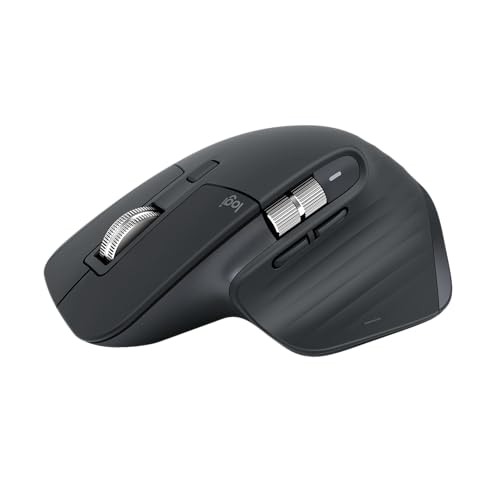
A designer's mouse is the tool they touch most, and the MX Master line is the one most design teams standardize on. The 3S adds quiet clicks and 8K DPI tracking to the MagSpeed wheel, which freewheels through a long page layout and clicks back to line-by-line precision for nudging. The thumb wheel scrolls horizontally across a timeline or a wide canvas, and every button can be mapped per app.

Why it beats a fancier gift: a $500 monitor gets used for years too, but it is a big decision with a lot of personal preference. The MX Master 3S is a near-universal upgrade at about $80, and it shows up on the first morning.

To complete the desk, pair it with the Logitech MX Keys S keyboard (about $130), the matching low-profile backlit keyboard.

Our Pick

The mouse most designers end up on: MagSpeed scrolling that spins through long artboards, 8K DPI tracking, quiet clicks, and programmable buttons. A designer uses it for every hour of every workday.

Buy this for any graphic designer still on a stock mouse or a trackpad. It works with Mac, Windows, Linux, and Chrome over Bluetooth, so you do not need to know their setup.

What we don't like

It is a right-handed shape, and this version connects by Bluetooth only, with no USB receiver in the box. A designer who already owns one will not need a second.
Best Splurge: Color-Accurate Monitor

Size

27 in

Resolution

4K UHD

Panel

IPS

Color

99% DCI-P3, 99% Adobe RGB (stated)

Accuracy

Calman Verified, Delta E under 2

USB-C

96W power delivery

Stand

Height adjustable

Pros

  • Wide gamut for print and screen
  • Factory calibrated
  • One-cable USB-C for laptops
  • Height-adjustable stand

Cons

  • Big to ship and wrap
  • Needs desk space
  • Personal choice on size

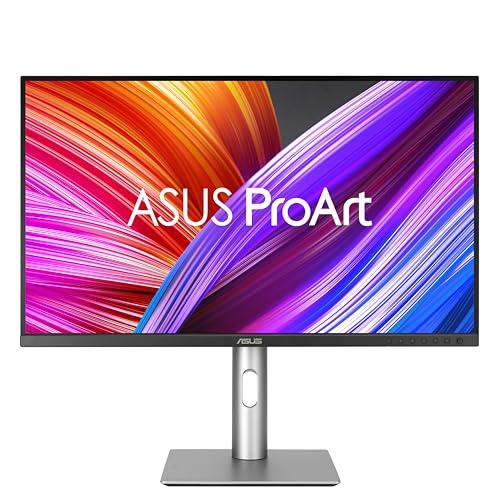
Color work on an inaccurate screen is guesswork, and most laptop and office monitors are inaccurate. The PA279CRV is factory calibrated and Calman Verified to a Delta E under 2, and it states coverage of 99% DCI-P3 and 99% Adobe RGB, which covers both screen and print workflows. At 27 inches and 4K, it is sharp enough for type work.

The laptop factor: USB-C with 96W power delivery means one cable carries picture, data, and charging for a MacBook. For a designer who docks a laptop daily, that is a real convenience.

It is the top value pick in our best monitors for photo editing guide, which ranks the step-up 5K and 32 inch options too.

A 27 inch 4K IPS monitor that is Calman Verified with Delta E under 2 and states 99% DCI-P3 and 99% Adobe RGB, plus USB-C with 96W charging for a laptop. It is the most monitor a designer can get for the price without stepping into reference-display money.

Buy this for a designer working on a laptop screen or an old office monitor, especially one doing print work where Adobe RGB coverage matters. The single USB-C cable suits a MacBook setup.

What we don't like

It is a large, heavy gift that depends on desk space, and a designer with a recent color-accurate monitor does not need it.

Best Desk Upgrade

Keys

9 customizable display keys

Dial

Separate control dial

Use

Graphic design apps, Zoom, Spotify

Includes

3-month Adobe Creative Cloud membership (stated)

Pros

  • Physical control of app tools
  • Dial for brush size and zoom
  • Adobe membership included
  • Pairs with the MX line

Cons

  • Setup required
  • Pricey for a keypad
  • Not essential

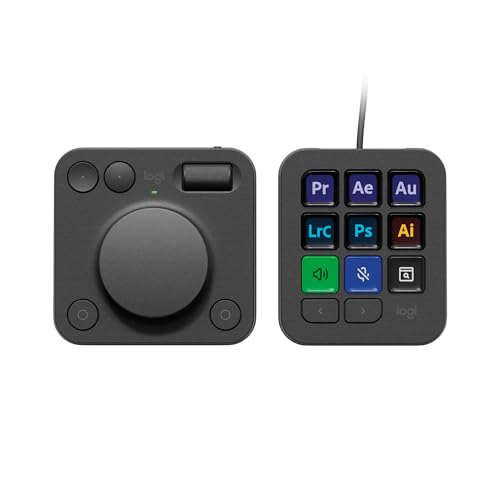
The Creative Console is Logitech's answer to the question of what goes on the left side of the mouse. It splits into a keypad with nine display keys that show which tool each one triggers, and a dial for continuous adjustments like brush size, zoom, or opacity. Designers who work in Adobe apps all day are the target.

The extra in the box: the listing includes a three-month Adobe Creative Cloud membership, which partly offsets the price for a designer who pays for Creative Cloud anyway.

It is a luxury rather than a necessity, which is exactly why it makes a good gift: it is the tool a designer would not buy for themselves.

A keypad with nine customizable display keys and a separate control dial, built for graphic design apps. The listing includes a three-month Adobe Creative Cloud membership.

Buy this for a designer who lives in Photoshop, Illustrator, or InDesign and wants tools and adjustments on physical keys and a dial. It is the gift for someone who has everything else on the desk.

What we don't like

It only pays off after the designer sets up their profiles, and a keyboard-shortcut purist may never change habits.

Best for Color Matching

Type

Colorimeter

Software

Calibrite 1 2 3 workflow

Connection

USB-C

Displays

Supports 2

Pros

  • Matches two screens
  • Simple software
  • Under $100
  • Corrects drift over time

Cons

  • Unexciting in the box
  • Needs reruns
  • Advanced features cost more

Monitors drift, and two monitors drift differently. A colorimeter measures each screen and builds a profile so the brand blue looks the same on both, and the same as the proof. The Display 123 keeps it to three steps and supports two displays.

Pair it: a factory-calibrated monitor like the ProArt starts accurate; a calibrator keeps it accurate.

See our best monitor calibrators guide for the higher-end Calibrite and Datacolor kits.

A simple colorimeter with a three-step workflow, USB-C, and a before and after check, supporting two displays. It keeps a designer's screens matched over time, which a factory calibration does not.

Buy this for a designer who sends work to print or works across two monitors that never quite match. It pairs with the ProArt above.

What we don't like

It is an unexciting gift to unwrap, and it only helps if it is rerun every month or two.

Austin Art Insider

Free weekly guide to galleries, exhibitions & collecting in Austin.

Best for Print Designers

Type

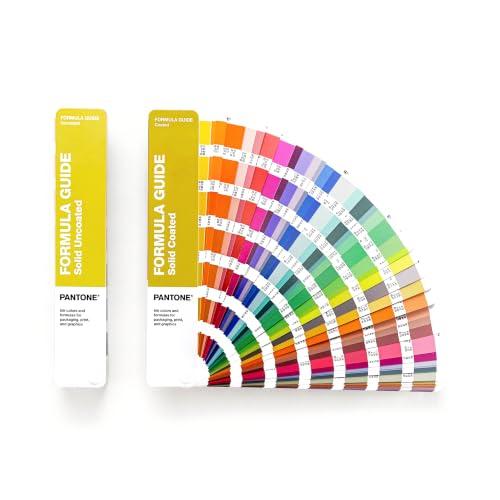
Pantone Formula Guide (fan deck)

Stock

Coated and uncoated

System

PMS spot colors

Model

GP1601C (new version)

Pros

  • The reference for spot color
  • Coated and uncoated in one set
  • Replaces a faded older guide
  • Clients trust it

Cons

  • $248
  • Fades with light and use
  • Of little use for screen-only work

Every print designer eventually holds a fan deck up to a proof, and that fan deck is a Pantone. The Formula Guide shows the PMS spot colors printed on both coated and uncoated paper, which matters because the same ink reads very differently on each. A screen preview cannot show that difference reliably.

Why replace an old one: printed swatches fade with light exposure and handling, and Pantone adds colors over time. A designer working from a guide that is years old may be specifying against colors that no longer match the current library.

For a designer who does brand identity or packaging, this is the professional gift. For a screen-only designer, choose the mouse or the monitor instead.

The physical Pantone Matching System fan guide, in coated and uncoated stock, that print and packaging designers use to spec spot colors. A screen cannot replace it for checking how ink will look on paper.

Buy this for a designer who specs spot colors for print, packaging, or brand identity, especially one whose guide is more than a couple of years old. Printed guides fade and Pantone updates the library.

What we don't like

It is expensive for a printed object, and designers who work only on screen will rarely open it.

Best Monitor Light Bar

Type

Monitor light bar

Sensor

Motion sensor

Adjust

Brightness and color temperature

Power

USB-C

Fits

Flat and curved monitors

Pros

  • No screen glare
  • Turns on when they sit down
  • Adjustable color temperature
  • Fits curved monitors

Cons

  • Pricey for a lamp
  • Needs a monitor bezel
  • Cheaper bars do the basics

A light bar lights the desk without putting a reflection on the screen, which is what a designer checking color needs. The ScreenBar Pro adds a motion sensor so it turns on when the designer sits down and off when they leave, plus adjustable color temperature for matching ambient light.

Budget option: our best monitor light bars guide covers the Quntis bar at about $40 if the budget is smaller.

It is the kind of desk upgrade a designer notices daily and would rarely buy for themselves.

BenQ's motion-sensing monitor light bar with ultrawide lighting and adjustable brightness and color temperature, powered over USB-C. It lights the desk for sketching and print proofs without glare on the screen.

Buy this for a designer who reviews printed proofs or sketches at the same desk, or works late. It fits curved monitors too.

What we don't like

It costs several times what basic light bars do, and it needs a monitor top to clip onto.

Best Design Book

Author

Ellen Lupton

Edition

3rd, revised and expanded

Publisher

Princeton Architectural Press

Topic

Typography

Pros

  • The standard type reference
  • Updated third edition
  • Useful at any level
  • Under $20

Cons

  • Many designers already own one
  • Print book, not a workbook
  • Type-focused only

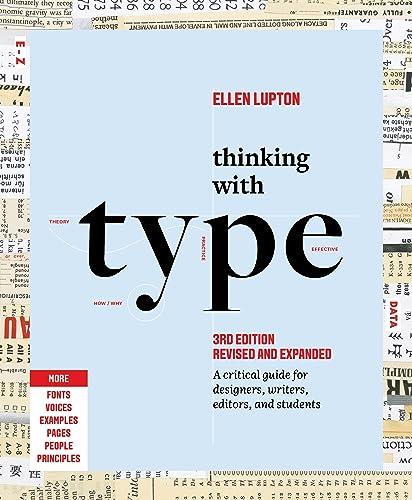
If a designer owns one book on typography, it is usually this one. Thinking with Type covers letter, text, and grid, from the anatomy of type to how text behaves on a page and screen. The third edition is revised and expanded.

Companion book: Graphic Design: The New Basics (about $14), by Ellen Lupton and Jennifer Cole Phillips, covers the visual principles beyond type. Both appear in our best books on color theory and visual aesthetics.

At about $17, it is a stocking stuffer that a designer will reread.

Ellen Lupton's standard guide to typography for designers, writers, editors, and students, in a revised and expanded third edition. It is the book design programs assign and working designers keep on the shelf.

Buy this for a student, a self-taught designer, or anyone who owns an older edition. It is the safe book gift for any designer.

What we don't like

A senior designer may already own a copy, so check the shelf or choose the companion book below.

Check Thinking with Type on Amazon →$17 · Princeton Architectural Press
Best Sketching Pens

Pens

12

Includes

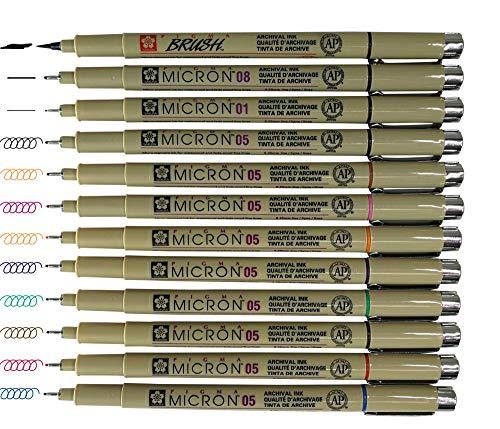
05 in assorted colors, black brush, 08, 01, 05

Ink

Pigma archival ink

Pros

  • Standard pen for thumbnails
  • Multiple point sizes
  • Colors for markup
  • Cheap

Cons

  • Fine tips bend under pressure
  • Not refillable
  • Paper sketchers only

Most identity work starts as a page of tiny thumbnails, and a Micron is the pen most designers draw them with. This 12-pen set mixes black in several point sizes with colored 05 pens for markup and a brush pen for bolder strokes.

Pairing: add the Moleskine sketchbook below for a complete paper kit under $45.

It is a stocking stuffer that gets used up, which is the best kind.

Twelve Pigma Micron fineliners in black and colors, with a brush pen and several point sizes. Microns are the pens designers reach for when thumbnailing logos and layouts on paper before opening the software.

Buy this for any designer who sketches ideas on paper first. It pairs with the sketchbook below.

What we don't like

The finest tips bend if pressed hard, and a designer who sketches only on a tablet will not use them.

Best Sketchbook

Size

Large, 5 x 8.25 in

Pages

104

Paper

165 gsm

Cover

Hard cover

Media

Drawing, illustration, dry media

Pros

  • Heavy paper for pens
  • Portable size
  • Durable hardcover
  • Under $20

Cons

  • Not for wet media
  • Small for big layouts
  • Plain gift on its own

A hardcover sketchbook that fits in a bag is the designer's idea notebook. The Art Plus uses 165 gsm paper, heavier than a standard notebook, so fineliners do not show through, in a large size that still travels.

More options: our best sketchbooks guide ranks larger pads and mixed media books.

Together with the Microns, it makes a sub $45 gift that gets used every week.

A large 5 by 8.25 inch, 104-page hardcover sketchbook with 165 gsm paper for drawing, illustration, and dry media. It is the sketchbook a designer carries to meetings and fills with thumbnails.

Buy this for any designer who sketches, as a pair with the Micron set above.

What we don't like

The paper suits dry media and pens rather than heavy markers or wet media.

How we
chose

How we chose these gifts:

  • Daily use. We ranked by how often a working designer is likely to use each item, favoring the tools touched every day.
  • Print and screen. We covered both kinds of designer and flagged which gifts suit which.
  • Ladder of budgets. The list runs from $17 to $429 with real options at every rung.
  • Reuse of our research. Monitors, calibrators, light bars, books, and sketchbooks come from our category guides, linked throughout.
  • Verified listings. Every product, price, and image is verified against the live Amazon catalog at the time of writing. We compared listings, stated specifications, and owner feedback patterns; we did not physically test these.

Share this guide

Share

Common Questions

Frequently Asked Questions

Have art
to sell?

Austin Gallery specializes in selling inherited art, estate collections, and fine art with zero upfront fees. Get a free evaluation today.