Austin Gallery
Craft MachinesNovember 25, 2026Updated November 25, 202610 min read

Cricut Maker 4 vs Explore 4: Explore vs Maker Explained

The Explore line cuts 100+ materials with 6 tools. The Maker line cuts 300+ with 13, including the Rotary Blade, Knife Blade and engraving tips. Explore 4 and 5 vs Maker 3, 4 and 5 on tools, materials, thickness, blades and price, with a decision table.

By · How we research

★ Our Top Pick

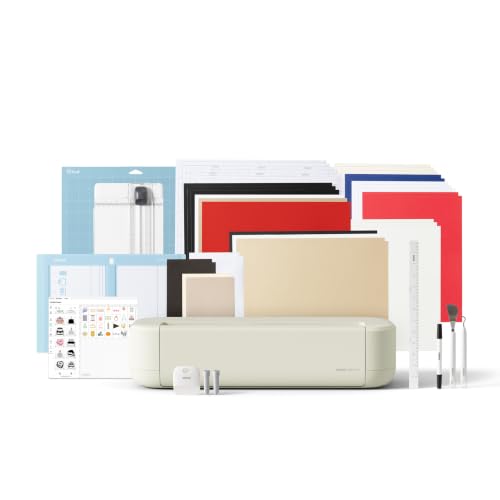
Cricut Explore 5 Essential Bundle (Taupe)

Cricut Explore 5 Essential Bundle (Taupe)

Vinyl, iron-on, cardstock and stickers. 100+ materials, 12 in wide.

$199.00rated 4.6/5 in our review

Not sure yet? Compare all 4 picks below ↓

The difference between the Cricut Explore and Maker lines is tools and materials, not speed or cutting width. Every current Explore (Explore 4, Explore 5) works with 6 tools and 100+ materials and cuts up to 1.5 mm with the Deep-Point or Deep Cutting Blade. Every Maker (Maker 3, Maker 4, Maker 5) adds Cricut's adaptive tool system, 13 tools, 300+ materials, 2.4 mm capacity (3 mm on the Maker 5), and Maker-only tools: the Rotary Blade for fabric, the Knife Blade for wood and chipboard, and engraving, debossing and perforation tips. All five cut 12 in wide and up to 12 ft on Smart Materials without a mat.

Cricut Maker 4 vs Explore 4: buy the Maker 4 if you want fabric, felt, basswood or engraving; buy an Explore for vinyl, iron-on, cardstock and stickers. Amazon had no buyable Explore 4 or Maker 3 offer on November 25, 2026, so today the practical choice is the Explore 5 ($199 bundle), the Maker 4 ($349) or the Maker 5 ($399 bundle).

Specs on this page come from Cricut's product pages, comparison chart, help center and launch posts. We did not cut on these machines ourselves. Every product link goes to Amazon with our affiliate tag; we earn a small commission, at no cost to you, when you buy through us.

Best Explore for Vinyl, Iron-On and CardstockOur Pick

Materials

100+ (Cricut)

Tools

6, incl. Fine-Point, Deep Cutting, Bonded-Fabric, Foil, Scoring Tool, pens (Cricut)

Max material thickness

1.5 mm with the Deep Cutting Blade (Cricut)

Cutting width

12 in

Max cut length

12 ft on Smart Materials, no mat

Top speed

14.1 in/sec (Cricut comparison chart)

Size

19.8 x 7.5 x 4.7 in, 10 lb (Cricut)

Released

February 27, 2026

Pros

  • About $200 less than a Maker 5 bundle
  • Same 12 in width and 12 ft matless cuts as the Makers
  • About 30% smaller than the Explore 4 (Cricut)
  • Scoring Tool included in the box

Cons

  • No Rotary Blade, Knife Blade or engraving
  • 1.5 mm maximum thickness
  • Original Explore pens and Scoring Stylus do not fit

The Explore line is the vinyl and paper line, and the Explore 5 is its current model. Cricut released it February 27, 2026. Its own Explore 5 vs Explore 4 comparison says there is very little the Explore 5 can do that the Explore 4 cannot; the differences are the smaller body, the new Scoring Tool in the box, and a lower price ($199 starting at Cricut against $249 for the Explore 4).

100+compatible materials on the Explore line, against 300+ on every Maker, per Cricut

What the Explore cuts well: adhesive vinyl, Smart Vinyl, iron-on (HTV), Infusible Ink sheets, cardstock, sticker paper for Print Then Cut, and thicker materials up to 1.5 mm such as craft foam and poster board with the Deep Cutting Blade. Bonded fabric (fabric with an iron-on backer) cuts with the Bonded-Fabric Blade. Unbonded fabric, felt without a backer, basswood and chipboard are where the Maker line takes over.

Existing Explore owners: blades and mats from the Explore 4 and earlier carry over, per Cricut. The original Scoring Stylus and the machine-specific Explore pens do not. Our best Cricut machines guide ranks the Explore 5 against the Joy line.

Our Pick

Most people asking Explore or Maker cut vinyl decals, iron-on shirts, stickers and cards. For that work the Explore 5 is the right machine. Cricut lists 100+ compatible materials, a 12 in cutting width, cuts up to 12 ft long on Smart Materials without a mat, and a top speed of 14.1 in per second, the same figure it lists for the Maker 5. The Essential Bundle is $199 on Amazon on November 25, 2026.

Buy the Explore 5 if your list is vinyl, iron-on, cardstock, Infusible Ink, Print Then Cut stickers and craft foam, and you never plan to cut fabric with a rotary blade, basswood, thick leather or engrave.

What we don't like

No adaptive tool system, so no Rotary Blade, Knife Blade, engraving, debossing or perforation. The Deep Cutting Blade tops out at 1.5 mm per Cricut. It takes only the new universal pens, not the original Explore pen sets.
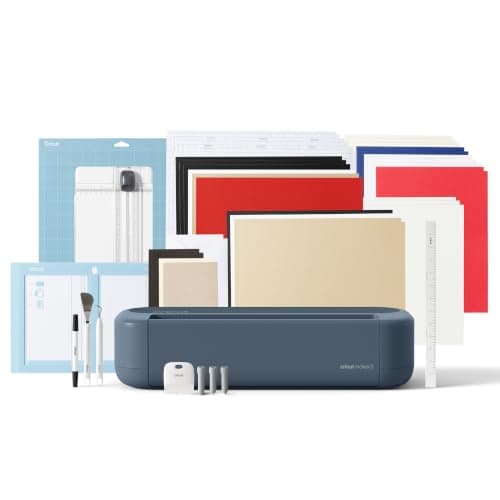
Best Maker for Fabric, Leather, Wood and EngravingBest Maker

Materials

300+ (Cricut)

Tools

13, adaptive tool system (Cricut)

Max material thickness

3 mm (Cricut)

Cutting width

12 in

Max cut length

12 ft on Smart Materials, no mat

Top speed

14.1 in/sec (Cricut comparison chart)

Size

19.8 x 7.5 x 4.7 in, 10.9 lb (Cricut)

Released

September 4, 2026

Pros

  • Thickest rated Cricut: 3 mm
  • Rotary Blade, Knife Blade, engraving and debossing
  • Same compact body size as the Explore 5
  • 300+ materials, three times the Explore count

Cons

  • About $200 more than the Explore 5 bundle
  • One clamp, tool swaps for score and draw
  • Older Scoring Stylus not compatible

The Maker line exists for the adaptive tool system. That system steers the blade and adjusts pressure as it cuts, which is what lets a Maker drive the Rotary Blade through unbacked fabric and the Knife Blade through basswood and chipboard, and run the QuickSwap tips for engraving, debossing, perforation, wavy cuts and the Scoring Wheel. None of those tools fit an Explore. That is the whole Explore vs Maker decision, more than speed or size.

Cricut's Maker 4 vs Maker 5 comparison lists the same 13 tools and 300+ materials for both machines, 3 mm vs 2.4 mm maximum thickness, and a Maker 5 that is over four pounds lighter. On Cricut.com the Maker 5 machine alone lists at $349; on Amazon the Essential Bundle with supplies is $399. Our Cricut Maker 5 vs Maker 4 comparison covers the upgrade question in detail.

Fabric crafters: if fabric is most of what you cut, compare the Maker against Brother's ScanNCut line in our Brother ScanNCut vs Cricut Maker 3 page before deciding.

Best Maker

If any of your projects need the Rotary Blade, the Knife Blade or an engraving tip, buy a Maker, and buy the Maker 5. Cricut rates it to cut, foil and engrave compatible materials up to 3 mm thick, with the same 13-tool system and 300+ materials as the Maker 4, in a body about 30% more compact. The Essential Bundle is $399 on Amazon on November 25, 2026.

Buy the Maker 5 if you cut unbacked fabric for quilting or sewing, felt, leather, basswood or chipboard, or you want to engrave, deboss or perforate. It is also the Cricut to buy if you are not sure and can afford the extra $200, because it does everything the Explore does.

What we don't like

About $200 more than an Explore 5 bundle for capability many vinyl crafters never use. The original Scoring Stylus does not work with it, and it has one clamp, so draw and score jobs need tool swaps.

Austin Art Insider

Free weekly guide to galleries, exhibitions & collecting in Austin.

Maker on a Budget (Two Clamps)

Materials

300+ (Cricut)

Tools

13, adaptive tool system (Cricut)

Max material thickness

2.4 mm (Cricut)

Cutting width

12 in (11.7 in on Smart Materials, Cricut)

Clamps

Two (A and B)

Size

22.1 x 7.1 x 6.2 in, 15.4 lb (Cricut)

Released

February 28, 2025

Pros

  • Full Maker tool system for $349
  • Two clamps for draw, score and cut
  • Takes the original Scoring Stylus

Cons

  • 2.4 mm max, below the Maker 5
  • Bigger and heavier
  • Only about $50 under a Maker 5 bundle

Cricut Maker 4 vs Explore 4 is the comparison most searchers start with, and it splits cleanly. Both launched in early 2025 and both cut 12 in wide on mats and up to 12 ft on Smart Materials. The Maker 4 adds the adaptive tool system (13 tools vs the Explore's 6), 300+ materials vs 100+, and 2.4 mm vs 1.5 mm. The Explore 4 started at $249 at Cricut; the Maker 4 launched at $399.99. Amazon had no buyable Explore 4 offer on November 25, 2026, so the real choice today is Maker 4 vs Explore 5.

Compare bundle to bundle. The Maker 4 listing here is the basic Digital Content Bundle; the Explore 5 and Maker 5 listings are Essential Bundles with project supplies. A machine-only price and a bundle price are not the same thing.

The Maker 4 is the cheapest way into the Maker line on Amazon right now, at $349 on November 25, 2026. It has the full 13-tool adaptive system and 300+ materials, cuts up to 2.4 mm, and keeps two clamps, so a pen or scoring tool and a blade sit in the machine at the same time.

Buy the Maker 4 if you need Maker tools (fabric, felt, basswood, engraving) but want to spend less than a Maker 5 bundle, or you make cards and boxes that are drawn, scored and cut in one pass.

What we don't like

It is the larger, heavier Maker (22.1 x 7.1 x 6.2 in, 15.4 lb per Cricut), and its 2.4 mm limit is below the Maker 5. At current Amazon prices it saves about $50 against a Maker 5 bundle.

Non-Cricut Alternative for Stickers and Decals

Cutting width

12 in

Software

Silhouette Studio (desktop)

Best use

Stickers, decals, vinyl

Pros

  • Strong sticker and decal machine
  • Desktop software
  • Cheaper than a Maker 5 bundle

Cons

  • No rotary or engraving tools
  • Steeper software learning curve

For vinyl and sticker sellers it is a real alternative to both lines. For fabric, leather and engraving, a Maker still wins. Our Cricut vs Silhouette Cameo 5 comparison goes through it head to head.

If you are choosing between an Explore and a Maker mainly for stickers and decals, the Cameo 5 Alpha is the machine to cross-shop. It is $299 on Amazon on November 25, 2026, sits between the Explore 5 and the Maker 5 on price, and runs on Silhouette Studio desktop software.

Buy it if you sell Print Then Cut stickers and decals and want desktop software that works offline.

What we don't like

No equivalent of the Maker's Rotary Blade for unbacked fabric or its engraving and debossing tips.

Head-to-Head

How the top picks compare

The one question that decides it: do you need a tool only the Maker runs?

Cricut Explore 5 vs Maker 5

Same 19.8 x 7.5 x 4.7 in body, 12 in width and 12 ft matless cuts. The Maker 5 adds the adaptive tool system, 300+ materials and a 3 mm rating.

Cricut Explore 5

Cricut

Winner

Cricut Explore 5

Vinyl, iron-on, cardstock and stickers for about $200 less

$199.00
Check Price →
Cricut Maker 5

Cricut

Cricut Maker 5

Rotary Blade, Knife Blade, engraving, 3 mm materials

$399.00
Check Price →

Our verdict

Winner: Cricut Cricut Explore 5. The Explore 5 wins for most crafters because the projects most people make (decals, shirts, cards, stickers) use only tools both lines share. The Maker 5 wins outright the moment a project needs unbacked fabric, felt, basswood, chipboard or engraving, because no Explore can run those tools.

Buy the Cricut

your projects are vinyl, iron-on, cardstock, Infusible Ink and Print Then Cut stickers.

Buy the Cricut

you will cut fabric, felt, wood or leather, or engrave and deboss.

How we
chose

How we built this comparison:

  • Cricut's numbers only. Materials, tools, thickness, cutting width, speed, size and prices at Cricut come from Cricut's comparison chart, the Explore 5 product page, Cricut's Explore 5 vs Explore 4 and Maker 4 vs Maker 5 comparison posts, and the Cricut help center (including the Maker Quick Start Guide's 2.4 mm limit for earlier Makers).
  • Tool lists by line. We grouped tools by whether they need the adaptive tool system, because that is the one thing an Explore cannot add later.
  • Live prices. Every linked product was checked live on Amazon on November 25, 2026. The Explore 4 and Maker 3 had no buyable offer, so they appear only in the spec table, without a buy link.
  • No testing claims. We did not run cutting tests; where Cricut's own pages disagree (the Explore 5 page lists both five and six tools), we use the count Cricut gives in its feature list.

Share this guide

Share

Common Questions

Frequently Asked Questions

Have art
to sell?

Austin Gallery specializes in selling inherited art, estate collections, and fine art with zero upfront fees. Get a free evaluation today.