Austin Gallery
Home & DecorJuly 22, 202615 min read

Best Lighting for Video Calls 2026: 12 Real Fixes

Twelve verified picks for the people the camera sees every day: soft key lights, monitor bars, laptop kits, a desk lamp that secretly does both jobs, and the $17 floor that ends being the dark blur in the meeting. Plus the three placement rules worth more than any product.

By Justin Park · How we research

What Lighting Do You Need for Video Calls?

Your situationBuy thisPrice
Daily calls, want the professional standardElgato Key Light Neo$58.48
Same tier, mounted on the monitorLogitech Litra Glow$58.43
Laptop nomad, calls from anywhereLume Cube VC Kit$69.99
Light must not look like gearLume Cube Edge 2.0 Lamp$149.99
Bright room that overpowers small lightsNEEWER 25W Key Light$82.99
Zero desk space, zero fussHumanCentric Monitor Bar$59.99
Glasses glare or half-shadowed faceyAyusi Dual Lamp$35.99
Just stop being the dark blur, cheaplyNEEWER 5" Ring Light$16.99

Five years into the remote-work era, the camera hierarchy at most companies is settled: the people who look present, energetic, and trustworthy on calls are, overwhelmingly, the people with a light pointed at their face. It is not the webcam. Laptop cameras are good enough; the dim, ceiling-lit, window-backlit rooms they sit in are the problem, and no camera upgrade fixes a lighting problem. The fix costs between $16.99 and $150, takes minutes, and this guide maps every version of it.

Our top pick, the Elgato Key Light Neo ($58.48), is the soft, software-controlled panel the streaming world standardized on, sized and priced for the home office. Around it: the Logitech alternative for monitor mounting, battery kits for laptop nomads, a desk-lamp hybrid for people who refuse visible gear, high-output panels for bright rooms, monitor bars for full desks, and the honest $17 to $36 tier that solves being underlit without ceremony. Every product verified in stock at a real price at publish time. Every link goes to Amazon with our affiliate tag; we earn a small commission, at no cost to you, when you buy through us.

Related lighting reading: content creators stepping past calls into filming should see our ring light and photography lighting guide, desk-first workers our desk lamp roundup, and monitor-comfort seekers the monitor light bar guide (a different product: those light your desk, not your face).

In a Hurry?

The 3 picks that cover most readers. Tap to read the full review or buy direct.

Best Overall

Elgato Key Light Neo

Elgato Key Light Neo

$58.48

The streaming world's soft-light standard, sized for the home office.

The Stealth Option

Lume Cube Edge 2.0

Lume Cube Edge 2.0

$149.99

A premium desk lamp by day, a key light the moment the meeting starts.

Best Under $20

NEEWER 5" Ring Light

NEEWER 5" Ring Light

$16.99

The trusted-brand fix for being the dark blur in the meeting.

Best Overall Video Call LightOur Pick

Type

Edge-lit soft panel key light

Control

Brightness + color temp, app control

Power

USB

Mounting

Desk stand, standard mount compatible

Pros

  • Genuinely soft, flattering light quality
  • Software control from the desktop
  • The streamer standard at a call-friendly price

Cons

  • Single-face coverage by design
  • Best experience assumes the app

The difference between looking tired and looking present on a call is almost never the camera; it is the light hitting your face. Laptops point their cameras up at ceiling fixtures, windows sit behind you, and the result is the dim, hollow-eyed look every remote worker knows. The Key Light Neo fixes it the way studio lighting does: one soft, broad source at face height, slightly off-center, bright enough to become the dominant light on you.

The one-light recipe: place the light just behind and beside your camera, angled at your face from slightly above eye level, at 30 to 45 degrees off-center. Set color temperature near your room's ambient light (warmer at night, cooler in daylight) and brightness until the window stops winning. That is 90% of professional-looking video, from any light in this guide.

Elgato earned the streaming world's default-brand status on exactly this product category, and the Neo is the accessible version of that pedigree. For home offices where the light must also survive being seen (it sits on your desk, visible all day), its clean design is part of the value. Pair with a decent webcam and you have out-lit half of corporate America for under $60.

Our Pick

The streaming world's favorite key light brand, distilled to the video-call essentials: a genuinely soft edge-lit panel with adjustable brightness and color temperature, USB powered, controlled from your computer. It makes ordinary rooms look like good lighting happened naturally.

Buy this if you are on camera daily and want the one-light setup professionals actually converge on. The Neo's diffusion is the point: a large soft source flatters faces where hard little LEDs carve shadows, and software control means brightness follows the day without touching the light. Sits on the desk or mounts anywhere standard.

What we don't like

One light lights one face; the room behind you is your responsibility (the ambience note below covers it). Elgato's software is excellent on desktop and indifferent to being used without it.

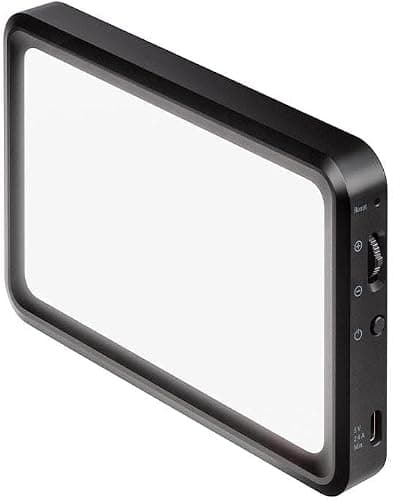
Best Alternative Key LightThe Logitech Answer

Type

TrueSoft frosted-dome LED

Mount

Three-way adjustable monitor mount

Control

Rear physical buttons + Logitech app

Power

USB-A

Pros

  • Best monitor-top mounting in the category
  • Physical buttons, no app required
  • Pairs naturally with Logitech webcams

Cons

  • Slightly smaller soft source than the Neo
  • USB-A cable in a USB-C world

The Neo-versus-Glow decision is the category's classic, and it usually comes down to real estate. Desk space free: the Neo's larger panel on its stand gives the softest light. Desk space precious: the Glow rides the monitor bezel on a genuinely well-engineered mount, putting the light exactly at the flattering above-eye angle without claiming a square inch.

Light quality between them is close enough that mounting preference should decide, which is exactly what the head to head below concludes with full reasoning. Either way you land in the personal-key-light tier that makes the $20 clip rings look like what they are: the budget answer.

The Logitech Answer

Logitech's take on the personal key light: TrueSoft diffusion through a frosted dome, a clever three-way monitor mount, and physical buttons on the back for control without software. Five cents cheaper than the Neo and better for monitor-top mounting.

Buy this over the Neo if you want the light ON the monitor rather than beside it, or if you prefer physical controls to apps. The monitor mount adjusts height and tilt in ways most competitors do not, and Logitech's ecosystem plays nicely if your webcam is already theirs.

What we don't like

Smaller emitting surface than the Neo means marginally harder light at equal distance; both are leagues softer than bare LEDs. USB-A power feels dated in 2026.

Best Laptop-Mounted KitThe Original Zoom Light

Type

Bicolor LED panel with diffusion

Mount

Suction, laptop lid or monitor

Power

Built-in battery + USB

Travel

Pocketable footprint

Pros

  • The best travel and laptop-first setup
  • Battery power unties you from outlets
  • Warm-to-cool adjustment on the light itself

Cons

  • Panel size suits laptop distance best
  • Suction mount has moods on textured lids

Remote work's dirty secret is that the office is wherever the meeting catches you, and fixed desk lighting cannot follow. The Lume Cube kit was built for exactly this: it suctions to the laptop lid, runs on its own battery, and turns the kitchen-table standup or the hotel-room pitch into a lit, professional frame.

Desk-bound workers get more light per dollar from the Neo; hybrid workers who float between rooms and cities should weight portability at full value. Lume Cube's Broadcast kit below is this idea grown up for the permanent desk.

The Original Zoom Light

The light that defined the category in the remote-work boom: a bicolor LED panel with real diffusion, a suction mount that rides the laptop lid or monitor, and battery power for calls anywhere. Still the best pure laptop-first kit.

Buy this if your office is a laptop, wherever the laptop is: kitchen table mornings, coworking afternoons, hotel-room presentations. The built-in battery and suction mount mean the whole lighting setup travels in a pocket of the laptop bag and deploys in thirty seconds.

What we don't like

Smaller panel than the desk key lights, so it flatters best within arm's-length laptop distances. Suction mounts want clean smooth surfaces and occasional re-seating.

Best Premium Desk KitThe Polished Setup

Type

Diffused bicolor LED panel

Stand

Weighted desk stand, height adjustable

Control

Brightness + color temperature

Pedigree

Photo-lighting company build

Pros

  • Proper above-eye height without mounting anything
  • Soft, precise, repeatable face light
  • Built like the photo gear it descends from

Cons

  • Two budget lights can rival it for coverage
  • Permanent desk footprint

There is a tier of remote professional for whom the camera is the job: the fundraiser, the closer, the coach, the on-air consultant. The Broadcast kit is priced and built for that tier. The difference from the $60 class is not raw brightness but control: a stand that holds the light exactly where the flattering angle lives, diffusion even enough to kill hot spots, and adjustments that repeat day after day.

The honest alternative at this price is two cheaper lights (a key and a fill), which trades polish for coverage; the ambience note below explains when that matters. For a single-light setup that looks its price on camera and on the desk, this is the class act.

The Polished Setup

The step-up desk kit: a larger softened panel on a proper weighted desk stand with height adjustment, bicolor control, and the build quality of a company that started in professional photo lighting. For the on-camera-constantly tier: executives, salespeople, coaches, creators.

Buy this if video presence is professionally load-bearing and you want a light that adjusts precisely and stays put. The stand's height range gets the light properly above eye line (the angle cheap desk lights miss), and the diffusion produces the soft, even face light that reads as natural on camera.

What we don't like

At $99.99 it competes with buying two budget lights for a two-point setup, a legitimate alternative path. The stand claims real desk space; this is a permanent-installation choice.

Best Desk Lamp HybridThe Double-Duty Lamp

Type

Articulating desk lamp + edge-lit key light

Arm

Full articulation, task-to-face in one motion

Extras

USB charging port in base

Control

Brightness + color temperature

Pros

  • Furniture-grade looks, lighting-gear function
  • One device for task light and call light
  • Ideal for desks in shared living spaces

Cons

  • Neither single role is best-in-class alone
  • Premium price for the combination

Most video lighting fails the domestic test: it looks like a TV studio moved into the bedroom, and half the people who need good call light refuse it on those grounds. The Edge 2.0 is the truce. By day it is an armed task lamp of the quality our desk lamp guide celebrates; when the meeting starts, the head swings around and becomes a soft edge-lit source at exactly face height.

The double-duty math justifies the $149.99: a good task lamp plus a good key light bought separately land in the same money and claim two footprints. For design-conscious home offices, this is the pick this guide exists to surface.

The Double-Duty Lamp

The category's cleverest answer for people who hate the way lighting gear looks: a genuinely premium articulating desk lamp that doubles as an edge-lit video key light, with a USB charging port in the base. On calls it lights your face; the rest of the day it is simply the best lamp on the desk.

Buy this if your desk is in a living space where a streaming panel on a stand would look like equipment. The Edge 2.0 reads as design-store furniture, swings its head from task position to face position in seconds, and replaces two devices with one, which in a small home office matters twice.

What we don't like

As a pure key light, a dedicated panel diffuses slightly softer; as a pure task lamp, cheaper lamps exist. You are paying for the union, which is only a deal if you need both.

Austin Art Insider

Free weekly guide to galleries, exhibitions & collecting in Austin.

Best Premium Desktop Key LightThe Streamer's Secret

Type

Large soft LED panel, 2800-6500K

Mount

Desk-edge clamp, floats above monitor

Dimming

Deep, flicker-free range

Pedigree

Pro cinema lighting brand

Pros

  • The softest, largest source in this guide
  • Clamp mount uses zero desk space
  • Studio-grade dimming and color range

Cons

  • Enthusiast price for a call light
  • Utilitarian software

Photography people who work from home tend to own one light the rest of us have never heard of, and lately it is this one. Godox supplies working studios, and the ES45 brings that engineering to the desk: a panel large enough to wrap light around a face rather than spotlight it, mounted on a clamp arm that hovers it in the ideal position no desk stand quite reaches.

Light size is the least-understood spec in this category (bigger source, softer light, better skin), and the ES45 simply has more of it than anything else here. For the daily-on-camera professional who noticed the difference between lit and well-lit, this is where the money goes.

The Streamer's Secret

Pro photo-lighting DNA aimed at the desk: a large, seriously soft panel with a clamp mount that floats it over the monitor without eating desk space, magnetic accessories, and the deep dimming range Godox builds for cinema clients. The enthusiast's key light.

Buy this if you know enough about light to want a bigger, softer source than the consumer tier sells: the ES45's panel area and quality of dimming put it closer to studio equipment. The clamp mount is the practical star, positioning the light perfectly with zero footprint.

What we don't like

Overkill for the occasional check-in call, and the price buys two Neos. Godox's app is workmanlike rather than delightful.

Best Value Key Light with StandThe Spec Bargain

Panel

12.9 inch edge-lit, 25W

Includes

Desk stand, 2.4G remote, USB transmitter

Range

Bicolor, wide dimming

Output

Headroom for bright rooms

Pros

  • The most output per dollar in the guide
  • Remote control included, no app required
  • Big panel softness at midrange money

Cons

  • Looks like equipment because it is
  • Software is the weak link

Every lighting guide needs the pick for the room with the huge window, because no $60 personal light out-shouts noon. The NEEWER 25W is that pick: enough panel and wattage to stay the dominant light on your face when the ambient room is bright, which is the physics-level requirement for looking consistent on camera across the day.

NEEWER built its brand on this exact value equation in photo gear (our ring light guide features them heavily), and the formula holds here: 80% of the premium experience, 60% of the price, accessories included. Bright-room workers start here.

The Spec Bargain

NEEWER's classic move, applied to key lights: more panel, more watts, and more accessories (desk stand, remote, USB transmitter) than the name brands at the price. A 12.9 inch edge-lit panel with genuine output headroom for bright rooms.

Buy this if your room fights back: big daytime windows, bright overheads you cannot control, or a deep desk that puts the light farther from your face. The 25W output out-muscles the personal lights, and the included remote handles adjustment without software.

What we don't like

The aesthetic is gear, not decor, and the stand is functional rather than elegant. NEEWER's app ecosystem is broad but scattershot across product lines.

Best Monitor-Mounted BarThe Zero-Footprint Pick

Type

Diffused LED bar, monitor-top

Mount

Bezel perch, webcam-style

Footprint

Zero desk space

Control

Brightness + color temperature

Pros

  • Lives where your face already points
  • Zero desk footprint, near-zero visual noise
  • Meaningfully softer than clip rings

Cons

  • Directional softness, monitor-distance tuned
  • Shares bezel space with the webcam

There is a large, quiet population that wants better call lighting and refuses to own a light on a stand, and the monitor bar exists for them. The HumanCentric perches where the webcam does, throws diffused light straight down the axis you actually face, and asks for nothing: no desk space, no positioning ritual, no aesthetic forgiveness.

It cannot match the wraparound softness of the big panels; physics keeps score. But it beats every clip-on ring in this guide while being tidier than any of them, and for the minimalist office that Zooms daily, that intersection is exactly the assignment.

The Zero-Footprint Pick

The tidy answer: a diffused light bar that perches on the monitor bezel like a webcam, lighting your face from the exact spot your gaze already points. No stand, no clamp, no desk claim, and a design language that disappears into an office.

Buy this if the desk is full, the monitor is where your face points anyway, and you want the light to be invisible infrastructure rather than a device you manage. Setup is genuinely three minutes, and the diffusion is a real cut above clip-ring quality.

What we don't like

Bar-shaped sources are wider than tall, so the softness is directional; it flatters at monitor distance and thins at laptop-on-lap angles. Camera-beside-it placement needs a webcam that shares the bezel gracefully.

Best Budget Clip-OnThe $20 Standard

Type

Clip-on mini ring light

Mount

Clips to laptop lid or monitor

Power

USB

Modes

Brightness and color steps

Pros

  • Solves underlighting for $19.99
  • Clips to anything, travels everywhere
  • Zero setup or software

Cons

  • Hard light shines on skin and glasses
  • Stepped, basic adjustment

Not everyone needs studio-adjacent lighting; plenty of people just need to stop being the dark blur in the meeting. The Cyezcor is the honest $20 answer: clip it above the webcam, tap the button, and you are lit. Millions of these little rings shipped during the remote-work boom because they clear the actual bar, which is visibility, not cinematography.

The upgrade path is written in this guide's structure: when the shine on your forehead starts to bother you, the monitor bar and the Neo are the next rungs. Until then, this does the job for the price of lunch.

The $20 Standard

The best-selling shape of the category: a small ring light that clips to the laptop lid or monitor and plugs into USB. It is the $19.99 difference between silhouette-in-a-dim-room and clearly-visible-human, which for many callers is the entire requirement.

Buy this if the goal is visible and inexpensive rather than flattering and adjustable: the occasional-meeting worker, the student, the second light for the travel bag. It clips anywhere, weighs nothing, and solves the actual problem of being underlit.

What we don't like

A small bare ring is a hard source: expect some shine on skin and glasses, and dimming steps rather than smooth control. It is the floor of good, honestly priced.

Cheapest Real FixBest Under $20

Size

5 inch ring

Mounts

Clip + included mini tripod

Power

USB

Brand

NEEWER photo-lighting line

Pros

  • Trusted-brand build at $16.99
  • Clip and tripod both included
  • Consistent color for the class

Cons

  • Small hard source, inherently
  • Tripod height flatters less than clip height

At the bottom of the market the differentiator is not features, it is whether the thing is any good, and NEEWER's version of the $17 ring simply is. Honest color, working dimmer, two mounting options, and the quality floor of a company that sells real studio equipment upstairs in its catalog.

If the budget says under $20, choose between this and the Cyezcor by mounting need: the Cyezcor's clip is more universal, the NEEWER's tripod adds a desk option. Either one retires the phrase sorry, I know it is dark in here from your meetings.

Best Under $20

The cheapest light in this guide from a brand with an actual lighting reputation: a 5 inch ring with both a clip and a mini desk tripod, so it mounts to the laptop or stands beside it. NEEWER quality control at impulse-buy money.

Buy this as the starter, the spare, or the just-in-case drawer light. The dual mounting (clip and tripod) makes it more flexible than the Cyezcor for the same class of output, and the brand's photo-gear pedigree shows in the color consistency.

What we don't like

Same hard-source physics as every small ring. The mini tripod is cute, not commanding; desk placement sits lower than ideal face-light height.

Best Flexible Desk LightThe Gooseneck Utility

Type

Diffused panel on flexible gooseneck

Base

Weighted desk base

Modes

30 brightness/temperature combos

Position

Fully positionable

Pros

  • Positions anywhere the good angle is
  • Diffusion beats every ring at this price
  • Doubles as a document and craft light

Cons

  • Base takes real desk space
  • Mode abundance over mode quality

Between the $20 clips and the $60 key lights sits a genuinely useful middle: enough diffusion to flatter, enough flexibility to find the angle, half the key-light price. The LitONES is the pick of that middle. The gooseneck is the feature that earns it: lighting angle is most of lighting skill, and this is the cheapest light in the guide that can be placed exactly where the angle wants.

It moonlights well too: craft demos, document shots on calls, even fill light for the Neo when a two-light setup evolves. A utility player at a utility price.

The Gooseneck Utility

The midfield workhorse: a diffused panel on a weighted base with a flexible neck and 30 lighting modes, positionable anywhere the flattering angle lives. More light quality than the clip rings, more placement freedom than the bars, under $40.

Buy this if you want real adjustability without key-light spend: the gooseneck reaches positions fixed stands cannot (over the laptop, beside the monitor, above a document you are showing on camera), and the mode range covers warm evening calls to cool daylight matching.

What we don't like

Thirty modes is marketing for a dozen useful ones. The weighted base claims a corner of desk that the clamp and bezel picks do not.

Best Two-Point Budget KitThe Symmetry Fix

Type

Dual diffused lamps, single mount

Coverage

Both sides of the face

Control

Remote + touch, bicolor

Mount

Monitor top

Pros

  • Even, shadowless coverage from one purchase
  • Kinder to glasses than single center sources
  • Remote control included

Cons

  • Moderate total output for bright rooms
  • Crowds the bezel neighborhood

One light, however good, casts one shadow, and it lives on the other half of your face. Studio lighting solves it with a second, softer fill source, and the yAyusi packages that whole idea into a single monitor-top unit: two diffused lamps angled across your face, meeting in the middle, no shadow line.

It is the glasses-wearer's sleeper pick (two angled moderate sources reflect less than one bright frontal one) and the easiest route to the even, news-desk look without rigging separate lights. The premium version of this evenness is the Godox's sheer panel size; this is the $35.99 shortcut.

The Symmetry Fix

Two lights in one monitor-top unit: paired diffused lamps that spread illumination across both sides of your face, killing the single-source shadow line that one-light setups leave on the off side. Two-point lighting theory, $35.99 implementation.

Buy this if you have noticed the half-shadowed look of single lights and want even, symmetrical face light without buying and rigging two separate units. Glasses wearers take note: two moderate sources at angles produce less lens glare than one bright center source.

What we don't like

Splitting the wattage means each lamp is moderate; very bright rooms overpower it. Monitor-top mounting shares the bezel-crowding caveat of the bar picks.

Head-to-Head

How the top picks compare

The two matchups buyers actually weigh: the category's classic head-to-head at $58, and whether the design-friendly hybrid justifies its premium.

Elgato Key Light Neo vs Logitech Litra Glow: The $58 Question

The two personal key lights everyone cross-shops, five cents apart.

Elgato Key Light Neo

Elgato

Winner

Elgato Key Light Neo

Larger soft panel, best-in-class desktop software

$58.48
Check Price →
Logitech Litra Glow

Logitech

Logitech Litra Glow

Superior monitor mount, physical controls

$58.43
Check Price →

Our verdict

Winner: Elgato Elgato Key Light Neo. The Neo wins on the fundamental: its larger emitting panel is a softer source, and softness is the entire reason to buy this tier instead of a $20 ring. Add desktop software that makes brightness and warmth a two-second adjustment mid-call and it is the more polished instrument. The Glow's case is entirely practical and often decisive: its three-way monitor mount is genuinely better than anything Elgato ships at this price, putting the light at the ideal height with zero desk claim, and its rear buttons mean no app dependency. Desk space available: Neo. Monitor-mount life, Logitech peripherals, or app aversion: Glow. Nobody loses this matchup; the Neo just wins it on light quality, which is the point of the purchase.

Buy the Elgato

you have desk space and want the softest light and slickest control.

Buy the Logitech

the light must live on the monitor and work without software.

Lume Cube Edge 2.0 vs Broadcast Kit: Stealth or Specialist?

Lume Cube versus Lume Cube: the $149.99 lamp hybrid against the $99.99 dedicated kit.

Lume Cube Edge 2.0 Desk Lamp

LUME CUBE

Winner

Lume Cube Edge 2.0 Desk Lamp

Furniture looks, task lamp + key light in one

$149.99
Check Price →
Lume Cube Broadcast Kit

LUME CUBE

Lume Cube Broadcast Kit

Purpose-built panel, softer dedicated key light

$99.99
Check Price →

Our verdict

Winner: LUME CUBE Lume Cube Edge 2.0 Desk Lamp. The Edge 2.0 wins for the audience this guide keeps meeting: people whose desk lives in a bedroom or living room, who need good light and refuse to look like they operate a podcast studio. As the only pick that earns its desk space between meetings (it is a legitimately excellent articulating task lamp), its $149.99 replaces two purchases and one aesthetic argument. The Broadcast kit is the better pure key light: bigger diffusion, a stand built to hold the ideal angle all day, $50 less. Dedicated office with a door: take the Broadcast and the savings. Desk in the living space, or a lamp needed anyway: the Edge is the category's most livable answer.

Buy the LUME CUBE

the desk is in living space and a great task lamp is needed anyway.

Buy the LUME CUBE

you have a dedicated office and want maximum light per dollar.

How we
chose

How we picked these twelve, and why you can trust the list:

  • Call-lighting criteria, not studio criteria. We ranked for what a video call needs: soft flattering output at desk distances, sane controls, mounting that fits real desks, and looks that survive living rooms. Raw lumen wars and cinema features carried no weight.
  • Light size respected. Source size drives softness, the spec that actually decides how skin renders on camera, so panels and diffused sources outrank bare rings at every tier, and we say why.
  • Verified live prices and stock. Every product was checked against Amazon's live catalog data at publish time: real price, in stock, real product images. No list-price fiction.
  • Every real budget served. The $16.99 floor and the $149.99 hybrid answer different, legitimate questions; each pick names its user rather than upselling everyone to the top.
  • Placement over product. The editorial breaks teach the three placement rules and background craft because they improve results more than any single product swap, and a guide that pretends otherwise is selling, not advising.

Share this guide

Share

Common Questions

Frequently Asked Questions

Have art
to sell?

Austin Gallery specializes in selling inherited art, estate collections, and fine art with zero upfront fees. Get a free evaluation today.