Austin Gallery
Home & DecorJuly 2, 2026Updated July 2, 202611 min read

7 Best Desk Lamps for 2026 (Task Lamps, Clamp Lamps & Monitor Light Bars)

Good desk light is one of the highest-return upgrades a workspace can get — and the right one depends on your desk. We sorted the best LED task lamps, architect clamp lamps, and monitor light bars by what actually matters: color temperature, CRI, brightness, and glare.

By Justin Park · How we research

★ Our Top Pick

BenQ ScreenBar Halo 2 Monitor Light Bar

BenQ ScreenBar Halo 2 Monitor Light Bar

Monitor-mounted light bar — clears the desk, kills screen glare.

$199.00rated 4.6/5 in our review

Not sure yet? Compare all 7 picks below ↓

Good desk light is quietly one of the highest-return upgrades you can make to a workspace — it is the difference between eye strain by mid-afternoon and a surface you can actually work on for hours. And "best" depends on the desk: a monitor light bar clears the surface and kills screen glare, an architect clamp lamp reaches over a drawing board, and a high-CRI task lamp shows color the way daylight does. The whole range here runs roughly $25 to $130, and there is a genuinely good pick at every point.

A few specs actually decide it. Color temperature is warm versus cool — a warm ~2700K glow for evenings, a daylight-cool ~5000K for focused daytime work; the best lamps adjust between them. CRI (Color Rendering Index) is how truly a light shows color on a 100-point scale — most cheap lamps sit near 80, but 90+ CRI matters enormously if you draw, paint, or review art, because low-CRI light quietly distorts the colors you are judging. Lumens set brightness (most desks want a few hundred), and glare is why a monitor light bar wins for screen-first desks — it lights the desk without bouncing into the panel. Flicker-free is the last box; all our picks are.

For a screen-first working desk, the BenQ ScreenBar Halo 2 is the smartest single upgrade; for most everyday desks, the Lepro metal lamp (~$35) is the value default; and for anyone judging color, the Honeywell CRI94 is the tool. Good light for reviewing and making art is a natural fit for us — if you are also setting up the desk itself, see our guides to the best office chairs, best standing desks, and best color-accurate monitors. Every link below goes to Amazon with our affiliate tag — we earn a small commission, at no cost to you, when you buy through us.

Best OverallOur Pick

Type

Monitor-mounted light bar (screen bar)

Color temperature

Adjustable 2700K–6500K

Control

Wireless dial + auto-dimming light sensor

Glare

Asymmetric optics — no light on the screen

Power

USB-powered from monitor or hub

Pros

  • Frees the entire desktop — no lamp footprint
  • Asymmetric beam lights the desk, never the screen
  • Auto-dims to match the room; wireless color/brightness dial

Cons

  • Most expensive option on this list
  • Lights the desk in front of the monitor — not an aimable arm

The BenQ ScreenBar Halo 2 is the upgrade that changes how a desk feels to work at. Instead of standing a lamp on the surface — where it eats space and throws glare across your monitor — the bar clamps to the top edge of the screen and points down and forward. Its asymmetric optics are the trick: the beam falls on your keyboard, notes, and desk while none of it hits the panel, so you get bright task light with zero screen reflections.

Why it wins overall: it solves the two things a desk lamp usually gets wrong — footprint and glare — while adding controls that actually matter. Adjustable color temperature from a warm 2700K to a daylight-cool 6500K lets you match the light to the task, and an ambient sensor auto-dims the bar so the desk stays evenly lit as the room changes. The wireless dial puts brightness and warmth under one hand.

It is the priciest pick here, and being monitor-mounted, it lights the area in front of the screen rather than reaching across the room like a swing-arm. For a screen-first working desk — especially one where you review art, photos, or color on-screen and still handle paper — it is the most refined lighting you can buy.

Our Pick

The desk light that clears your surface and kills screen glare in one move. It clamps to the top of your monitor, casts an even pool of light onto the desk in front of you, and never bounces reflections back into the screen. Asymmetric optics, auto-dimming to match the room, and adjustable color temperature make it the smartest lighting upgrade a working desk can get.

Buy this if your desk is a monitor plus a small work surface and you are tired of a lamp eating space or throwing glare across the screen. It frees up the whole desktop, lights your keyboard and papers evenly, and the wireless dial lets you tune brightness and warm-to-cool color without reaching. Ideal for anyone who reviews images, drawings, or color on-screen and also works with paper.

What we don't like

It is the most expensive pick here, and because it mounts on the monitor it lights the desk in front of the screen — it is not an arm you can aim at an easel across the room. Very thick or unusually curved monitors can need the fit checked before ordering.

Best Monitor Light BarBest Value Bar

Type

Monitor-mounted light bar (screen bar)

Color temperature

Adjustable warm-to-cool

Control

Touch dimming, stepless brightness

Glare

No-glare design — light aimed at desk, not screen

Power

USB-powered

Pros

  • Screen-bar benefits at a fraction of the price
  • Adjustable color temperature and stepless dimming
  • Clears the desktop, no glare on the monitor

Cons

  • No ambient auto-dimming sensor
  • Value-grade controls and finish

The Quntis light bar proves you do not need to spend premium money to get the screen-bar advantage. It works on the same principle as the BenQ — clip it over the top of your monitor and it lights the desk in front of you without throwing any light onto the panel, so your surface is bright and your screen stays reflection-free. Space that a standing lamp would have taken up stays clear.

You get stepless brightness and an adjustable color temperature to shift from warm evening light to a cooler daylight tone for focused work. What you give up versus the BenQ is the ambient auto-dimming sensor and the premium wireless dial — the controls here are simpler and the finish is value-grade. At around $40 that is an easy trade, and it makes the light-bar format accessible to almost any desk.

Best Value Bar

The same glare-free, desk-clearing idea as the BenQ for a fraction of the price. It clips over the top of your monitor, lights the desk without bouncing into the screen, and offers stepless brightness and adjustable color temperature. The smart way to try a screen bar without spending premium money.

Buy this if the monitor-bar concept appeals but $130 does not. You still get the core benefits — a clear desktop and no screen glare — plus dimming and warm-to-cool color adjustment, for around $40. A great first light bar or a second one for a spare monitor.

What we don't like

The controls and finish are good-for-the-price rather than premium, and there is no auto-dimming ambient sensor like the BenQ. The clip fits standard flat monitors best; check clearance on very thick or curved screens.

Best Architect / Clamp LampMost Reach

Type

Clamp-mount wide-area task lamp

Head

Extra-wide LED, shadow-free spread

Brightness

5 light levels

Mount

Clamp (frees desktop space)

Brand

OttLite, decades-old task-lighting specialist

Pros

  • Extra-wide head lights a whole work surface evenly
  • Clamp mount keeps the desk clear
  • The task-lighting brand crafters have trusted for decades

Cons

  • Needs a desk edge to clamp to
  • Daylight-tone light, not a warm-to-cool dial

The OttLite is the pick when the work is bigger than a keyboard. Most task lamps throw a focused pool; this one's extra-wide LED head spreads even, shadow-free light across an entire cutting mat, drawing board, or open sketchbook, and the clamp mount means none of your work surface is sacrificed to a lamp base. Five brightness levels run from a gentle evening setting up to the bright, detail-revealing output OttLite built its name on.

That name is the quiet reassurance here: OttLite has supplied craft rooms, sewing tables, and studios for decades, it is the brand you find at the checkout of every fabric store in America, built around clear, daylight-quality task light that shows true colors and fine detail. The trades are honest ones: it needs a desk edge to grip, the styling is workshop rather than showroom, and the light is OttLite's signature daylight tone rather than an adjustable warm-to-cool dial. For an art, drafting, sewing, or hobby desk where the light has to cover the whole project, it is the most capable clamp lamp here.

Most Reach

The craft-room standard, clamped to your desk. OttLite has been the task-lighting name in sewing rooms, studios, and craft benches for decades, and this extra-wide LED head pours shadow-free light across a whole work surface, with five brightness levels and a clamp that keeps the desktop clear.

Buy this if you draw, paint, sew, letter, model-build, or spread work across a large surface and want broad, even light over all of it. The clamp frees your desktop, the adjustable neck aims the extra-wide head over the work, and five brightness levels cover dim evening sessions to full daylight-bright detail work.

What we don't like

A clamp lamp needs a desk edge it can grip, and the working style is function-first white-and-silver rather than decor. Color temperature is OttLite's signature daylight tone rather than a warm-to-cool dial.

Best for Color-Accurate WorkHighest CRI

Type

Base task lamp, full-spectrum LED

CRI

CRI 94 (high color accuracy)

Color temperature

Adjustable, includes neutral daylight

Control

Dimmable, multiple modes

Best use

Color-critical work — art, review, crafts

Pros

  • CRI 94 renders color close to true daylight
  • Full-spectrum light for art, review, and crafts
  • Adjustable brightness and color temperature

Cons

  • Fixed base, not a long-reach swing arm
  • Small premium over a basic lamp for the CRI panel

The Honeywell HWT-H2 is the pick when color has to be right. Its headline number is CRI 94 — a Color Rendering Index that tells you how faithfully a light shows colors compared to natural daylight, on a 100-point scale. Most cheap LED lamps sit around 80, which is fine for reading but quietly shifts reds, skin tones, and subtle shades. At 94, this lamp renders those colors close to true, so a painting, a photo print, or a swatch looks under the lamp the way it will look in daylight.

Why it matters for art: if you are drawing, painting, matching colors, or reviewing work, a low-CRI lamp lies to you — you correct for a color the light is distorting. A full-spectrum, high-CRI lamp removes that guesswork. This is the single most important spec for anyone doing color-critical work at a desk.

The trade-off is format: it is a fixed-base task lamp that lights the space beneath it, not a long arm you swing across a big board. And you pay a little more than a bargain lamp — for the high-CRI panel, which is the entire reason to buy it. For an artist's desk or anywhere color judgment happens, it is the clear choice.

Highest CRI

The lamp to buy when getting color right matters. A CRI of 94 means it renders reds, skin tones, and subtle shades close to how daylight shows them — so what you draw, paint, or review looks true, not shifted. Full-spectrum, dimmable, and adjustable in color temperature. The choice for artists and anyone judging color.

Buy this if you paint, draw, do makeup or crafts, sort photos, or review artwork and need colors to read accurately under the lamp. The CRI94 full-spectrum light is the differentiator — cheaper lamps can wash color out or push it warm. Adjustable brightness and color temperature let you set neutral daylight for the truest read.

What we don't like

It is a fixed-base task lamp, not a long-reach arm — it lights the area beneath it rather than swinging across a large surface. You pay a small premium over a basic lamp for the high-CRI panel, which is exactly what you are buying it for.

Austin Art Insider

Free weekly guide to galleries, exhibitions & collecting in Austin.

Best ValueEditor's Choice

Type

Metal base task lamp

Brightness

800 lumens, 5 levels

Color modes

5 (warm to daylight)

Control

Touch control, memory function

Body

Metal construction

Pros

  • Bright 800 lm with 5 color modes and 5 brightness levels
  • Solid metal body feels above its price
  • Touch control with memory for your last setting

Cons

  • Compact base — lights the near area, not a wide reach
  • Preset color modes, not a color-critical CRI dial

The Lepro is the lamp we point most people to first. It hits the middle of the whole category: for around $35 you get a solid metal body that looks and feels a cut above the plastic lamps at this price, 800 lumens of bright, even light that is more than enough for a desk, and genuinely useful controls. Five color modes take you from a warm 2700K-style glow for the evening to a cool daylight tone for focused daytime work, and five brightness levels plus a memory function mean it comes back on exactly where you left it.

It is a compact base lamp, so it lights your immediate work area rather than swinging across a large board — and its color modes are convenient presets rather than a color-critical CRI panel, so an artist judging color should reach for the Honeywell instead. For everyone who just wants one reliable, handsome, well-priced task lamp for a home office or study desk, this is the smart default.

Editor's Choice

The best all-round desk lamp for the money. A solid metal body, 800 lumens of bright even light, five color modes from warm to daylight, and five brightness levels via a touch control — the everyday recommendation for most desks, at around $35.

Buy this if you want one dependable, good-looking task lamp without overthinking it. The metal build feels a step above plastic lamps, 800 lumens is plenty for a desk, and the five color modes let you go warm for evening or cool-daylight for focused work. The default pick for a home office or study desk.

What we don't like

It is a compact base lamp, so it lights your immediate work area rather than reaching across a big surface. The color modes are presets rather than a continuous CRI-grade dial, so for color-critical art the Honeywell is the better tool.

Best BudgetCheapest Good Lamp

Type

Metal swing-arm architect lamp

Socket

Standard E26 (bulb not included)

Adjustable

Multi-joint swing arm

Build

All metal

Best use

Desks, reading, task light on a budget

Pros

  • All-metal build at a plastic-lamp price
  • Standard bulb socket, choose warm, bright, or smart
  • Swing arm aims light exactly where you need it

Cons

  • Bulb not included, no built-in dimmer
  • Classic spring-arm action, not silky-smooth

The TORCHSTAR is proof that a budget lamp does not have to mean disposable. This is the classic metal architect design, a multi-joint swing arm on a weighted base, all metal, no gimmicks, from TORCHSTAR, an established LED-lighting company with a full commercial and residential catalog behind it. For around $22 you get the one thing plastic budget lamps never deliver: a lamp that adjusts precisely, holds its position, and lasts.

The E26 socket is the quiet advantage. Instead of being stuck with whatever diodes a sealed budget lamp shipped with, you pick the light: a warm 2700K bulb for evening reading, a high-CRI daylight LED for color-true work, or a smart bulb that adds dimming and scheduling for a few dollars more. The trades are honest: the bulb is your job, there is no built-in dimmer, and the spring-arm action is classic rather than luxurious. As a first desk lamp, a dorm lamp, or the workhorse second light, it is the best cheap option here.

Cheapest Good Lamp

The classic metal architect lamp at its honest price, from a real lighting company. TORCHSTAR's swing-arm takes a standard E26 bulb, meaning you choose the brightness, warmth, and even smart dimming, in an all-metal adjustable frame that will outlast every plastic gadget lamp near this price.

Buy this if you want a capable, durable task lamp for as little as possible without buying junk. The all-metal swing arm aims light exactly where you need it, and the standard bulb socket is the sleeper feature: fit a warm 2700K bulb for evenings, a bright daylight LED for work, or a smart bulb for app dimming.

What we don't like

The bulb is yours to supply, and there is no built-in dimmer, the bulb you choose sets the light. The spring-arm adjustment is classic and functional rather than silky.

Best Cordless / RechargeableGo Anywhere

Type

Cordless rechargeable touch lamp

Power

Built-in rechargeable battery (USB charge)

Control

Touch on/off and dimming

Size

10" mushroom form

Brand

Brightech, established US lamp maker

Pros

  • Cordless — works anywhere, no outlet needed
  • Touch dimming in a genuinely handsome form
  • Established lamp brand, not a disposable gadget

Cons

  • Battery runtime is finite vs. a plug-in lamp
  • Soft ambient glow, not a big-surface work light

The Celia is the lamp for a workspace that does not sit still. Its whole point is freedom from the outlet: a built-in rechargeable battery means you can put good light on the couch while you sketch, on a table with no nearby plug, on a nightstand, or out on the balcony for the evening. There is no cord to run across the desk and nothing to plug in until it needs a charge over USB.

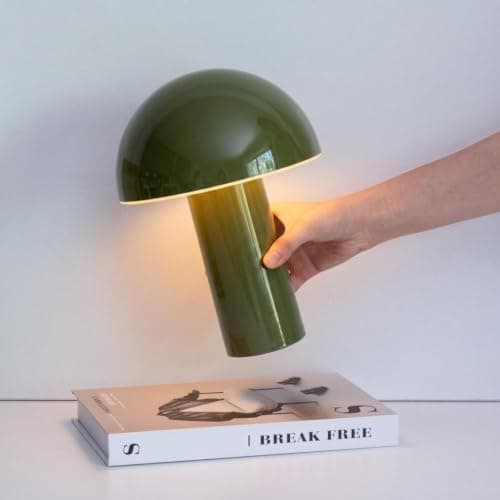
What separates it from the wave of no-name cordless lamps is that it is an actual designed product from Brightech, the US lamp brand behind the Litespan and Maxwell lines: the 10-inch mushroom dome reads as decor, the touch control cycles brightness with a tap, and the build is meant to survive being carried around, which is the whole job. The trade-offs are inherent to being cordless: runtime is finite, so a fixed all-day desk is better served by a plug-in lamp, and the soft dome glow favors atmosphere and reading over big-surface task work. For a flexible, roaming, or occasionally-off-grid setup, the untethered convenience, in a lamp you are happy to have visible, wins.

Go Anywhere

A cordless, rechargeable lamp from an established US lighting brand, no outlet, no cord across the desk. The Celia's 10-inch mushroom form is touch-controlled and dimmable, and the built-in battery takes good light to the couch, the balcony, a dinner table, or a desk with no plug in reach.

Buy this if your light needs to move, between rooms, to the couch to sketch, out to a table with no plug, or onto a shelf where no cord can follow. Tap the lamp to switch and dim it, recharge it over USB when it runs down, and enjoy that it looks like a designed object rather than a gadget.

What we don't like

Battery power means finite runtime, for all-day stationary use at a fixed desk, a plug-in lamp never dims on you. Its soft mushroom-dome glow is ambient-leaning; it lights your immediate area rather than blasting a big work surface.

How we
chose

We ranked these desk lamps by what actually makes light good to work under, not by watt-count bragging:

  • Color accuracy (CRI) first for creative work. The Color Rendering Index tells you how truly a light shows color versus daylight — 90+ is a real step up from the ~80 most cheap lamps hit. For art, review, and color-critical tasks we prioritized high-CRI, full-spectrum light and said plainly which picks deliver it.
  • Adjustable color temperature. A warm ~2700K suits evenings and a cool ~5000K daylight tone suits focused daytime work. Lamps that let you tune between them fit more of the day, so we favored them.
  • Glare and format. On a screen-first desk, a monitor light bar's asymmetric beam lights the surface without bouncing into the panel — a real advantage we weighted for those setups. For a drawing board, an architect arm's reach matters more.
  • Brightness that fits a desk. Most desks want a few hundred lumens of even light, not a floodlight. We judged whether each lamp lights its intended area well rather than chasing the biggest number.
  • Flicker-free and value at the price. All picks run flicker-free for eye comfort, and a great $25 lamp and a great $130 light bar are judged against their own band — we flagged where the cheap pick is right and where stepping up genuinely pays.

Share this guide

Share

Common Questions

Frequently Asked Questions

Have art
to sell?

Austin Gallery specializes in selling inherited art, estate collections, and fine art with zero upfront fees. Get a free evaluation today.