Austin Gallery
Studio & ToolsNovember 25, 202610 min read

Best Book Scanners 2026: CZUR, ScanSnap and Flatbeds

Overhead and book-edge scanners for digitizing books, sketchbooks, art journals, and archives without breaking a spine, compared on resolution, page flattening, and speed, with a book scanner vs flatbed vs phone app table.

By · How we research

★ Our Top Pick

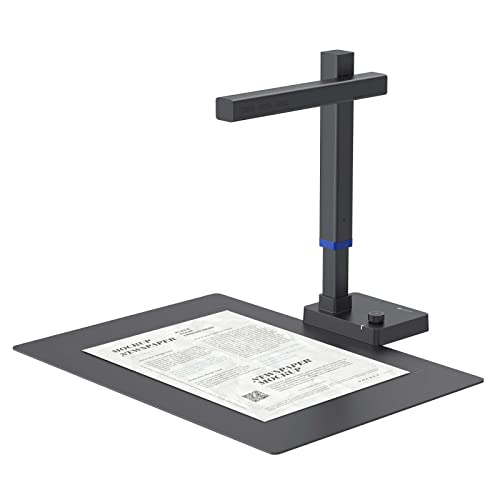
CZUR ET24 Pro Professional Book Scanner (24MP, A3)

CZUR ET24 Pro Professional Book Scanner (24MP, A3)

24MP, A3, laser page flattening, about 1.5 s per scan.

$649.00rated 4.6/5 in our review

Not sure yet? Compare all 7 picks below ↓

A book scanner photographs or scans a bound book while it lies open, then corrects the curve of the pages in software, so you never press the spine flat on glass. The CZUR ET24 Pro is our pick for most people: 24MP, A3 capture, laser-guided page flattening, and about 1.5 seconds per scan per CZUR. This guide covers the CZUR line from the $160 Shine Ultra to the $645 ET MAX, the ScanSnap SV600, a book-edge flatbed for high detail, and when a plain flatbed is the better buy.

Artists have a specific version of this problem. A filled sketchbook or art journal is a bound object you do not want to break, and most of the time you want a faithful digital record, not a print master. Overhead scanners are ideal for that. When a single drawing needs to become a print, scan that page on a flatbed at 600 to 1200 dpi instead; our main art scanner guide covers those. Every link goes to Amazon with our affiliate tag; we may earn a small commission at no cost to you.

Book Scanner vs Flatbed vs Phone App

Figures are manufacturer specifications. Phone figures depend on the phone; the dpi shown assumes a 12MP photo with the page filling the frame.

MethodResolutionPage-curve correctionSpeedBest for
Overhead book scanner (CZUR ET24 Pro)320 dpi (CZUR)Yes, laser-guided auto-flattenAbout 1.5 s per scan (CZUR)Whole books, sketchbooks, archives
Overhead line scanner (ScanSnap SV600)Up to 285 dpi (Ricoh)Yes, in softwareAbout 3 s per pageScanSnap offices, archives
Book-edge flatbed (Plustek OpticBook 4900)1200 dpi (Plustek)Not needed, page is pressed flat at a 2 mm edge3.6 s per A4 page at 300 dpi, plus turning the bookHigh-detail pages from bound books
Standard flatbed (Canon LiDE 400)4800 dpi (Canon)None, spine must be pressedSlowest for books: reposition every pageLoose or spiral-bound pages, print masters
Phone scanning appAbout 300 dpi on an A4 page from a 12MP photoSome apps flatten curved pages; most only crop and correct perspectiveAs fast as you turn pagesA few pages, quick reference copies

The short version: overhead scanners win on speed and on protecting the book, flatbeds win on detail, and a phone is fine for ten pages but tiring for a hundred because lighting and framing change every shot.

Best Book Scanner OverallOur Pick

Verified price

$524.07 (Nov 25, 2026)

Sensor

24MP, 5696 x 4272 px

Resolution

320 dpi (CZUR)

Max size

A3 (16.5 x 11.7 in)

Speed

About 1.5 s per scan (CZUR)

Flattening

Laser curve detection, auto-flatten and deskew

Pros

  • Book stays open face-up, no spine pressing
  • Auto-flatten splits a spread into two clean pages
  • A3 capture fits large sketchbook spreads
  • HDMI out doubles as a document camera

Cons

  • 320 dpi ceiling, not for print enlargements
  • Glossy pages can show glare
  • Software has a learning curve

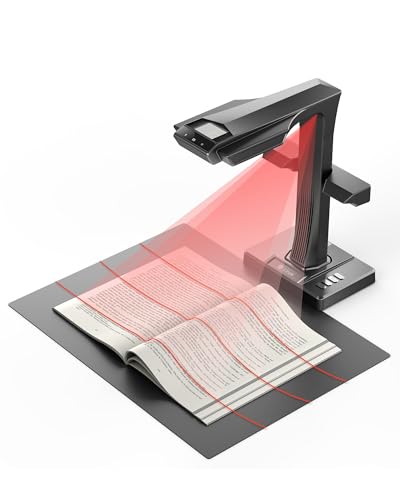
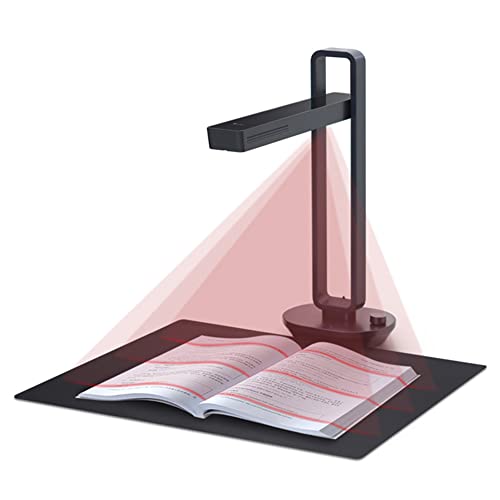
The ET24 Pro earns the top spot because it does the one thing a flatbed cannot: it scans a bound book without breaking it. The book sits open on the pad, face up. A 24MP camera captures the full spread, and CZUR's laser lines measure how the pages curve toward the spine so the software can flatten each page, crop it, and save it as a separate image or a searchable PDF. CZUR rates the cycle at about 1.5 seconds per scan, triggered by a hand button, foot pedal, or automatic page-turn detection.

What 320 dpi means here: CZUR lists 320 dpi, which is what a 5696 pixel wide sensor gives you across an A3 spread. That is enough for sharp text, OCR, and a faithful screen record of a sketchbook page. It is not enough to reproduce a small drawing as a large print. For that, scan the loose sheet on a flatbed at 600 to 1200 dpi.

Against the ET MAX below, the ET24 Pro gives up 14 megapixels and some flattening refinement for about $120 less at the time of writing. Against the Aura Pro, it adds resolution, speed, and a sturdier stand. For a library, a family archive, or an artist with a stack of filled sketchbooks, it is the balance point of the CZUR line.

Our Pick

The overhead scanner most people digitizing books should buy. A 24MP camera (5696 x 4272 pixels, 320 dpi per CZUR) looks down on an open book, lasers read the page curve, and the software flattens the spread and splits it into two pages. CZUR rates it at about 1.5 seconds per scan and an A3 maximum, so a full sketchbook spread fits.

Buy this if you have shelves of books, sketchbooks, or bound archives to digitize and you do not want to press a spine flat on glass. It is also the right tool for artists who want a clean digital record of every sketchbook they fill.

What we don't like

It is a camera, not a flatbed, so 320 dpi is the ceiling. That is plenty for reading, OCR, and screen viewing, but not for scanning a drawing to print it larger than the original. The software takes some learning and glossy pages can reflect the lamp.
Best High-Resolution Book ScannerUpgrade Pick

Verified price

$645.19 (Nov 25, 2026)

Sensor

38MP, 7168 x 5376 px

Resolution

Up to 410 dpi (CZUR)

Max size

A3

Flattening

Laser curve-flatten with sidelights

Pros

  • Highest resolution in the CZUR line
  • Sidelights reduce glare on coated paper
  • Laser curve-flattening
  • Foot pedal and auto page-turn triggers

Cons

  • Costs more than most text projects need
  • Large files
  • Still a camera, not a reproduction scanner

The ET MAX is the overhead scanner for pages you want to look at, not just read. Its 38MP sensor captures 7168 x 5376 pixels, and CZUR rates it at up to 410 dpi at default settings. Side-mounted lights reduce the hot spot that a single overhead lamp throws on coated and glossy paper, which matters for art books, exhibition catalogs, and journals with gouache or marker on the page.

For an artist, this is the best way on this page to keep a detailed record of bound sketchbooks and journals without unbinding them. It still cannot replace a flatbed for print masters, because no overhead camera reaches the 600 to 1200 dpi a reproduction scan needs. If your books are mostly text, the ET24 Pro does the job for less.

Upgrade Pick

CZUR's top overhead scanner: a 38MP camera (7168 x 5376 pixels, up to 410 dpi per CZUR), sidelights to cut glare, and upgraded laser curve-flattening. Buy it when the pages themselves are the point, as with illustrated books, art journals, and archives where fine detail matters.

Buy this if you are digitizing illustrated material, rare books, or art journals and want the most detail an overhead scanner can capture. Archives and small libraries scanning all day will also value the speed and the trigger options.

What we don't like

About $120 more than the ET24 Pro for a resolution jump most text-only projects will not use. Large 38MP files fill drives quickly.

Best Budget Book ScannerBudget Pick

Verified price

$231.20 (Nov 25, 2026)

Sensor

14MP, 4320 x 3240 px

Max size

A3

Speed

About 2 s per page (CZUR)

Flattening

Laser-guided auto-flatten and deskew

Design

Foldable, doubles as a lamp

Pros

  • Laser page flattening at a budget price
  • Folds flat for travel
  • Doubles as a desk lamp
  • A3 capture

Cons

  • About 240 dpi at A3
  • Slower than the ET line
  • Lighter build

The Aura Pro is the entry point to overhead book scanning that still does it properly. It uses the same idea as the ET models: a camera above the open book, laser lines to read the page curve, and software that flattens and splits each spread. CZUR lists a 14MP sensor and about 2 seconds per page. There are two Aura Pro listings on Amazon; we link the one CZUR lists with fingerprint removal, which erases the fingers you use to hold pages flat.

The trade is resolution. 4320 pixels across an A3 spread works out to roughly 240 dpi, which reads cleanly and OCRs well but loses some of the texture in a pencil sketch. For a home archive of books and notebooks it is the value pick. For sketchbooks you care about, the ET24 Pro is worth the step up.

Budget Pick

The cheapest real book scanner here, with laser page flattening, at about $231. A 14MP camera (4320 x 3240 pixels) captures up to A3, CZUR rates it at about 2 seconds per page, and it folds flat to store or travel. Fine for personal reading copies, recipe books, and notebooks.

Buy this if you want to digitize a few dozen books or notebooks at home, or carry a scanner to an archive or library reading room. It also works as a desk lamp, which is how many owners keep it on the desk.

What we don't like

14MP across an A3 spread is about 240 dpi, so fine print and pencil detail are softer than on the ET24 Pro. It is slower and lighter in build.

Austin Art Insider

Free weekly guide to galleries, exhibitions & collecting in Austin.

Best for Thin Books and Loose Pages

Verified price

$160.69 (Nov 25, 2026)

Sensor

13MP, 4160 x 3120 px

Resolution

About 340 dpi at A4, 245 dpi at A3 (CZUR)

Max thickness

10 mm (CZUR)

Pros

  • Cheapest CZUR overhead scanner
  • Higher dpi than the Aura Pro at A4
  • Fast single-page capture

Cons

  • 10 mm document thickness limit
  • No laser curve guides
  • Not for hardcovers

The Shine Ultra is a document camera first and a book scanner second. At A4 it captures about 340 dpi per CZUR, which is actually more than the Aura Pro, because the same 13MP sensor is spread across a smaller page. That makes it a sharp, quick tool for letters, loose drawings, zines, and family papers. CZUR lists a 10 mm maximum document thickness, which is the catch: a thick hardcover or a fat sketchbook will not sit flat enough under it.

If your project is mostly bound books, skip it for the Aura Pro or the ET24 Pro, whose laser guides read deep spine curves. If it is mostly paper, this is the cheapest good answer.

A low-cost overhead camera for loose pages, letters, zines, and thin books. CZUR lists a 13MP sensor (4160 x 3120 pixels), about 245 dpi at A3 and 340 dpi at A4, and a 10 mm maximum document thickness. It flattens pages in software but lacks the laser guides of the Aura and ET models.

Buy this if most of what you scan is loose paper, letters, receipts, thin pamphlets, or staple-bound zines, and you only occasionally open a thicker book.

What we don't like

The 10 mm thickness limit rules out most hardcovers and thick sketchbooks, and without laser guides its page flattening is less reliable on deep spine curves.

Best Overhead Scanner With ScanSnap Software

Verified price

$639.99 (Nov 25, 2026)

Sensor

CCD line sensor

Resolution

Up to 285 dpi (Ricoh)

Speed

About 3 s per page

Max size

A3 scan mat

Software

ScanSnap Home, book curve correction

Pros

  • Mature ScanSnap Home software
  • Book curve correction and page-turn detection
  • A3 scan area

Cons

  • Pricier than the ET24 Pro
  • Lower maximum dpi
  • Older design

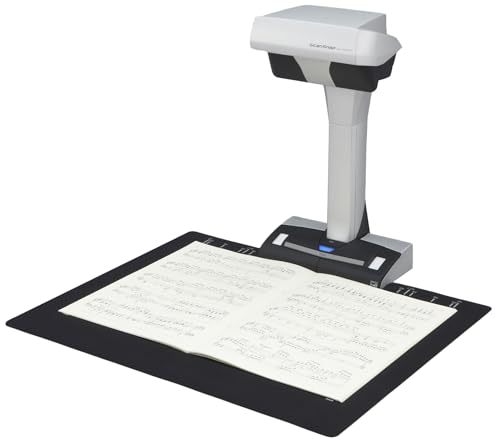
The SV600 is the established name in overhead scanning, and it still works well. Instead of a single camera frame it sweeps a CCD line sensor across the page, takes about 3 seconds per scan, and corrects the curve of an open book in software. It covers an A3 mat, detects page turns so you can scan hands-free, and saves into the ScanSnap Home workflow that many offices already use for their sheet-fed ScanSnaps.

The reason it is not our pick is value. At the time of writing it costs about $115 more than the ET24 Pro, and Ricoh lists a 285 dpi maximum against CZUR's 320. If you are buying your first book scanner, start with the CZUR. If your team already lives in ScanSnap software, the SV600 keeps everything in one place.

The long-running overhead scanner from the ScanSnap line (formerly Fujitsu, now Ricoh). It uses a sweeping CCD line sensor rather than a camera, scans about 3 seconds per page at up to 285 dpi, and includes book-curve correction and page-turn detection. Buy it if your office already runs ScanSnap Home.

Buy this if you already use ScanSnap document scanners and want the same software for books, or you prefer a sensor that sweeps the page instead of a single camera exposure.

What we don't like

It costs more than the ET24 Pro and its 285 dpi maximum is lower. The design is from 2013 and the CZUR models have caught up on flattening.

Check the ScanSnap SV600 on Amazon →$639.99 · ScanSnap (Ricoh)
Best Book-Edge Flatbed for Highest Detail

Verified price

$499.00 (Nov 25, 2026)

Resolution

1200 dpi optical (Plustek)

Book edge

2 mm (Plustek)

Speed

3.6 s, A4 at 300 dpi (Plustek)

Max size

A4

Pros

  • Real flatbed resolution for bound books
  • 2 mm edge reduces spine shadow
  • Page is pressed flat, no software flattening needed

Cons

  • One page at a time
  • A4 maximum
  • Slow across a whole book

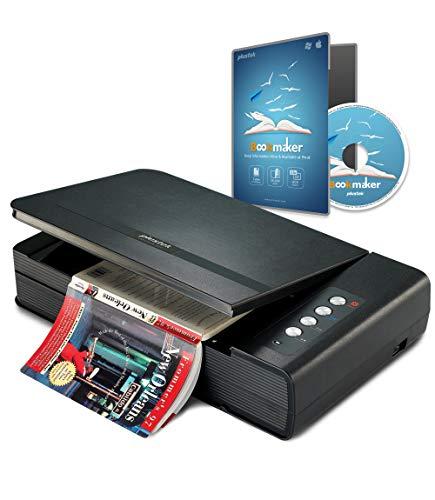
The OpticBook solves the spine problem with geometry instead of software. The scan glass runs to within 2 mm of the edge of the unit, so the book opens over the edge and only one page lies on the glass. That page is pressed flat and scanned at flatbed resolution, up to 1200 dpi per Plustek, with no curve to correct and almost no gutter shadow. Plustek calls this its Shadow Elimination Element design.

The cost is time. You scan one page, lift the book, rotate it, and scan the facing page. Across a 300 page novel that is slow; across the twenty drawings in a sketchbook you want to reproduce, it is exactly right. Think of it as the bridge between the overhead scanners above and the art flatbeds in our art scanner guide.

A flatbed whose glass runs to within 2 mm of the edge of the case, so you hang one page of an open book over the edge and press only that page to the glass. You get true flatbed resolution, 1200 dpi per Plustek, without forcing the spine flat. Plustek rates it at 3.6 seconds for an A4 page at 300 dpi.

Buy this if you need more detail than any overhead camera captures, for example scanning illustrations from a sketchbook to make prints, and you can live with turning the book for each page.

What we don't like

A4 maximum, one page at a time, and you rotate the book between pages, so it is far slower than an overhead scanner across a whole book. Plustek lists 24-bit output.

Best Flatbed Alternative for Loose Sketchbook PagesFlatbed Pick

Verified price

$89.99 (Nov 25, 2026)

Bed

Letter / A4

Resolution

4800 dpi (Canon)

Power

Single USB cable

Pros

  • About $90
  • Print-quality resolution
  • Slim and USB powered

Cons

  • Bad for bound books
  • Letter size only
  • No page-curve correction

A book scanner is the wrong buy if your pages lie flat. Spiral-bound sketchbooks, loose sheets, and books you are willing to unbind all scan better on a flatbed, because the glass presses the paper flat and the resolution is in a different class. The LiDE 400 is our pick for that route; our drawings and sketchbooks scanner guide covers it and the alternatives in detail.

For a flat sketchbook page you plan to print, scan at 600 dpi for archive and 1200 dpi if you will enlarge it. For photos and prints, see our photo scanner guide; for pages larger than letter size, the large format art scanner guide.

Flatbed Pick

If your sketchbooks are spiral-bound or you can remove the pages, you do not need a book scanner at all. The LiDE 400 is a slim letter-size flatbed with 4800 dpi listed resolution and a single USB cable, at about $90. Scan each page flat at 600 to 1200 dpi.

Buy this if your sketchbooks open fully flat or come apart, or if you mainly want print-quality scans of individual drawings rather than a fast digital copy of whole books.

What we don't like

Pressing a bound book on any flatbed strains the spine and leaves a dark gutter. It is letter size only.

How we
chose

We ranked book scanners on the things that decide whether a bound book gets digitized well and quickly:

  • Page-curve handling. Laser-guided flattening ranked ahead of software-only flattening; book-edge flatbeds were judged on how close the glass reaches the edge.
  • Resolution at the page size you scan. Overhead scanners spread a fixed sensor across the page, so we noted dpi at A3 and A4 where the maker lists it.
  • Speed per page and capture size. From manufacturer specifications.
  • Price for what it does. At verified prices on November 25, 2026.
  • Verified listings. Every product links to a live Amazon listing confirmed on the date shown. Specifications come from CZUR, Ricoh, Plustek, and Canon; we do not report measurements we did not make.

Share this guide

Share

Common Questions

Frequently Asked Questions

Have art
to sell?

Austin Gallery specializes in selling inherited art, estate collections, and fine art with zero upfront fees. Get a free evaluation today.