Austin Gallery
Printing & ReproductionNovember 25, 2026Updated November 25, 202610 min read

Best 4x6 Photo Printer 2026: 7 Home Printers Ranked

Five dye-sub compacts and two inkjets for 4x6 prints at home, ranked by cost per print, included media and how they print from an iPhone.

By · How we research

★ Our Top Pick

Canon SELPHY CP1500 Wireless Compact Photo Printer + RP-108 Ink/Paper Set

Canon SELPHY CP1500 Wireless Compact Photo Printer + RP-108 Ink/Paper Set

About $0.31 a 4x6 print on refills, 41 second prints.

$165.30rated 4.7/5 in our review

Not sure yet? Compare all 7 picks below ↓

Quick answer: the best 4x6 photo printer is the Canon SELPHY CP1500 (about $165 on Amazon on November 25, 2026, bundled with a 108-print RP-108 set). It prints a laminated-style dye-sublimation 4x6 in about 41 seconds and costs about $0.31 a print on refills, the lowest here. For the most prints in the box, the Liene M100 (about $136 with 100 sheets) is the value pick. For iPhone printing over Bluetooth, the Liene Amber M110 (about $137).

This guide covers printers that make standard 4x6 photos at home: five dye-sublimation compacts and two six-ink inkjets. Dye-sub printers make dry, coated 4x6 prints and nothing larger. Inkjets cost more per 4x6 but also print 5x7 and 8x10. Pocket printers that make 2x3 stickers are in our separate portable photo printer guide. Prices were checked on Amazon on November 25, 2026.

Which 4x6 Printer to Buy

You wantBuyPrice
Lowest cost per 4x6 printCanon SELPHY CP1500$165.30 with 108 prints
Most prints in the boxLiene M100$135.99 with 100 sheets
Bluetooth from an iPhone, plus square stickersLiene Amber M110$137.27
A phone dock and chargerKodak Dock Plus$159.99
4x6 plus 5x7, 8x10 and scanningCanon PIXMA TS8820$199.99

Cost per 4x6 Print

Dye-sub printers sell paper and ribbon together, so the refill price divided by the sheet count is the full cost of a print. All prices are Amazon on November 25, 2026.

The SELPHY's RP-108 set is the cheapest way to make a 4x6 at home. Canon's KP-108IN is the same 108-print idea, and it cost more per print in the 2-pack on the day we checked, so buy whichever is cheaper when you reorder. The inkjet figure is an estimate for a full-coverage borderless print; the method is in the TS8820 review.

Best 4x6 Photo Printer OverallOur Pick

Print method

Dye sublimation with overcoat (Canon)

Resolution

300 x 300 dpi, 256 levels per color

4x6 print time

About 41 seconds

Sizes

4x6 postcard, card size, square and sticker labels

Connectivity

Wi-Fi, USB-C, SD card slot

Screen

3.5 inch color LCD

Battery

Optional NB-CP2LI, up to 70 postcard prints

App

SELPHY Photo Layout

Pros

  • Lowest cost per 4x6 print in this guide
  • Overcoat layer, Canon rates album prints up to 100 years
  • Phone, SD card and USB drive printing

Cons

  • 4x6 maximum, no 5x7
  • Canon paper and ink cassettes only

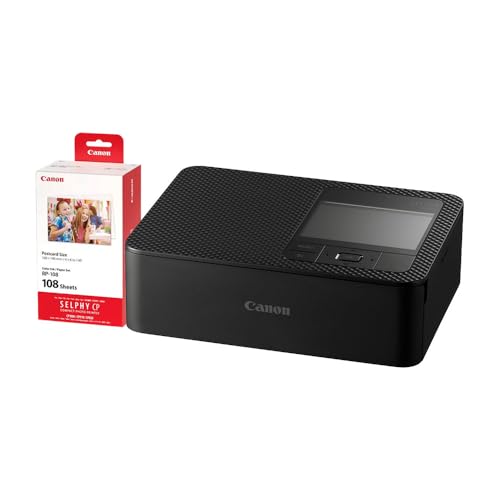
The SELPHY line has been Canon's compact 4x6 printer for years, and the CP1500 is the current model. Per Canon's spec sheet, it prints by dye sublimation at 300 x 300 dpi with 256 levels per color, takes about 41 seconds for a borderless 100 x 148 mm postcard print, and finishes each print with a protective overcoat. Canon describes album-stored prints as lasting up to 100 years.

What makes it the pick is the refill math. Canon's RP-108 set is $33.49 on Amazon for 108 prints, about $0.31 each, the lowest in our cost per print table. The competing Liene, Kodak and HP refills all land between $0.39 and $0.44. For a head to head with Liene's 4x6 models, see Canon SELPHY CP1500 vs Liene.

Our Pick

The SELPHY CP1500 is the 4x6 printer to buy. It prints a borderless 4x6 in about 41 seconds by dye sublimation with a clear overcoat, it has the lowest refill cost here (about $0.31 a print with Canon's RP-108 set), and it takes photos from a phone, an SD card or a USB drive. This bundle includes the 108-print RP-108 set, so the first 108 prints are already paid for.

Buy it if you print family photos, fridge prints and album pages at home and want lab-style 4x6 prints for the least money per print. It also prints card-size photos and square labels on the same machine, and the optional battery makes it a party printer.

What we don't like

The 300 x 300 dpi spec is lower on paper than inkjets, though dye sublimation blends continuous tone so it reads smoother than the number suggests. Paper and ink are Canon-only, and it prints 4x6 at most, so 5x7 and 8x10 need an inkjet.
Best Value Wi-Fi 4x6 PrinterBest Value

Print method

4-layer dye sublimation (Liene)

Resolution

300 x 300 dpi

4x6 print time

59 seconds

Connectivity

Wi-Fi Direct (printer hotspot), USB-C for PC

Weight

About 1.2 kg (2.65 lb)

In the box

100 sheets, 3 cartridges

App

Liene Photo

Pros

  • 100 prints included with the printer
  • Up to five devices on its Wi-Fi
  • Refills about $0.39 a print

Cons

  • Slower than the SELPHY
  • No card slot, no battery

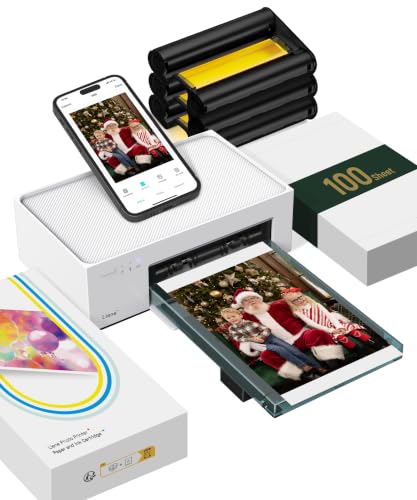
Liene's M100 is the printer Amazon shoppers usually compare against the SELPHY, and on first cost it wins. Liene's spec table lists D2T2 dye sublimation in four layers, 300 x 300 dpi, a 59 second print, and a built-in Wi-Fi access point. The paper cassette holds 20 sheets and each ribbon cartridge covers 40 prints.

This bundle ships with 100 sheets and 3 cartridges, so the box alone covers your first 100 prints. After that, Liene's 80-sheet refill is $31.44, about $0.39 a print, against about $0.31 on the SELPHY. If you would rather pair by Bluetooth than join a printer hotspot, the Amber M110 below is the same print engine with Bluetooth.

Best Value

The Liene M100 is the value pick: about $136 with 100 sheets and 3 cartridges in the box, which is more starter media than any other printer here. Liene lists 4-layer dye sublimation (print plus laminate) at 300 x 300 dpi, a 59 second print, and a Wi-Fi hotspot that up to five phones can join.

Buy it if you want the most prints for the first purchase price, or a family printer several phones will use. Refills run about $0.39 a print with Liene's 80-sheet pack.

What we don't like

It prints 4x6 only, it is slower than the SELPHY (59 seconds against about 41), and it needs wall power. It has no SD card slot or screen, so everything goes through the Liene Photo app or a computer over USB-C.

Best Bluetooth 4x6 Printer for iPhoneEasiest for iPhone

Print method

4-layer dye sublimation, laminated (Liene)

Resolution

300 dpi

4x6 print time

59 seconds

Connectivity

Bluetooth

Media

4x6 photo paper and 3 inch square sticker paper

In the box

60 4x6 sheets, 20 square sticker sheets, 2 cartridges

Pros

  • Bluetooth pairing keeps your phone online
  • Prints 3 inch square photo stickers too
  • Same refills as the M100

Cons

  • Phone and tablet printing only
  • No battery

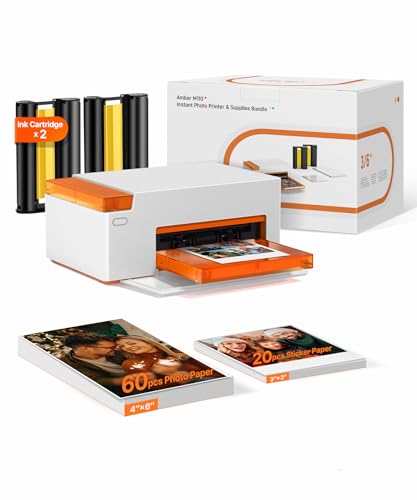
The M110 exists for people who print from a phone and nothing else. Liene's product page lists 4-layer thermal dye sublimation at 300 dpi, printing and lamination in a single pass, a 59 second print and Bluetooth pairing in about 13 seconds. The bundle here adds 20 sheets of 3 inch square sticker paper, which is a format the SELPHY handles only as card-size labels.

It uses the same 4x6 refills as the M100, about $0.39 a print. For pocket printers that make smaller photo stickers, see our portable photo printer guide.

Easiest for iPhone

The Amber M110 is the simplest 4x6 printer to use from an iPhone. It pairs over Bluetooth (Liene says in about 13 seconds), so your phone stays on your home Wi-Fi, and its dual tray prints both 4x6 photos and 3 inch square photo stickers.

Buy it if you print from a phone and hate joining a printer's Wi-Fi network, or if you want square photo stickers for journals and scrapbooks alongside regular 4x6 prints.

What we don't like

Bluetooth means phones and tablets, not a networked family printer. Print time is the same 59 seconds as the M100, and it is 4x6 maximum.

Best Docking 4x6 PrinterThe Dock

Print method

4Pass dye transfer with laminate (Kodak)

Connectivity

Bluetooth

Extras

Phone dock, charges while printing

In the box

50 sheets

Refill

80-sheet cartridge, about $0.40 a print

Pros

  • Laminated prints, water and fingerprint resistant
  • Charges the phone on the dock
  • Widely sold refills

Cons

  • Fewer included prints than the M100
  • Per print cost above the SELPHY

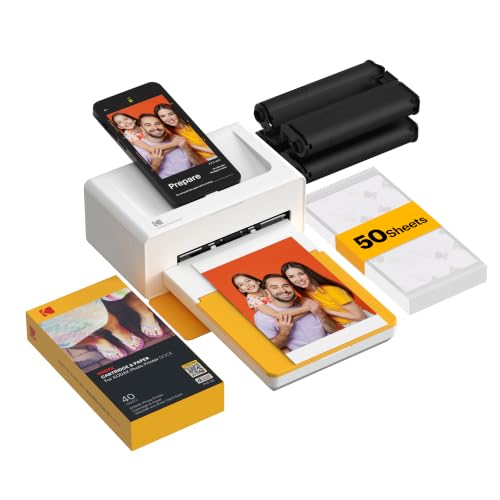
The Dock Plus is Kodak's 4x6 answer, and its pitch is the dock. Kodak describes its 4Pass process as printing each color in turn and then a laminating layer, which makes prints fingerprint-proof and water-resistant, with a Bluetooth connection to the phone.

On cost it sits in the middle: Kodak's 80-sheet cartridge refill is $31.99, about $0.40 a print, against $0.31 on the SELPHY. Buy it for the dock and the Kodak app, not for the economics.

The Dock

Kodak's Dock Plus prints 4x6 by its 4Pass process (three colors plus a laminate layer) over Bluetooth, and its listing says it charges your phone while it prints. Refills cost about $0.40 a print with Kodak's 80-sheet cartridge.

Buy it if you like the idea of a printer that doubles as a phone stand and charger on the counter, or you are already in the Kodak app ecosystem from a Kodak Mini.

What we don't like

It costs more than the Liene M100 and SELPHY with fewer included prints (50 sheets), and per-print cost lands above the SELPHY. Kodak does not publish a print time on its product page.

Austin Art Insider

Free weekly guide to galleries, exhibitions & collecting in Austin.

Best 4x6 Starter BundleMost Media in the Box

Print method

Dye sublimation (listing)

Connectivity

Wi-Fi

In the box

118 sheets, 3 cartridges

Refill

108 sheets + 2 cartridges, about $0.44 a print

App

HP Sprocket

Pros

  • 118 prints included
  • Wi-Fi, so no pairing
  • Same app as HP's pocket Sprockets

Cons

  • Highest dye-sub refill cost here
  • Paper only fits this model

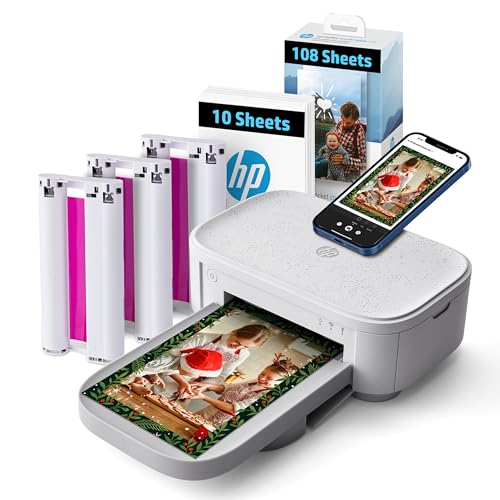
The Studio Plus is HP's desktop step up from its pocket Sprocket. It prints full 4x6 photos by dye sublimation over Wi-Fi and, in this bundle, ships with 118 sheets and 3 cartridges. HP's 108-sheet refill is $46.99, about $0.44 a print.

That refill price is why it ranks below the SELPHY and Liene M100. The pocket HP Sprocket, which prints 2x3 ZINK stickers, is in our portable photo printer guide.

Most Media in the Box

HP's Sprocket Studio Plus is a Wi-Fi dye-sublimation 4x6 printer sold here with 118 sheets and 3 cartridges, the largest starter supply in this guide. Refills are about $0.44 a print.

Buy it if you want a big first batch of prints in the box and you already use the HP Sprocket app from a pocket Sprocket.

What we don't like

Refills cost the most per print of the dye-sub printers here, and the paper only fits this printer. HP's spec page was not reachable when we checked, so we list only what the Amazon listing states.

Best Inkjet for 4x6 and LargerBest Inkjet

Inks

6 individual tanks, incl. photo blue

Sizes

4x6 up to letter, borderless

Connectivity

Wi-Fi, AirPrint, Canon PRINT app

Extras

Scan, copy

4x6 cost (our estimate)

About $0.59 ink and paper

Pros

  • Prints 4x6, 5x7, 8x10 and letter
  • Scanner and document printer included
  • Cheap 4x6 paper (about $0.07 a sheet)

Cons

  • Higher cost per 4x6 than dye-sub
  • No protective overcoat

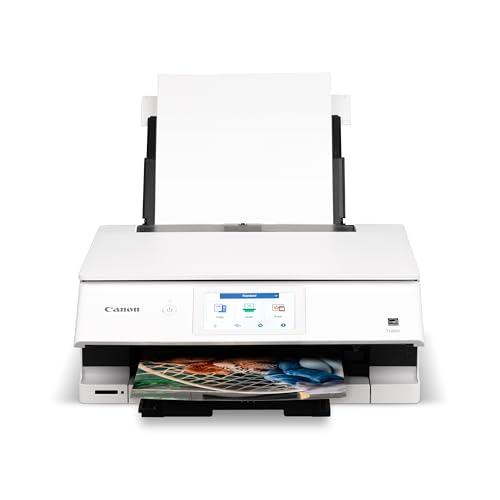
The case for an inkjet is size range. A dye-sub compact stops at 4x6; the TS8820 prints a 4x6, a 5x7 for a frame and an 8x10 from the same tray. For the frames those sizes fit, see our photo print sizes chart.

The cost of a 4x6 is our estimate: about 0.24 ml of ink for a 24 square inch print (the per square inch figure and Canon's CLI-231 tank price are sourced in our sticker printer cost table), about $0.53, plus Canon Photo Paper Plus Glossy II at $26.99 for 400 sheets, about $0.07. Light images use less ink. For art prints at 13 inches and up, see our home art printer guide.

Best Inkjet

Pick an inkjet over a dye-sub compact when you also want 5x7, 8x10 or letter prints, plus scanning and documents. The TS8820 is Canon's six-ink photo all-in-one; by our estimate a borderless 4x6 costs about $0.59 in ink and Canon glossy paper.

Buy it if one printer has to handle 4x6 photos, larger prints, homework and scans. It prints borderless and works with AirPrint and the Canon PRINT app.

What we don't like

A 4x6 costs nearly twice what it costs on the SELPHY, and inkjet prints need to dry and have no laminate layer. Cartridges dry out if the printer sits unused for months.

Best Epson for Photo PrintsSix-Color Epson

Inks

6 colors (Epson 340 cartridges)

Sizes

4x6 and larger, borderless

Connectivity

Wi-Fi, USB, memory card

Extras

Scan, copy, up to 10 ppm (listing)

Pros

  • Six-color photo output
  • Memory card printing
  • Compact all-in-one

Cons

  • Ink cost per print not published
  • Pricier than the TS8820

The XP-8800 is Epson's small-footprint six-color photo printer. Its listing names six-color photo printing, scan and copy, USB and memory card support. A 4x6 on Epson Premium Photo Paper Glossy ($14.99 for 100) costs about $0.15 in paper; the Epson 340 ink 3-pack is $39.55, but without a published fill volume we leave its ink cost out of the table rather than guess.

If you print 13 inch and larger art and want refillable tanks, Epson's EcoTank Photo ET-8550 is covered in our ET-8550 review.

Six-Color Epson

Epson's six-color photo all-in-one, with scan, copy, USB and memory card printing. Choose it over the Canon if you already use Epson paper or want card-slot printing without a phone.

Buy it if you want a compact six-color inkjet for 4x6 and larger photos and print straight from a camera card. Epson Premium Photo Paper Glossy runs about $0.15 a 4x6 sheet.

What we don't like

Epson does not publish ink volume for the 340 cartridges in what we could check, so we did not estimate its ink cost per print. It costs about $30 more than the TS8820.

Head-to-Head

How the top picks compare

The two choices most 4x6 buyers weigh.

Canon SELPHY CP1500 vs Liene M100

The cheapest prints against the cheapest start.

Canon SELPHY CP1500

Canon

Winner

Canon SELPHY CP1500

About $0.31 a print, 41 seconds, card slot and screen

$165.30
Check Price →
Liene M100

Liene

Liene M100

100 prints included, Wi-Fi for five devices

$135.99
Check Price →

Our verdict

Winner: Canon Canon SELPHY CP1500. The SELPHY wins over time. Its refills cost about $0.31 a print against $0.39 on the Liene, it prints faster, and it prints from an SD card or USB drive without a phone. The Liene wins the first purchase: about $30 less with 100 prints in the box. If you print a few hundred photos a year, the SELPHY's lower refill cost closes that gap within the first few refills.

Buy the Canon

you print regularly and want the lowest cost per print and phone-free printing.

Buy the Liene

you want the lowest starting price and the most prints in the box.

Dye-Sub vs Inkjet: SELPHY CP1500 vs Canon TS8820

A 4x6 specialist against a printer that does every size.

Canon SELPHY CP1500

Canon

Winner

Canon SELPHY CP1500

Dry coated 4x6 prints at about $0.31

$165.30
Check Price →
Canon PIXMA TS8820

Canon

Canon PIXMA TS8820

4x6 through letter, plus scanning

$199.99
Check Price →

Our verdict

Winner: Canon Canon SELPHY CP1500. For 4x6 prints, the SELPHY: lower cost per print, no drying, no clogs and a protective coat. Buy the TS8820 instead if you also need 5x7 and 8x10 prints or a home scanner, and accept about $0.59 per 4x6 by our estimate.

Buy the Canon

you mostly print 4x6.

Buy the Canon

you want larger sizes and documents from one printer.

How we
chose

How we built this guide:

  • Manufacturer specs. SELPHY figures come from Canon's CP1500 specification page; Liene figures from Liene's M100 and M110 product pages; Kodak's description from its Dock Plus page. Where a maker's page was not reachable (HP), we list only what the Amazon listing states.
  • Cost per print from live prices. Every printer and refill was checked live on Amazon on November 25, 2026. Dye-sub cost is the refill price divided by the print count. The inkjet figure is our estimate, with the method stated.
  • No hands-on testing claims. We did not test these printers ourselves. Rankings weigh cost per print, included media, connection options and size range.
  • 4x6 only. Pocket 2x3 printers are in our portable photo printer guide; label and sticker roll printers are in our thermal sticker printer guide.

Share this guide

Share

Common Questions

Frequently Asked Questions

Have art
to sell?

Austin Gallery specializes in selling inherited art, estate collections, and fine art with zero upfront fees. Get a free evaluation today.