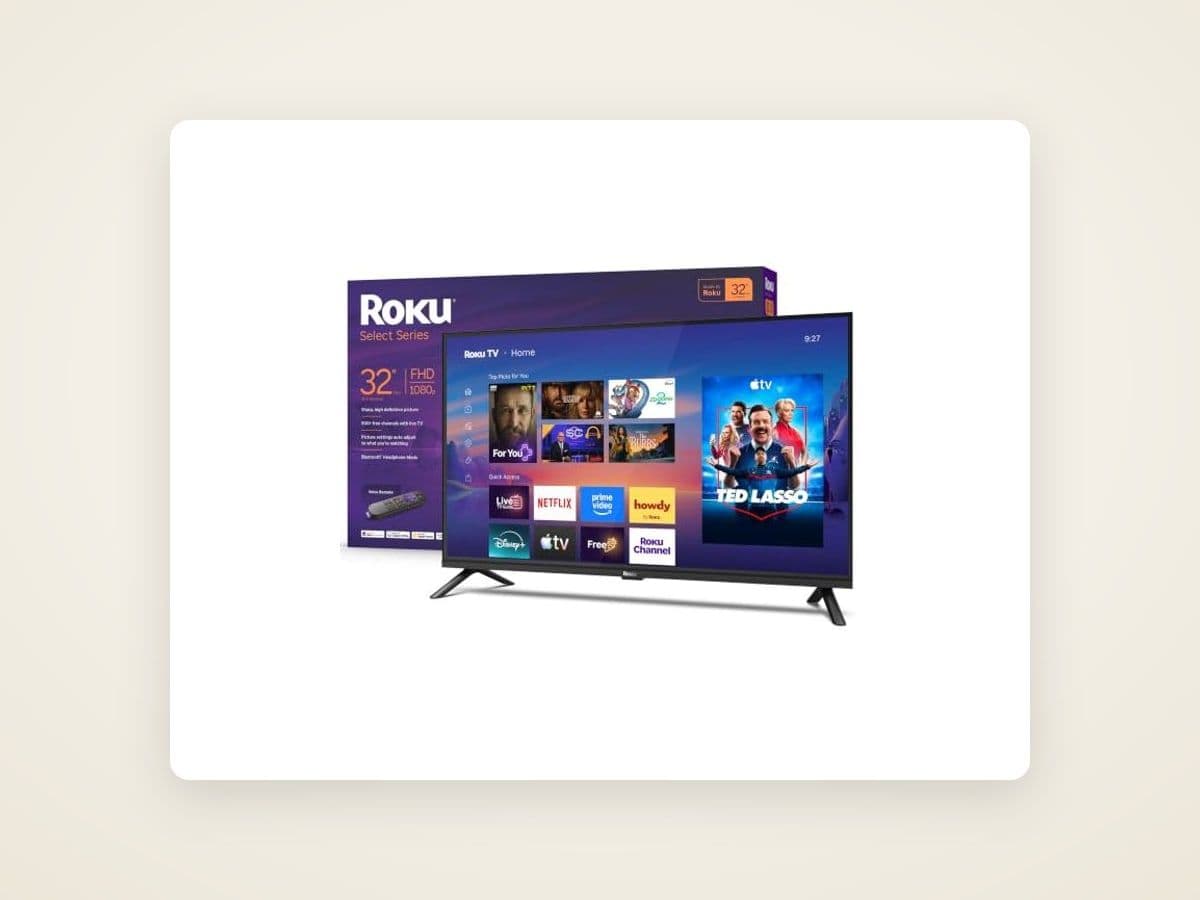
The under-$300 kitchen TV is the most underrated category in consumer electronics. It's also the category where 90% of online reviews are useless — they're either reviewing 65" living-room TVs (wrong category) or they're affiliate-farms that never look past the spec sheet. We cross-checked every TV under $300 with verified listing data and enough owner reports to judge. The shortlist is short.
$300 k
The under-itchen TV is the most underrated category in consumer electronics
This is the practical buyers' guide for the small TV that lives over the counter, on the fridge wall, or under a cabinet. Ranked on what actually matters in a kitchen: off-axis viewing, brightness, voice control, and network reliability. Recommendations weight owner-reported real-world use, not just the spec sheet.
Key Takeaways
- The right size for a kitchen TV is 24-32" — bigger is impractical, smaller is hard to read recipe text from across the room.
- Resolution matters less than you'd think. 720p is fine at 24"; 1080p is the sweet spot at 32"; 4K is overkill for kitchen distances.
- Smart TV OS matters more than panel quality at this size. Roku and Fire TV are the only two interfaces worth dealing with daily.
- Mounting is half the battle. Under-cabinet mounts ($30–60) are usually wrong; tilting wall mounts work better in 90% of kitchens.
- Voice assistants are useful here — your hands are dirty. Both Roku Voice and Alexa-on-Fire-TV handle "set timer
minutes" and "play recipe video" well.
24–32"The right size range for a kitchen TV
720p–1080pResolution sweet spot at kitchen viewing distances
$140–280Where the value lives in 2026
2xMargin we use over the manufacturer's "wall mount weight" rating
What we ranked for
Picking a kitchen TV is different from picking a living-room TV. The criteria that matter:
- Off-axis viewing — you're not always sitting on the couch facing the screen. Most kitchen viewing is at 30–60° angles. Cheap panels look terrible at angles.
- Brightness — kitchens have direct sunlight, under-cabinet lights, and bright overhead fixtures. A dim TV is unwatchable here.
- Voice control — your hands are wet, dirty, or holding something. Voice has to actually work, not just be advertised.
- Network reliability — kitchen Wi-Fi is often weaker than living-room Wi-Fi (further from the router, more interference). The TV's antenna matters.
- Boot time — you want to glance at a recipe and see it in seconds, not wait for a 90-second cold start.
Picture quality, frame interpolation, gaming features, and HDR are essentially irrelevant for this use case. We didn't weight them.
Best Overall: TCL 32" S3 Class HD Roku Smart TV (≈$170)
The 32" TCL S3 with Roku is what most kitchens should buy. It is the most consistently well-reviewed set in the category, and owner reports on long-term reliability hold up.
The 32" TCL S3 with Roku is what most kitchens should buy.
What works:
- 32" is the right size for under-cabinet or end-wall mounting
- Roku interface is genuinely the best on this category — fast, simple, doesn't shove ads into your face
- 1080p resolution is the sweet spot at kitchen viewing distances
- Roku Voice (with the included remote OR via the Roku app) handles "set a timer," "play [recipe channel]," "show me [show]" reliably
- Off-axis viewing is acceptable — not great, but not terrible
What doesn't:
- The factory wall mount is junk; budget another $30 for a real tilting mount
- Built-in speakers are tinny; if you cook with audio, plan to use a small Bluetooth speaker or the kitchen's existing audio
- Black levels are mediocre, but you're not watching prestige drama in the kitchen
Best for: kitchens with reasonable sightlines, families that want a single TV that just works.
Best Under $200: Insignia 24" F20 Series LED HD Smart Fire TV (≈$140)
If you only have wall space for 24", or you're on a tight budget, the Insignia 24" with Fire TV is the right choice.
What works:
- Fire TV interface is solid; Alexa integration genuinely useful for kitchen voice control
- 720p is fine at 24" — you can't tell the difference at typical kitchen distances
- Good built-in microphone for voice (no need to grab the remote with messy hands)
- Light enough that almost any wall mount handles it
- Boots in 8–12 seconds reliably
What doesn't:
- Fire TV interface is more aggressive about pushing Amazon content
- Off-axis viewing is the worst of the under-$200 options — face the TV, not from the side
- Speakers are weak
Best for: small kitchens, secondary kitchens, RV/cabin/garage installs. Budget $140–160 with a tilt mount.
Austin Art Insider
Free weekly guide to galleries, exhibitions & collecting in Austin.
Best at 32" with Better Picture: Roku 32" Select Series 720p HD ($179)
The Roku Select is what we'd buy if Roku interface was the deciding factor and 720p was acceptable. The picture isn't quite as good as the TCL, but the interface is identical and the build is slightly more solid.
What works:
- Same Roku experience as the TCL — fast, ad-light, voice works
- Slightly better build quality than the TCL S3
- Boot time under
- seconds reliably
What doesn't:
- 720p at 32" is noticeably softer than 1080p — it's fine for casual viewing but you'll see it on small text in cooking shows
- Slightly more expensive than the TCL S3 for less resolution
Best for: Roku loyalists, kitchens where build quality matters (busy households, kids, etc.).
Best Under-Cabinet: Tyler 12" Portable LCD TV ($120)
Most under-cabinet TVs are bad. The category exists because it sounds great in the appliance store, then you live with it for two months and realize 12" is too small to read anything from across the kitchen.
If you do go under-cabinet, the Tyler 12" portable is the least-bad option. It's not a smart TV — it's a basic TV with HDMI input — but it works for streaming via a Roku stick or Chromecast.
What works:
- Genuinely fits under most cabinets
- HDMI in works with any streaming device
- Built-in battery means it can move
- Cheap enough to replace if it fails
What doesn't:
- 12" is hard to read at any real distance
- Picture quality is mediocre
- No native streaming
Best for: the very specific case where you absolutely need under-cabinet mount and have wall space or sightline issues. Most kitchens are better served by a 24" or 32" on a wall.
What to avoid
Specific anti-recommendations from the research:
- Anything from "off-brand" labels under $100. Quality control is poor, customer service is non-existent when it fails, and warranty is theoretical. The $50 you save costs you $200 in a year when it dies.
- No-name "smart TVs" with their own OS. They run apps slowly, the OS doesn't get updates, and the streaming services drop support after 2–3 years. Stick to Roku or Fire TV at this price point.
- VIZIO at the budget end. Their flagship line is fine, but the budget D-series under $300 is significantly worse than the TCL or Insignia equivalent.
- Older 4K sets sold as "kitchen-perfect." 4K at kitchen viewing distances is wasted. You're paying 30% more for resolution you won't see, on a panel that's often worse in other ways than a 1080p competitor at the same price.
Mounting — the part most people get wrong
The TV is half the cost of a kitchen TV install. The right mount is the other half.
Don't use the factory wall mount. It's an afterthought. The included mounts on under-$300 TVs are flat (no tilt), don't extend off the wall, and use the cheapest hardware. Budget $30–60 for a real mount.
For 24" TVs: a basic tilt mount ($25–40) handles it. Look for one with at least 5° downward tilt — useful when the TV is mounted high.
For 32" TVs: a full-motion mount ($40–80) is worth the upgrade if the TV will move (off the wall, sideways, etc.). For a fixed install, a quality tilt mount ($35–55) is enough.
Heavy-duty kitchen install (cabinet area, vibration, kids walking by): use a stud-mounted bracket, not drywall anchors. We covered the picture-hanging principles — most apply here too. Find the stud, use lag bolts, accept the limitation if the stud is in the wrong place.
Voice control — what actually works in 2026
Hands wet, holding something, oven timer going off. Voice control is genuinely useful in the kitchen, IF it works:
- Roku Voice — works via the included remote OR via the Roku mobile app on your phone. Reliable for navigation ("show me cooking shows"), search ("play [show name]"), and basic playback control. Doesn't do timers natively — pair with an Echo or Google Home for that.
- Alexa on Fire TV — built-in microphone on the TV, no remote needed. Best voice option in the under-$200 category. Can set timers, play music, search content.
- Google Cast / Chromecast — works as a dumb stick on any HDMI input. No native voice on the TV; voice via Google Home if present in the kitchen.
If voice is a primary feature for you, Fire TV (with Alexa built in) or Roku (with Echo/Google Home in the kitchen) are the only two paths that work reliably. Avoid TVs that advertise their own proprietary voice assistant — they almost universally underperform.
What about the bigger picture (literally)?
For most kitchens, more than one TV is wasteful. The under-$300 you put on the wall replaces the iPad propped against a flour bag and the phone leaning against the spice rack. It's not a status purchase.
If you have a multi-zone kitchen-and-family-room setup where the kitchen TV is visible from a couch, size up to a 40–43" — but at that point you're outside this category and into mid-range living-room TVs (different recommendations apply).
For accessories — picture lighting, wall mounting hardware, smart-home pairing — see our parent guide the best kitchen TVs of 2026 for the full picture, and the 8 tools for hanging anything heavy on a wall if your wall is concrete, brick, or pre-1960s plaster.
Recommended for Your Kitchen TV Setup
The fast version
- Most kitchens: TCL 32" S3 Class with Roku ($170) + tilt mount ($35) = $205 done
- Tight budget: Insignia 24" F20 with Fire TV ($140) + tilt mount ($25) = $165
- Under-cabinet only: Tyler 12" + Roku Stick = $145, but consider whether a wall-mount 24" is actually a better fit for your kitchen
Buy on Amazon, return easily if it doesn't fit. We've linked the specific units we recommend with our affiliate tags — if you buy through those, Austin Gallery earns a small commission at no cost to you. That money funds the editorial work behind guides like this. The recommendations don't change based on commission rates; we recommend what the specs and owner record support.
The recommendations don't change based on commission rates; we recommend what the specs and owner record support.
Mount it tonight. Glance at a recipe in seconds tomorrow. It's a small upgrade with outsized daily payoff.
Consignment
Have Art You Want to Sell?
Free appraisals, zero upfront fees, nationwide service from Austin, Texas.