Guide · Updated June 2026
How to Turn Any TV Into Wall Art
You don't need a $1,500 Samsung Frame to put a screen on the wall that looks like framed art. You need four things done right — and to understand the one display fact that makes or breaks the whole illusion.
By the Austin Gallery editors · June 26, 2026 · ~9 min read
The four steps
1. Pick the screen → 2. Add a frame bezel so the edge reads as a picture → 3. Mount it flush and hide the cables → 4. Load the art (curated or your own). Do all four and a TV stops looking like a TV. Here's each one.
First, the one thing that makes it work: matte vs. glossy
Before the steps, the secret nobody mentions. The reason a Samsung Frame looks like art and a normal TV looks like a TV isn't magic software — it's the panel finish. A glossy screen mirrors the room back at you, so even a gorgeous image reads as “shiny screen.” A matte, anti-glare panel scatters that light the way the surface of a canvas or a fine-art print does, so the artwork sits on the surface instead of glowing through reflections.
What this means for you
Step 1: Pick the screen
Two routes. The premium route is a Samsung Frame — its matte panel and Art Mode do the work for you. The budget route is any 32" smart TV (around $100–$135) that you'll dress up yourself; you give up the matte panel but keep most of the look for a quarter of the price. We compare both paths and the exact models in our guide to the best TVs for displaying art. For a single small piece, consider skipping the TV entirely for a dedicated digital art frame instead.

Budget Path · Best Value Canvas
Best ValueThe cheapest credible 'canvas.' Add a bezel + a screensaver and you're ~80% of the way to a Frame for a quarter of the price.

Premium Path · The Real Thing
The only TV with a true matte, anti-glare panel — the reason it genuinely passes for framed art with zero DIY.
Step 2: Add a frame bezel
This is the highest-impact, lowest-cost move. A magnetic frame bezel snaps onto the edge of the TV and instantly turns the black border into a wooden or metal picture frame. It's the single change that does the most to sell the illusion — a $30 bezel on a budget TV fools the eye more than any setting. See our picks in the best Frame TV bezels guide (many fit non-Samsung TVs too).

The Highest-Impact $140 You'll Spend
Snaps on magnetically and turns the black border into a real wooden picture frame — the single change that sells the illusion. (Cheaper universal bezels in our bezels guide.)
Step 3: Mount it flush and hide the cables
A framed picture sits flat against the wall — so your TV has to as well. A standard mount leaves a one-to-two inch gap, and that gap is exactly what tells your eye “television.” A slim-fit flush mount closes it so the panel sits nearly flat. Then deal with the cables: a visible power cord ruins everything, so route them with an in-wall cable kit (hire an electrician for the in-wall power side) or a paintable cord cover. Our best Frame TV mounts and cable kits guide covers both.

Best Flush / Slim-Fit Mount
Our PickHolds the panel about a third of an inch off the wall — flush, like a real picture frame, not a screen on a bracket.
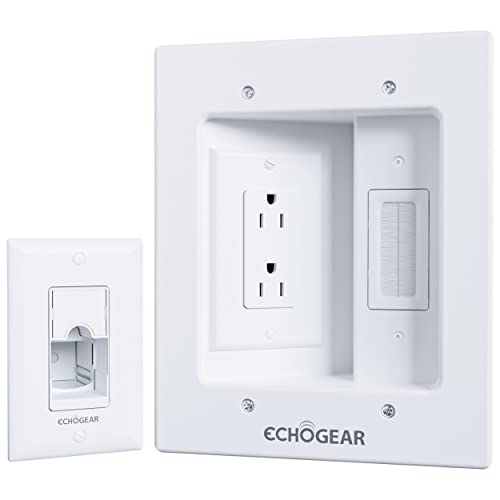
Hide Every Cable
Routes power and AV cables inside the wall so nothing trails down. (Hire an electrician for the in-wall power side.)
Step 4: Load the art
Now make it show art, not a home screen. On a Samsung Frame, Art Mode does this natively with a store of licensed works plus your own uploads. On any other TV, you have three free options:
Screensaver / ambient galleries — Roku, Fire TV, and Google TV all have built-in art screensavers you can point at a gallery or your own photos. Cast from your phone — send images or a slideshow straight to the screen. USB — load a drive with high-resolution art and set it to loop. The best free “art” is usually your own photography or scanned work, rotating on a timer.
Pro tip

Add Art Apps to Any TV
Turns any older TV smart and unlocks the Ambient art gallery + your own photos — the cheapest way to make a dumb TV display art.
The honest verdict: DIY or buy the Frame?
Both are right — for different people. Buy a real Frame if a flawless, glare-free art look is the whole point and the budget is there. Go DIY (budget TV + bezel + flush mount) if you love the concept and want ~80% of the result for well under half the cost. The deciding factor is light: a bright, sunny room rewards the matte Frame; a dim or evening room makes the DIY build nearly indistinguishable. Either way, the four steps above are what turn a screen into something worth hanging.
Frequently asked questions
Can I make a normal TV look like a Samsung Frame?
Largely, yes. Add a magnetic frame bezel, mount it flush to the wall, hide the cables, and run an art screensaver, and a normal TV reads as framed art from across the room — for a fraction of a Frame's price. The one thing you can't fully replicate is the Frame's matte anti-glare panel, so a glossy TV will show more reflection in bright rooms. In dim or evening light, the DIY version is genuinely hard to tell apart.
What actually makes a TV look like art instead of a TV?
Three things, in order: (1) it sits flush to the wall — the gap from a standard mount is what screams 'TV'; (2) it has a frame bezel so the edge reads as a picture frame; and (3) the panel resists glare so the image sits on the surface instead of glowing through reflections. Get the first two with any TV; the third is where a real Frame's matte panel pulls ahead.
How do I display my own photos or art on a TV?
Every modern smart TV can show your own images: upload to the platform's screensaver/ambient gallery (Roku, Fire TV, Google TV), cast from your phone, or plug in a USB drive of images. Samsung's Frame has a dedicated Art Mode; on other TVs, free art-screensaver and digital-signage apps do the same job. Your own photography makes the most personal — and free — 'art.'
Does a TV-as-art use a lot of electricity?
Less than you'd think. Most art-display modes dim the panel substantially and many include a motion sensor that sleeps the screen when the room is empty. It costs more than a real framed print (which costs nothing to display) but far less than running a TV at full brightness all day.
Is a Frame TV worth it, or should I DIY?
If the flawless matte-art look is the point and budget allows, a real Frame is the cleanest result. If you love the idea but not the price, a $100–$135 TV plus a $30 bezel gets you most of the way. Decide by your room: bright, sunny space → the matte Frame earns its premium; dim or evening-lit space → the DIY build is hard to beat for the money.