Austin Gallery
Home & DecorJuly 4, 2026Updated July 4, 202612 min read

The Best Work-From-Home Gifts for 2026 (Desk Upgrades They'll Use Daily)

The best WFH gifts target the frictions people tolerate but never fix — the dim desk, the cold coffee, the flat-backed chair. Nine upgrades remote workers won't buy themselves but will use every single working day, from $23 stocking-tier to the $90 group gift.

By Justin Park · How we research

Work-from-home gifts are the easiest category to get right, because the recipient's day is so knowable: eight-plus hours at the same desk, in the same chair, under the same light, with the same mug going cold beside the same laptop. Every friction in that loop is a gift opportunity — and the best gifts target the frictions people tolerate rather than fix. Nobody buys themselves a $36 monitor light bar or a mug warmer; everybody who receives one uses it every single working day. That is the whole playbook: the gift they won't buy themselves but will use daily.

This is our home turf. The home office is the category we test hardest at Austin Gallery — we maintain year-round, hands-on guides to the best desk mats, best monitor light bars, best lumbar support pillows, and best office chairs — and this gift guide is those categories distilled into their most giftable single picks, plus the desk upgrades (webcam, charger, mug warmer, footrest, a plant with a life-support system) that round out a working setup.

Everything here is holiday-ready — most picks between $23 and $60, one $90 anchor for the group gift — and works equally for the remote-working spouse, the Secret Santa coworker, and the new-job congratulations box. Every link below goes to Amazon with our affiliate tag — we earn a small commission, at no cost to you, when you buy through us.

In a Hurry?

The 3 picks that cover most readers. Tap to read the full review or buy direct.

Best Overall

Quntis Monitor Light Bar

Quntis Monitor Light Bar

~$36

The desk upgrade nobody buys themselves and everybody uses daily.

Best Under $25

Aothia Leather Desk Pad

Aothia Leather Desk Pad

~$23

Turns a bare table into a workstation — the highest style-per-dollar here.

Premium Pick

Anker MagGo 3-in-1 Station

Anker MagGo 3-in-1 Station

~$90

Phone, watch, and earbuds on one clean stand — the group-gift anchor.

Best Overall — The Gift They Won't Buy ThemselvesOur Pick

Mount

Counterweight clip — sits on top of the monitor

Light

Asymmetric beam — lights the desk, not the screen

Adjustments

Brightness and color temperature

Power

USB — runs off the monitor or a hub

Desk space used

Zero

Pros

  • Glare-free desk light with zero screen reflection
  • Frees the desk space a lamp would occupy
  • Daily-use from day one — the ideal gift profile

Cons

  • Check mount fit on curved or ultra-thin monitors
  • One more USB cable to manage

The monitor light bar is the purest example of the great-gift formula: daily use, meaningful upgrade, and a price the recipient would never spend on themselves. It clamps over the top of the screen and throws an asymmetric beam — bright on the keyboard and papers, nothing on the screen itself. The result is a desk that is properly lit for eight hours a day without the glare that makes overhead lights and desk lamps miserable next to a monitor.

Why it's the top pick: nearly everyone who works from home has under-lit their desk for years without diagnosing it. This fixes a problem the recipient didn't know had a name — the best category of gift there is. For our full tested rankings of this category, see our guide to the best monitor light bars.

The Quntis is the value benchmark of the category: brightness and warmth adjustment, a counterweight mount that fits standard monitors, USB power. Two small checks before buying — curved-screen owners should verify mount fit, and the minimalist recipient inherits one more cable. Neither dents its status as the best under-$40 desk gift going.

Our Pick

The single best desk upgrade nobody buys for themselves. It perches on top of the monitor and washes the desk in glare-free light — no screen reflection, no eye strain by 3pm, no desk lamp eating surface space. Ask anyone who owns one: it goes on with the computer every morning, forever.

Buy this for any remote worker who squints at a screen in a dim room — which, by 4pm in winter, is all of them. It is the definition of a gift they'll use daily and would never have spent $36 on unprompted.

What we don't like

Curved and very thin-bezel monitors want a quick compatibility check on the mount. The USB cable adds one more wire to a desk that may already be fighting cable creep.
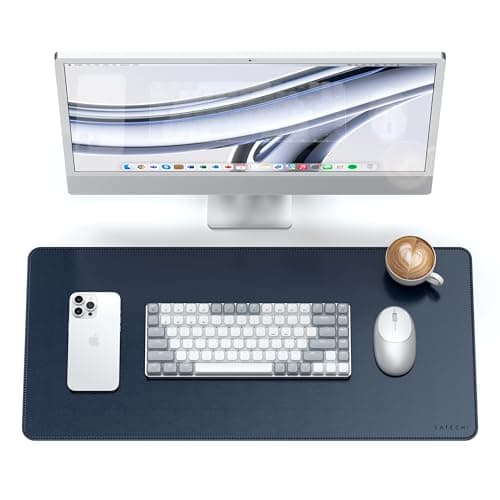
Best Desk UpgradeEditor's Choice

Material

PU leather, dual-sided colors

Size

Large — fits keyboard, mouse, and notebook

Surface

Smooth mouse tracking, easy wipe-clean

Base

Non-slip

Colorways

Dual-tone options to match any setup

Pros

  • Instantly upgrades the look of any desk
  • Protects the surface and softens wrist contact
  • Dual-sided colors — two looks in one mat

Cons

  • PU leather, not full-grain — priced accordingly
  • Needs a day or two to flatten after unrolling

A desk mat is to a desk what a rug is to a room — the thing that makes everything on it look placed rather than dropped. The Aothia is the category's best-known budget pick for good reasons: a generous footprint that unifies keyboard, mouse, and notebook into one zone, a PU leather surface that tracks a mouse smoothly and wipes clean of coffee rings, and dual-sided colorways so the recipient effectively gets two mats.

As a gift it has the rare quality of improving every video call the recipient takes — the desk simply looks better on camera. If you want to go deeper on the category, including full-grain leather and felt options for bigger budgets, we tested the field in our guide to the best desk mats. At around $23, the Aothia is the confident default: giftable, useful the hour it arrives, and impossible to already-own too many of.

Editor's Choice

The twenty-dollar upgrade that makes a whole desk look intentional. A large PU leather mat anchors the keyboard-and-mouse zone, warms up every video-call background, protects the desk surface, and feels better under the wrists than bare wood. The highest style-per-dollar item on this list.

Buy this for the remote worker whose desk is a bare slab with a laptop on it — the mat is what turns 'table' into 'workstation.' The dual-tone colorways let you match their setup without guessing.

What we don't like

PU leather is the right call at this price (durable, wipeable, uniform) but it is not real leather — gift-wrap accordingly. It arrives rolled and wants a day or two to flatten fully.

Best for Their Back

Fill

100% memory foam

Attachment

Adjustable dual straps — fits most chairs

Cover

Breathable mesh, removable and washable

Also works in

Car seats, dining chairs, recliners

Position

Fills the lumbar gap at the lower back

Pros

  • Immediate comfort upgrade for any flat-backed chair
  • Straps hold position — no constant re-adjusting
  • Washable cover survives daily use

Cons

  • Foam feel is personal — some prefer firmer support
  • A patch for a bad chair, not a cure

Most home-office back pain has a boring cause: a chair with no lumbar curve, occupied for eight hours. A lumbar pillow is the cheapest intervention that actually works — it fills the gap between the lower spine and a flat chair back, so the back stops rounding to reach the support. The Everlasting Comfort is the long-running favorite in the category: dense memory foam, dual straps that actually hold it at the right height, and a washable mesh cover.

Gift-wise, it threads a needle: pointed enough to be useful, generic enough not to say anything about the recipient's posture you'll regret. We rank the whole category — firmer foams, mesh designs, and chair-specific picks — in our guide to the best lumbar support pillows. And if their chair is truly beyond padding, the big-ticket fix is a proper chair; our tested office chair guide is the place to send the group-gift budget.

The gift for anyone who has ever said 'my back' on a video call. Memory foam that fills the gap between spine and chair back, adjustable straps that keep it in place, and a shape that turns a mediocre task chair into a tolerable one. Not glamorous — just used every working hour.

Buy this for the remote worker in a hand-me-down or budget office chair — the lumbar pillow is the cheapest meaningful fix for the eight-hours-seated problem. Also right for anyone splitting time between desk chair, dining chair, and car.

What we don't like

Memory foam firmness is personal; some backs want firmer support than foam provides. And it treats the symptom — a genuinely bad chair eventually needs replacing, not padding.

Best Video-Call Upgrade

Resolution

1080p at 30fps

Focus

Autofocus with HD light correction

Audio

Dual stereo microphones

Mount

Monitor clip plus tripod thread

Compatibility

Plug-and-play, Mac and Windows

Pros

  • The proven default — a decade of being the right answer
  • Light correction rescues dim home-office rooms
  • True plug-and-play; zero setup burden on the recipient

Cons

  • 1080p/30 in a 4K era — fine for calls, not for streaming
  • Utilitarian looks, unchanged in years

Laptop webcams are engineered to fit in a 3-millimeter lid, and it shows on every call. The C920x is the boring, correct fix — a dedicated 1080p camera with real optics, autofocus that holds, and light correction that does visible work in the lamp-lit rooms most people actually take calls from. It has been the default recommendation for so long because nothing at the price has managed to beat its combination of image quality and total reliability.

As a gift it scores on the effort-to-impact ratio: the recipient clips it to the monitor, plugs in USB, and every meeting from then on presents them better — no drivers, no accounts, no learning curve. The honest caveats are its age (the design predates the remote-work era it now serves) and its 30fps ceiling, which matters to streamers and nobody else. For the standard remote worker with a standard laptop camera, this is the most flattering $60 you can spend on them.

The webcam that has been the right answer for a decade. Sharp 1080p, dependable autofocus, light correction that rescues dim home offices, and stereo mics that beat every laptop's built-ins. If they take meetings on a laptop camera, this is the most visible upgrade on the list — literally.

Buy this for anyone still presenting themselves to colleagues through a grainy laptop camera at chin height. Clamps to the monitor, works instantly on Mac and Windows, no software required.

What we don't like

It is 1080p/30fps in an era where 4K webcams exist — though for video calls, 1080p done well beats 4K done cheap. The design is a decade old and looks it.

Austin Art Insider

Free weekly guide to galleries, exhibitions & collecting in Austin.

Best Desk Tech

Charges

Phone (magnetic) + watch + earbuds

Phone mount

Magnetic, adjustable viewing angle

Speed

Fast wireless charging for phone

Footprint

One stand, one outlet

Best for

iPhone + Apple Watch + AirPods desks

Pros

  • Replaces three cables with one clean stand
  • Phone sits upright and glanceable while charging
  • Anker reliability in a category full of flaky chargers

Cons

  • Aimed at the Apple ecosystem — check their devices
  • The priciest pick here — anchor-gift territory

Every remote worker's desk accumulates a charging corner, and it is always ugly. Three cables, two adapters, a phone lying flat and face-down: the 3-in-1 station exists to delete that corner. Anker's MagGo version is the one to gift because charging stations are a category where cheap means flaky — misaligned coils, dead watch pucks — and Anker's is the boring-reliable execution: the phone snaps on magnetically at a viewable angle, the watch and earbuds get their own spots, one cable feeds it all.

The gift logic is strong precisely because it is a want-not-need: everyone's current cables technically work, which is why nobody upgrades — until someone hands them the upgrade. Do the thirty seconds of reconnaissance first (magnetic charging means iPhone 12 or later for the full experience; Android users want a different pick), and know that at ~$90 this is the centerpiece gift of the list, best given solo or as the group gift.

One tidy stand that charges phone, watch, and earbuds — and ends the desk's charging-cable rats' nest. Anker's MagGo line is the reliable execution of the 3-in-1 idea: magnetic phone mount at a glanceable angle, watch puck, earbud pad, all off a single outlet. The premium pick on this list, and the tidiest.

Buy this for the Apple-ecosystem remote worker whose desk hosts three separate cables. The phone charges upright at eye level, which quietly doubles as a second screen for notifications during the workday.

What we don't like

It is ecosystem-specific — magnetic phone charging targets iPhone, so confirm what they carry. This is also the priciest item on the list; it is the anchor gift, not the add-on.

Best Desk Companion

Monitors

Soil moisture, water level, light, battery

Watering

Self-watering from built-in reservoir

Display

Front screen with status (and a face)

Plant included

No — add a pothos or snake plant

Best plants

Pothos, snake plant, herbs

Pros

  • Self-waters — survives the chronic plant killer
  • Status display makes care obvious, not guesswork
  • Adds something alive to the workspace, low stakes

Cons

  • No plant included — pair it with a cutting
  • Cute-gadget aesthetic isn't for the minimalist

Research keeps finding that a plant on the desk measurably improves the workday — and remote workers keep killing them anyway. The PLANTSIO pot attacks the actual failure mode, which is not neglect exactly but ambiguity: nobody knows whether the plant needs water until it is dramatic. Here a display on the pot reports moisture, reservoir level, and light, and the reservoir self-waters, so the plant's needs are met the way office workers understand best — as a dashboard.

As a gift it lands as three things at once: greenery, gadget, and a small desk companion with a face, which is more charm than any other $40 on this list buys. Two notes for the giver: it ships without a plant, so pair it with a pothos or snake plant (both nearly unkillable and reservoir-friendly) — arriving planted is half the gift. And read the recipient: for the spare, all-neutral desk, a plain ceramic pot may suit better. For everyone else, this is the pick that gets talked about on calls.

A desk plant with a life-support system and a face. The pot monitors soil moisture, water level, and light on a little display, and self-waters from its reservoir — which means the plant survives the exact person who kills plants. Equal parts greenery, gadget, and desk pet.

Buy this for the remote worker whose desk needs something alive on it — especially the self-described plant killer. The display turns plant care from guesswork into a status readout, which is exactly how office people like their responsibilities.

What we don't like

The plant itself is BYO — gift it with a pothos or snake plant cutting or it is an empty pot with a screen. It is also a gadget-cute object; the minimalist recipient may prefer a plain ceramic pot.

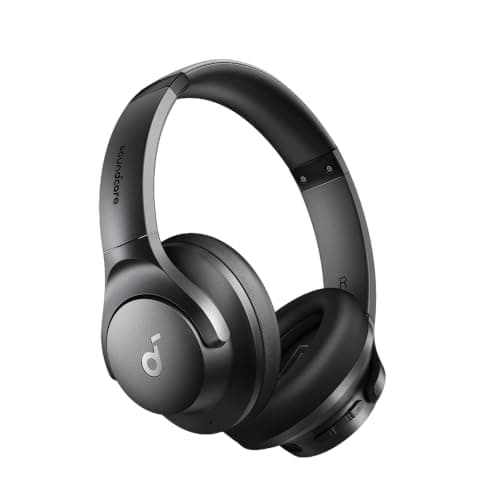
Best Budget Noise-Cancelling

ANC

Hybrid active noise cancelling

Battery

Up to 40 hours with ANC on

Connection

Bluetooth multipoint (two devices)

Comfort

Lightweight over-ear, all-day fit

App

EQ customization via Soundcore app

Pros

  • Genuine ANC under $50 — kills the household hum
  • 40-hour battery covers weeks of workdays
  • Multipoint pairs laptop and phone simultaneously

Cons

  • Voices and sharp sounds still leak through some
  • Light plastic build — desk-grade, not travel-grade

The dirty secret of noise-cancelling headphones is that the last 20% of silence costs 90% of the money. The Q20i is the smart end of that curve: hybrid ANC that genuinely flattens the steady noises of a working household — HVAC drone, dishwasher cycle, street hum — for about what two pizzas cost. Anker's Soundcore line owns the budget-audio space for a reason, and this is its focus-gift ambassador.

Set expectations honestly and the gift over-delivers: this will not vaporize a toddler or a leaf blower the way a $350 flagship might, and the plastic build is honest about its price. But the 40-hour battery means it always has charge, multipoint means it hops between laptop calls and phone music without re-pairing, and the recipient gets to discover the deep-work superpower of a quiet head without anyone having spent flagship money. Per dollar of focus delivered, nothing on this list touches it.

Real active noise cancelling at a tenth of the flagship price. The Q20i mutes the household hum — HVAC, dishwasher, someone else's meeting — for around $45, with a 40-hour battery that laughs at the workweek. Not Bose, and not pretending to be; the point is 80% of the silence for 10% of the money.

Buy these for the remote worker sharing a house with noise — partners on calls, kids after school, a barking dog. Also the right pick when you want to gift focus without gambling $300 on someone else's ears.

What we don't like

ANC at this price handles steady low rumble well but lets sharp sounds (voices, clatter) partially through — flagships do meaningfully better. Build is plastic-light; fine for a desk, less for travel abuse.

Best Small Luxury

Function

Keeps a mug at drinking temperature

Safety

Auto shut-off timer

Control

Simple touch operation

Best mugs

Flat-bottomed ceramic

Footprint

Coaster-sized

Pros

  • Ends the cold-coffee-after-every-meeting cycle
  • Auto shut-off makes it worry-free
  • Universal — every desk worker drinks something hot

Cons

  • Maintains heat; won't resurrect cold coffee
  • Wants a flat-bottomed mug for full contact

Track a remote worker's mug for a day and you will count three trips to the microwave. The mug warmer deletes those trips: a coaster-sized heated plate that holds coffee or tea at drinking temperature through the long meeting, the deep-focus block, and the email that got out of hand. The Oracer earns the pick over the sea of lookalikes on the feature that matters for a gift — automatic shut-off, so an abandoned mug or a forgotten unplug is never a worry.

It is the classic small luxury: faintly ridiculous to describe, immediately indispensable to own. Two physics notes keep expectations honest — it maintains temperature rather than reheating a cold mug, and it wants a flat-bottomed mug for good contact (tuck one in the gift box and the package is complete). For office gift exchanges, stockings, and the coworker you drew in Secret Santa, this is the reliable hit under $30.

For the person whose coffee goes cold during every 10am meeting — which is everyone who works from home. A heated plate keeps the mug at drinking temperature indefinitely, and the auto shut-off means walking away for lunch never becomes a hazard. Small, silly-sounding, and used every single day.

Buy this for the coffee-or-tea desk worker, no further qualification needed. It is the ideal office-gift-exchange and stocking-tier pick: universally applicable, mildly luxurious, zero learning curve.

What we don't like

It keeps coffee warm rather than reheating cold coffee — physics is what it is. Works best with flat-bottomed mugs; tapered and rounded bottoms make less contact.

Best Under-Desk Comfort

Adjustment

Multiple height positions

Surface

Textured, with roller massage zone

Angle

Tilts for rocking foot movement

Base

Non-slip on hard floors and carpet

Fits under

Standard desks with room to spare

Pros

  • Unlocks correct chair height for shorter users
  • Tilt-and-rock keeps legs moving through long sits
  • Massage texture is a sneaky-pleasant bonus

Cons

  • Zero unwrap glamour — a week-two gift
  • Claims permanent under-desk floor space

Ergonomics has an order of operations, and feet are the foundation everyone skips. Chair height should be set so forearms sit level with the desk — but for a large share of people, that leaves feet dangling or toes barely touching, loading pressure onto the thighs. A footrest closes that gap. The HUANUO is the category standard: several height settings, a tilting platform that invites the small rocking movements that keep blood moving, and a textured roller surface that amounts to a free micro-massage.

As a gift it demands a little faith: nobody gasps at a footrest. But it belongs to the same family as the lumbar pillow above — the unglamorous supports that determine whether eight seated hours end in comfort or an ache — and paired together they are a complete 'ergonomic care package' for under $75. For the final piece of that puzzle, the chair itself, our tested office chair guide covers the big-ticket options a group gift can reach.

The ergonomic upgrade nobody thinks about until they try one. An adjustable-height platform with a textured massage surface that gives dangling feet somewhere to be — which unlocks the chair height the desk actually wants, takes pressure off the thighs, and makes hour six of sitting feel like hour two.

Buy this for shorter-than-average remote workers especially — desks are built for a mythical average human, and a footrest is the correction. But almost anyone who sits all day finds their posture improves the week it arrives.

What we don't like

It is the least glamorous gift on this list; the gratitude arrives in week two, not at the unwrapping. It also permanently occupies under-desk floor space.

How we
chose

We picked these gifts against the specific physics of gift-giving for desk workers:

  • The won't-buy-themselves filter. Every pick had to be something remote workers demonstrably use daily but rarely purchase unprompted — light bars, mug warmers, footrests, lumbar pillows. Gifts that duplicate what they'd buy anyway (cables, notebooks) didn't make the list.
  • Daily-use over occasion-use. A gift touched five days a week beats a nicer one touched monthly. We scored picks by hours of weekly contact — the light bar and desk mat effectively score forty.
  • Backed by our tested category guides. Where we maintain a full hands-on guide (desk mats, monitor light bars, lumbar pillows, office chairs), the pick here is that guide's most giftable option — chosen for broad fit and price, with the deep-dive linked for bigger budgets.
  • Zero-setup bias. A gift that demands account creation, driver installs, or furniture assembly transfers work to the recipient. We favored plug-and-play — the webcam, warmer, and light bar work within a minute of unboxing.
  • Well-reviewed, real brands, honest trade-offs. Every pick is a strong seller with solid ratings, and we name what's imperfect — the PU leather that isn't full-grain, the ANC that isn't Bose, the footrest nobody gasps at — so the gift lands exactly as expected.

Share this guide

Share

Common Questions

Frequently Asked Questions

Have art
to sell?

Austin Gallery specializes in selling inherited art, estate collections, and fine art with zero upfront fees. Get a free evaluation today.