Austin Gallery
Home & DecorJuly 2, 2026Updated July 2, 202611 min read

7 Best Standing Desk Converters for 2026 (Turn Any Desk Into a Sit-Stand Setup)

You don't have to replace your desk to stand while you work. A standing desk converter is a riser that sits on top of the desk you already own and lifts your whole workstation to standing height. We sorted the best by what actually matters: lift type, weight capacity, surface size, and the desk depth each one needs.

By Justin Park · How we research

A standing desk sounds like a big purchase — until you realize you probably don't need to replace your desk at all. A standing desk converter (also called a desktop riser or sit-stand riser) is a platform that sits on top of the desk you already own and lifts your monitor, keyboard, and laptop from seated height to standing height in one motion. Keep the desk you like, keep its drawers and footprint, and add the ability to stand — for a fraction of the cost of a full motorized desk.

The features that matter are mechanical. The lift type is the big one: an X-lift raises straight up and needs little forward desk space; a Z-lift arm swings up and toward you, so it needs more clear depth in front; an electric column does it all at the push of a button and carries the most weight. Then check weight capacity (heavy dual monitors need a higher rating), whether you want a two-tier top (monitor high, keyboard low — better ergonomics) or a single flat top (best for laptops), the surface width for how many screens you run, and the desk depth the unit needs to clear. Sort those out and the rest is matching budget to build. Most converters run roughly $110 to $400.

For most desks, a 36-inch two-tier X-lift riser like the VIVO K Series is the smart default; if you want push-button ease or run heavy monitors, the electric VERSADESK is the step up. If you're building the whole workspace, see our companions on the best full standing desks, the best ergonomic office chairs, and the best under-desk walking pads. Every link below goes to Amazon with our affiliate tag — we earn a small commission, at no cost to you, when you buy through us.

In a Hurry?

The 3 picks that cover most readers. Tap to read the full review or buy direct.

Best Overall

VIVO 36" K Series

VIVO 36" K Series

~$160

A 36" two-tier X-lift riser that turns any desk into a sit-stand setup.

Best Electric

VERSADESK PowerPro

VERSADESK PowerPro

~$400

Push-button motor and 80 lb capacity — effortless, heavy-duty height changes.

Best Budget

FITUEYES 32"

FITUEYES 32"

~$110

A real two-tier Z-lift converter for around a hundred bucks.

Best OverallOur Pick

Lift type

X-lift (raises straight up)

Surface

36" wide, two-tier (monitor deck + keyboard tray)

Weight capacity

Up to 33 lb across both tiers

Height range

Sits flat to ~16" standing height

Desk depth needed

Moderate — vertical lift, minimal forward travel

Pros

  • Two-tier top puts screen and keyboard at the right heights at once
  • X-lift rises straight up — little forward desk travel
  • 36" surface fits a monitor plus a laptop or dual monitors

Cons

  • Keyboard tray sits below the main deck (a plus for most, not all)
  • A substantial unit to lift off a crowded desk

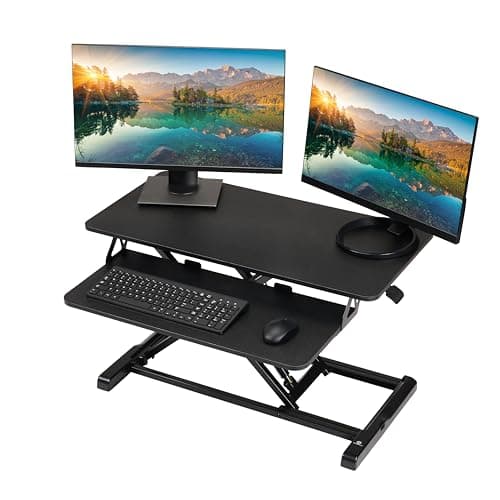
The VIVO 36-inch K Series is the converter we point most people to first. It nails the job a desktop riser exists to do: it sits on the desk you already own and lifts your whole workstation from seated to standing in one squeeze of a handle. The two-tier design is the key — the upper deck carries your monitor (or a laptop) at eye level while a lower tray holds the keyboard and mouse at elbow level, so both land where an ergonomist would put them instead of forcing you to choose.

Why it wins overall: an X-lift raises the surface straight up rather than arcing toward you, so it needs less clear desk depth than a Z-lift and won't crowd you at standing height. Add a 36-inch top with room for a monitor plus a laptop (or a dual-monitor pair) and a spring-assisted lift that holds any height, and you have a full sit-stand setup for a fraction of a motorized desk.

The only thing to know going in: the keyboard tray sits a few inches below the monitor deck, which is exactly what most people want ergonomically. If you specifically like your keyboard and screen on one flat plane, a single-top riser suits you better. For everyone else, this is the buy-once converter.

Our Pick

The riser most desks should get. A 36-inch two-tier top holds a monitor (or two) up high and a separate keyboard tray down low, the X-lift raises straight up without lunging forward, and a squeeze-handle sets any height in seconds. Enough surface for a real workstation, priced where a converter should be.

Buy this if you want to turn your current desk into a sit-stand setup without overthinking it. The two-tier design keeps your screen at eye level and your keyboard at elbow level in one motion, the 36-inch top fits a monitor plus a laptop or a dual-monitor pair, and the vertical X-lift needs far less desk depth than a Z-lift that swings toward you.

What we don't like

The separate keyboard tray drops the typing surface a few inches below the main deck, which most people want — but if you like keyboard and monitor on one flat plane, look at a single-top riser. Fully loaded it is a solid unit, so clearing a crowded desk to set it down takes a minute.

Best Electric ConverterAlso Great

Lift type

Electric column (push-button motor)

Surface

36" wide two-tier work surface

Weight capacity

Up to 80 lb — highest here

Height range

Powered lift, sits flat to ~20" standing

Desk depth needed

Moderate — straight vertical column lift

Pros

  • Push-button motor raises a loaded desk with zero effort
  • 80 lb capacity handles heavy dual monitors easily
  • Smooth, repeatable heights every time

Cons

  • Most expensive option on this list
  • Needs an outlet and is heavy to reposition

The VERSADESK PowerPro is the converter for people who want a standing desk to feel effortless. Every riser here does the same core job, but this one trades the manual squeeze-and-lift for a motorized column: you press a button, the entire work surface glides up or down, and it stops exactly where you let go. On a spring-assisted riser a fully loaded top takes a real push; here the motor does all of it, which matters if you go sit-to-stand a dozen times a day.

The other advantage is muscle. At up to 80 pounds of capacity it carries the most weight on this list by a wide margin, so a pair of large monitors, a laptop, and a full desk kit ride up together without the lift laboring. The trade-offs are the obvious ones for a motorized unit: it is the priciest pick, it needs an outlet nearby, and it is heavy enough that you install it once and leave it. If effortless, precise, heavy-duty height changes are what you're after, the PowerPro earns the step up.

Also Great

Press a button, it rises. The PowerPro swaps the manual squeeze-lift for a motorized column, so a loaded 36-inch converter glides up and down with no strain — and it carries far more weight than spring-assist risers. The pick if you have heavy monitors or just want effortless, repeatable heights.

Buy this if you run heavy dual monitors, switch between sitting and standing often, or simply don't want to lift a loaded surface by hand. The push-button motor moves the whole workstation smoothly and holds precise heights, and the higher weight rating means big monitors and a full desk kit are no problem.

What we don't like

It is the most expensive pick here and it needs a nearby outlet — a motor means a cord. It is also the heaviest converter on the list, so you set it once and leave it rather than moving it around.

Best Dual-MonitorEditor's Choice

Lift type

X-lift with integrated dual-monitor VESA arm

Surface

32" wide work deck + floating monitor mount

Weight capacity

Monitors 13"–30" on the arm; deck for keyboard kit

Height range

Independent screen height via the arm

Desk depth needed

Moderate — vertical lift plus arm reach

Pros

  • Built-in dual VESA arm — no separate mount to buy
  • Screens float above the deck, freeing the whole keyboard area
  • Each monitor sets its own height and angle

Cons

  • Monitors must be VESA-compatible for the mount
  • Taller, more involved to assemble than a plain riser

The VIVO 32-inch dual-monitor converter solves the problem two-screen users hit with ordinary risers: where do both monitors go? On a flat top, two monitors eat most of the surface. Here an integrated VESA arm lifts both screens (13 to 30 inches each) clear off the deck and floats them above it, so the entire work surface below stays open for your keyboard, mouse, and everything else.

Why it's the dual-monitor pick: the built-in arm means you don't buy — or bolt on — a separate monitor mount, and you can set each screen to its own height and tilt. That independent adjustment is a genuine ergonomic upgrade over a fixed two-tier deck, where both monitors share one height.

Two caveats. Your monitors need standard VESA mounting holes to attach — most modern displays have them, but confirm yours do. And the arm makes this a taller, more involved build than a basic riser, with a 32-inch deck that's generous but not the widest on this list. For a clean, adjustable two-monitor standing setup on your existing desk, it's the best-integrated answer here.

Editor's Choice

A converter with the monitor arm built in. An integrated dual mount floats two screens (13"–30") above the deck, freeing the entire keyboard surface below and letting you set screen height independently. The cleanest two-monitor sit-stand setup without buying a separate arm.

Buy this if you run two monitors and want them off the surface entirely. The built-in VESA arm holds both screens above the work deck, so you get a full, uncluttered keyboard area and can position each monitor at its own height and angle — an ergonomics win a flat two-tier top can't match for dual displays.

What we don't like

Your monitors must be VESA-compatible to use the mount (most are, but check). The integrated arm makes this a taller, more involved assembly than a plain riser, and the deck itself is 32 inches — ample, but not the widest here.

Best Large SurfaceAlso Great

Lift type

X-lift (raises straight up)

Surface

48" wide, two-tier (monitor deck + full keyboard tray)

Weight capacity

Up to 44 lb across both tiers

Height range

Sits flat to ~16.5" standing height

Desk depth needed

Moderate depth, but wide footprint — measure width

Pros

  • 48" of surface fits dual monitors plus laptop and notes
  • Full-width keyboard tray, not a cramped one
  • Same straight-up X-lift as the overall pick

Cons

  • Requires a genuinely wide desk to sit on
  • Largest, heaviest manual riser here

The VIVO 48-inch K Series is the pick when a normal riser just isn't big enough. It's the same well-sorted two-tier, straight-up X-lift design as our overall choice, scaled to a 48-inch top — and that extra width changes what the desk can hold. Where a 36-inch surface fits a monitor and a laptop, this fits two large monitors side by side with room to spare for a notebook, a tablet, or a second keyboard.

The full-width lower tray means your keyboard and mouse get a proper spread rather than a squeezed strip, and because the lift travels vertically, a surface this size still rises cleanly without arcing into you at standing height. The catch is simple physics: 48 inches needs a wide desk underneath it, so measure first, and it's the heaviest manual riser here to set in place. If you're building a spread-out, multi-monitor command center on your existing desk, this is the one with the real estate.

Also Great

The widest workstation here. A 48-inch two-tier top gives dual monitors real breathing room plus space for notes, a tablet, or a second input device — with the same straight-up X-lift as our overall pick. The riser for a spread-out, multi-monitor desk.

Buy this if your desk is a command center: two large monitors, a laptop off to the side, notebooks, a drawing tablet. The extra-wide 48-inch deck and full-width keyboard tray give everything a home, and the X-lift still raises straight up so a big surface doesn't lunge into your torso when standing.

What we don't like

It needs a wide desk to sit on — measure before you buy, because 48 inches is a lot of surface. It's also the largest, heaviest manual riser here, so lifting it on and off is a two-hands job.

Austin Art Insider

Free weekly guide to galleries, exhibitions & collecting in Austin.

Best Compact / LaptopBest for Small Spaces

Lift type

Slim vertical lift, single top

Surface

Single flat top (compact footprint)

Weight capacity

Suited to a laptop or laptop + small monitor

Height range

Folds nearly flat; lifts to standing

Desk depth needed

Low — minimal footprint, ideal for shallow desks

Pros

  • Single flat top is perfect for laptop work
  • Ultra-slim — barely raises your desk when lowered
  • Small footprint fits tight and shallow desks

Cons

  • Keyboard and screen share one height (fine for laptops)
  • Lower capacity — not for heavy dual-monitor rigs

The VIVO Ultra-Slim is the converter for people whose desk is small, whose setup is a laptop, or who just don't want a big contraption sitting on their workspace. Instead of a tall X-frame and a two-tier top, it's a single clean surface that lifts straight up to standing height and folds down almost flat when you're done. Lowered, it barely adds height to your desk — a real difference from bulkier risers that keep your keyboard an inch or two up even when collapsed.

The single flat top is exactly right for a laptop, where the keyboard and screen are one unit anyway, and it has room for a laptop plus a small external monitor or a mouse and notebook. That same design is its limit: if you want a separate monitor lifted to eye level while your keyboard stays low, a two-tier riser does that and this doesn't, and its capacity is tuned for a light setup rather than a heavy dual-monitor rig. For a tidy, laptop-first standing setup that disappears when you sit, it's the smart compact choice.

Best for Small Spaces

A single flat top that all but disappears when lowered. No bulky keyboard tray, no tall X-frame — just one clean surface that lifts a laptop (or a laptop plus small monitor) to standing height and folds nearly flat. The pick for tight desks and laptop-first setups.

Buy this if you work on a laptop, have a small or shallow desk, or want a riser that stays out of the way. The single-top design keeps keyboard and screen on one plane — ideal for a laptop — and its ultra-slim profile means when it's down it barely raises your working height, unlike bulkier two-tier units.

What we don't like

One flat surface means keyboard and monitor share a height, which is fine for a laptop but not ideal for a separate monitor you want at eye level. Lower weight capacity than the big two-tier risers, so it's built for a light setup, not a heavy dual-monitor rig.

Best ValueBest Value

Lift type

Gas-spring assisted lift

Surface

36" wide, two-tier (monitor deck + keyboard tray)

Weight capacity

Suited to a monitor + laptop kit

Height range

Sits flat to standing height

Desk depth needed

Moderate — near-vertical lift

Pros

  • 36" two-tier surface at a low price
  • Gas-spring lift holds any height smoothly
  • From a brand that specializes in sit-stand gear

Cons

  • Value-grade finish rather than premium
  • Best for a standard setup, not a heavy dual-monitor rig

The FLEXISPOT 36-inch riser is the value play — the converter to choose when you want the essentials done right without overspending. It brings the same core layout as our overall pick: a 36-inch two-tier top with a monitor deck up high and a separate keyboard tray down low, on a gas-spring lift that raises smoothly and holds wherever you set it. FLEXISPOT builds full motorized standing desks for a living, and that hardware know-how shows in how cleanly this one moves.

The compromise is where you'd expect at the price: the finish is solid and serviceable rather than premium, and the weight capacity suits a normal monitor-and-keyboard setup rather than a stack of heavy displays (for that, the VERSADESK electric pick is the better match). Neither holds it back as the smart-money option. If you want to turn your desk into a sit-stand workstation for as little as it sensibly costs, this is the one to start with.

Best Value

The most converter for the money. A 36-inch two-tier top and a smooth height-adjustable lift from a brand that builds full sit-stand desks — the same job as our top pick at a lower price. The value default for a first standing setup.

Buy this if you want a proper 36-inch two-tier riser without paying premium money. FLEXISPOT knows sit-stand hardware, and this delivers the essentials — a monitor deck, a separate keyboard tray, and a lift that holds any height — at a price that makes converting your desk an easy yes.

What we don't like

Fit and finish are very good for the price rather than premium — this is value engineering, not a heavy-duty motorized unit. Capacity is tuned for a typical monitor-and-keyboard setup, so a heavy dual-monitor rig is better matched to the electric pick.

Best Budget Z-LiftBest Under $130

Lift type

Z-lift arm (rises up and forward)

Surface

32" wide, two-tier (monitor deck + keyboard tray)

Weight capacity

Suited to a monitor + keyboard setup

Height range

Sits flat to standing height

Desk depth needed

More — Z-lift travels forward as it rises

Pros

  • Lowest price here for a true two-tier converter
  • Z-lift raises your setup in one smooth motion
  • Great low-risk way to try a standing setup

Cons

  • Z-lift needs more clear desk depth in front
  • 32" top is snug for dual monitors

The FITUEYES 32-inch converter is the budget entry point — the cheapest honest way on this list to turn your desk into a sit-stand workstation. For around a hundred dollars it gives you a real 32-inch two-tier top, with a monitor deck above and a keyboard tray below, on a classic Z-lift arm that raises the whole setup in one smooth pull. It's the low-risk pick: if you're not sure standing will stick for you, this is the way to find out without spending premium money.

The one thing to understand is the mechanism. A Z-lift arm rises up and forward — the surface travels toward you as it stands up — so it needs more clear desk depth in front than a straight-up X-lift does. Measure that space before you buy. Materials are good-for-the-price rather than heirloom, and the 32-inch top is a touch snug for dual monitors. None of that undercuts the value: as a first standing setup or a capable riser on a budget, it delivers the goods for the least money here.

Best Under $130

A real sit-stand converter at an entry price. A 32-inch two-tier top and a classic Z-lift arm that raises your workstation with one motion — the cheapest way here to try standing at your existing desk without committing hundreds.

Buy this if you want to test whether standing works for you before spending more, or you just need a capable riser on a tight budget. The 32-inch two-tier top holds a monitor and keyboard, and the Z-lift arm gets you from sitting to standing in one smooth pull for around a hundred bucks.

What we don't like

A Z-lift arm swings up and toward you as it rises, so it needs more clear desk depth than a straight-up X-lift — measure the space in front of the unit. Materials are good-for-the-price, and the 32-inch top is on the smaller side for dual monitors.

How we
chose

We ranked these standing desk converters by what makes a riser actually work on a real desk, not by spec-sheet bragging:

  • Lift mechanism first. How a converter rises decides how it fits your space. We favored X-lifts and electric columns that travel straight up (little forward crowding) and were explicit about which picks use a Z-lift that swings toward you and needs more clear depth.
  • Weight capacity, matched to the setup. A riser has to hold your gear without laboring. We weighted higher capacity for the picks aimed at heavy dual monitors, and noted where a lower-rated unit is right for a laptop-first setup.
  • Two-tier vs single-top, honestly. A two-tier top puts your monitor at eye level and keyboard at elbow level — better ergonomics for a monitor setup. A single flat top suits laptops. We matched each pick to the buyer it fits and said so plainly.
  • Surface width and desk depth. Width decides how many screens you can spread out; depth decides whether the unit fits your desk at all. We flagged the wide pick for command centers and the slim pick for tight desks, and called out where a converter needs room.
  • Value at the price. A great $110 budget riser and a $400 electric one are judged against their own band. We flagged where a budget pick is the right call and where stepping up to a motor genuinely pays off.

Share this guide

Share

Common Questions

Frequently Asked Questions

Have art
to sell?

Austin Gallery specializes in selling inherited art, estate collections, and fine art with zero upfront fees. Get a free evaluation today.