Austin Gallery
Photography GearJuly 22, 202616 min read

Best Cameras for Photographing Artwork 2026

Eleven verified picks for artists who need the file to match the work: documentation-grade cameras from $479 to full frame, the copy stand that squares everything forever, and the two color tools that matter more than any body upgrade.

By Justin Park · How we research

What Camera Do You Need to Photograph Artwork?

Your situationBuy thisPrice
The best all-around art documentation cameraCanon EOS R50 Kit$799.99
Same job, tightest budgetCanon EOS R100 Kit$499.00
Cheapest path + used macro lensesCanon EOS Rebel T7$479.00
Maximum texture and archival detailFujifilm X-T50 Kit$1,699.00
Full-frame tonality for print reproductionCanon EOS R8 Kit$1,499.00
Batches of works on paperSmith-Victor Copy Stand$542.93
Files that match the canvas, any cameraCalibrite ColorChecker$99.00
The $8 fix for orange-tinted art photosAnwenk Grey Card$7.99

Photographing artwork is its own discipline, and it is not the one general camera reviews are written for. The subject never moves, the light is fully yours to control, and the entire game is fidelity: the file must match the work, in color, in flatness, and in detail, because a juror, a print lab, or a collector is going to treat that file as the truth. That reframes every buying decision. Autofocus speed and burst rates, the specs that drive camera marketing, matter not at all; color science, RAW quality, resolution, and the gear that holds everything square and honestly lit matter enormously.

Our top pick, the Canon EOS R50 kit ($799.99), nails the working artist's requirements: trustworthy Canon color, 24MP files that satisfy juries and giclee labs, and manual control that non-photographers can actually operate. Around it we have verified ten more picks across every budget, from the $479 used-lens-friendly T7 to a 33MP professional body, plus the three non-camera items (copy stand, color target, grey card) that improve results more than any body upgrade. Every price and stock status checked live at publish time. Every link goes to Amazon with our affiliate tag; we earn a small commission, at no cost to you, when you buy through us.

Scope notes for neighbors of this topic: works on paper up to tabloid size are often better served by a flatbed, covered in our art scanner guide; the dedicated stand rigs get deeper treatment in our copy stand guide; and the lighting side lives in our light box guide.

In a Hurry?

The 3 picks that cover most readers. Tap to read the full review or buy direct.

Best Overall

Canon EOS R50 Kit

Canon EOS R50 Kit

$799.99

Honest Canon color and jury-grade files, without photographer overhead.

Best Under $500

Canon EOS R100 Kit

Canon EOS R100 Kit

$499.00

The same documentation files on a tripod, $300 less.

The Truth Card

Calibrite ColorChecker

Calibrite ColorChecker

$99.00

The $99 tool that makes every camera's color match the canvas.

Best Overall for Art DocumentationOur Pick

Sensor

24.2MP APS-C CMOS

Lens

RF-S 18-45mm kit (shoot at long end, f/8)

Files

14-bit RAW, essential for color correction

Extras

4K video for studio and process shots

Pros

  • Canon color science keeps pigments honest
  • 24MP is plenty for large prints and juried submissions
  • Approachable manual controls for non-photographers

Cons

  • Kit lens wants stopping down for critical flatness
  • No weather sealing at this tier

Photographing artwork is a color-fidelity problem wearing a camera-shopping costume. The file you submit to a jury or send to a print lab must match the physical work, and that chain starts with a sensor and color pipeline you can trust. The R50 is our pick because it delivers Canon's mature color science and clean 24MP RAW files at a price that leaves budget for the accessories that matter as much as the camera: the tripod or copy stand, the lights, and the color target further down this page.

The setup that makes any camera on this list work: camera perfectly parallel to the artwork (a copy stand or tripod with a bubble level), two lights at 45 degrees to kill glare, ISO 100, f/8, RAW format, and a color target in the first frame. Technique is 80% of art documentation; the camera is the other 20%.

For working artists the R50 hits every requirement without waste: enough resolution for full-size giclee reproduction of most paintings, 4K video for process reels, and a used market that respects Canon glass if you upgrade. Pair it with our tripod guide or the copy stand below, and the documentation problem is solved for years.

Our Pick

The sweet spot for artists documenting their own work: a 24.2MP APS-C sensor with Canon's famously faithful color science, full manual control, RAW files that survive serious color correction, and a kit lens that, stopped down at its longer end, photographs flat art without drama.

Buy this if you are an artist who needs gallery-submission and print-reproduction files without becoming a photographer first. Canon's color science is the quiet star: reds and skin-adjacent pigments that other brands shift stay honest, which matters enormously when the file has to match the canvas. The touchscreen interface keeps the manual settings you need approachable.

What we don't like

The 18-45mm kit lens is competent, not exceptional; shoot at 35-45mm around f/8 and it does the job, but a dedicated macro or prime is the eventual upgrade for small or highly detailed work. No in-body stabilization, irrelevant on a tripod.

Best Budget MirrorlessBest Under $500

Sensor

24.1MP APS-C CMOS

Lens

RF-S 18-45mm kit

Files

RAW + JPEG

Screen

Fixed (non-articulating)

Pros

  • Top-pick image quality for documentation at $499
  • Same trustworthy Canon color pipeline
  • Simple enough to configure once and forget

Cons

  • Fixed screen fights copy-stand angles
  • Bare-bones feature set beyond stills

Strip art documentation to its essentials and an uncomfortable truth appears: most of what you pay for in a modern camera is motion-handling you will never use on a painting. The R100 is what remains after that strip-down: the sensor, the color science, the RAW file, and a shutter. On a tripod at ISO 100 and f/8, its files are functionally indistinguishable from our top pick's.

The honest caveat is ergonomics. The fixed rear screen means overhead copy-stand shooting has you checking framing through the Canon app on your phone, which works but adds friction to every session. Artists shooting wall-mounted work on a tripod will never notice; artists digitizing stacks of works on paper should pay the $300 or read the T7 note below.

Best Under $500

The same 24MP sensor class and Canon color pipeline as our top pick, in a simpler body for $300 less. For pure on-a-stand art documentation, where autofocus speed and screens that flip mean little, the R100 gives up almost nothing that matters.

Buy this if the camera will live on a tripod photographing flat work and the budget is real. Documentation is the R100's ideal use case: static subject, controlled light, manual settings dialed once. The features it lacks against the R50 (fast tracking autofocus, articulating touchscreen, mic input) are features art copy work does not use.

What we don't like

The fixed screen makes copy-stand work (camera pointing straight down) genuinely awkward; you will use the app or contort. If you also shoot events, kids, or video, the R50's extra $300 buys things you WILL use.

Best DSLR ValueThe $479 Workhorse

Sensor

24.1MP APS-C CMOS

Mount

EF/EF-S (huge cheap used lens market)

Viewfinder

Optical

Battery

Outstanding, DSLR-class

Pros

  • Cheapest current path to 24MP documentation
  • Used EF macro lenses are the category's best bargain
  • Days of battery, no charging anxiety mid-session

Cons

  • Dated tech everywhere but the sensor
  • Kit lens needs the used-prime upgrade plan

The smartest cheap documentation setup in 2026 might be ten years old. Here is the play: T7 body with kit lens for $479, then a used EF 50mm f/1.8 STM or EF-S 60mm macro from the enormous secondhand market. Total outlay lands near the R100 kit, but the prime-lens image quality on flat work beats every kit lens in this guide, with edge-to-edge sharpness that matters when the corners of a canvas must be as crisp as the center.

What you give up is the modern experience: live view is sluggish, the screen is fixed and low-res, and Wi-Fi transfer is clunky. On a copy stand, tethered or shooting to card with settings locked, none of that touches the final file. It is the enthusiast's value pick, chosen with eyes open.

The $479 Workhorse

The last great DSLR bargain: 24.1MP, the same fundamental documentation capability as everything else here, and access to decades of dirt-cheap used EF lenses, including the macro primes that make small-work documentation sing.

Buy this if the used-lens angle excites you: a T7 body plus a second-hand EF 50mm f/1.8 or an old EF-S macro costs less than any mirrorless kit here and documents artwork beautifully. Artists who like optical viewfinders and battery life measured in days rather than hours still have a friend in DSLRs.

What we don't like

This is end-of-an-era technology: slow live view, basic screen, dated connectivity. The kit lens is the weakest glass in this guide; treat the used-prime upgrade as part of the plan, not an option.

Best for Tethered WorkflowsThe Studio Regular

Sensor

24.2MP APS-C Exmor

Strength

Excellent tethering and remote control

Mount

Sony E (deep macro and adapted-lens pool)

Screen

Tilting touchscreen

Pros

  • First-class tethered shooting at this price
  • Wide dynamic range recovers glare and shadow
  • E-mount macro options are plentiful and cheap

Cons

  • Cool default color wants a target-based profile
  • Kit zoom should be replaced for critical work

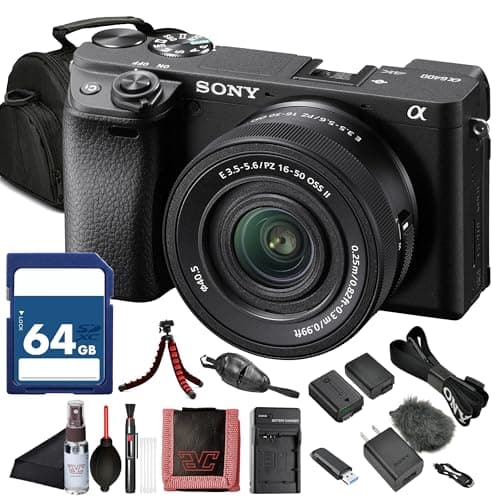
The pros who document art for galleries almost all shoot tethered, and once you try it you understand. The frame appears on a laptop screen at full resolution the moment it is captured: glare on the varnish, a soft lower-left corner, a color cast from the window you forgot to block, all visible immediately instead of after teardown. The a6400 is the affordable body that does this workflow gracefully.

Build a color profile from the ColorChecker below and Sony's cool default rendering becomes a non-issue; skip that step and Canon bodies are more forgiving. This is the pick for the artist who wants a semi-pro documentation station rather than a camera that visits a tripod occasionally.

The Studio Regular

The a6400 remains a documentation favorite for one workflow reason: Sony's tethering and remote tools are excellent, and the E-mount's adapted-lens universe includes superb affordable macros. 24.2MP files with wide dynamic range flatten glare recovery and shadow lifting.

Buy this if you shoot tethered to a laptop, or plan to: seeing each frame at full size the instant it is taken is the single biggest quality-of-life upgrade in art copy work, catching glare hotspots and soft corners before packing up the lights. Sony's ecosystem does this smoothly at this price point.

What we don't like

Sony's default color leans cooler than Canon's and pigment-critical work benefits from a custom white balance or a profile built from a color target (which you should do on any brand, but Canon forgives skipping it more). The 16-50 kit zoom is the weak link; the flat-field primes are the point.

Best Detail Resolution (APS-C)The 40MP Option

Sensor

40.2MP APS-C X-Trans 5

IBIS

In-body stabilization (handheld installs)

Films

Fujifilm color profiles

Lens

XC 15-45mm kit (upgrade path: XF primes)

Pros

  • 40MP resolves texture other APS-C cannot
  • Cropping latitude: detail shots from one frame
  • Handles subtle washes and earth pigments beautifully

Cons

  • Kit lens undersells the sensor; plan the prime
  • Priciest APS-C path in this guide

There is documentation, and there is archiving, and resolution is where they part ways. At 24MP a painting is faithfully recorded; at 40MP its surface is: the weave under thin passages, the ridge of each palette-knife stroke, the granulation in a watercolor sky. Print reproduction at full size, zoomable online viewing rooms, and insurance-grade records all cash that resolution in directly.

The X-T50 delivers it without full-frame money, with the caveat that lenses become the bottleneck: pair the body with a sharp XF prime for copy work and reserve the kit zoom for install shots. If your work is texture-forward (impasto, collage, textile), this is the pick that future-proofs the archive.

The 40MP Option

40.2 megapixels, the most resolution in APS-C, which for art documentation means texture: canvas weave, ink granulation, and pencil tooth captured at archival fidelity. For artists whose work rewards extreme detail, this is the sub-full-frame ceiling.

Buy this if your documentation doubles as archival record or feeds large-format reproduction. 40MP lets a full-frame capture of a 24x36 painting hold up at 1:1 reproduction size, and gives cropping latitude for detail shots from the same exposure. Fujifilm's color handling of subtle earth tones and washes is a quiet specialty.

What we don't like

The 15-45 kit zoom cannot fully feed a 40MP sensor; budget for an XF prime or macro to collect what you paid for. In-body stabilization helps handheld gallery shots but does nothing on a stand.

Austin Art Insider

Free weekly guide to galleries, exhibitions & collecting in Austin.

Best Full-Frame EntryThe Full-Frame Step

Sensor

24.2MP full-frame CMOS

Color

Canon flagship-grade color science

Lens

RF 24-50mm kit (upgrade path: RF macro)

Video

4K 60p for studio content

Pros

  • Full-frame tonal latitude at entry price
  • Same honest Canon color as our top pick
  • Light enough to be the everyday camera too

Cons

  • Kit zoom is the placeholder lens
  • No IBIS; handheld work wants care

Full frame earns its price in art documentation twice: once in the smoothness of tonal gradients, and once in forgiveness. Larger photosites mean washes, glazes, and airbrushed transitions render without the faint banding smaller sensors can introduce, and mistakes (a stop of underexposure, a shadowed corner) recover cleanly in RAW rather than costing a reshoot.

Against the Nikon Z5 II below, the R8 is the lighter, more video-capable body with Canon's pigment-faithful color; the Nikon counters with dual card slots and in-body stabilization. That fork gets the full head to head treatment below. Either way, pencil the macro lens into the budget; full-frame sensors are honest about mediocre glass.

The Full-Frame Step

Full-frame Canon color at the lightest price of entry: the R8 pairs a 24.2MP full-frame sensor with the color pipeline of bodies costing three times more. For documentation, the larger sensor buys cleaner files, wider tonal latitude, and access to RF's excellent macro lenses.

Buy this if you sell prints of your work and the reproduction chain deserves full-frame tonality: smoother gradients in skies and washes, more recoverable shadow detail under imperfect lighting, and cleaner high-ISO for handheld gallery and studio shots. It is also simply an outstanding general camera for an artist's whole practice.

What we don't like

The 24-50 kit zoom is compact but modest; the RF 35mm or a macro is the documentation lens this body deserves. No in-body stabilization at this tier, which the tripod renders moot.

Best Full-Frame for Archival WorkThe Belt-and-Suspenders Body

Sensor

24.5MP full-frame

Slots

Dual SD (simultaneous backup recording)

IBIS

In-body stabilization

Mount

Nikon Z (excellent 50mm/105mm macros)

Pros

  • Dual-slot backup: sessions survive card failure
  • IBIS makes handheld gallery shots dependable
  • Neutral color built for target-based correction

Cons

  • Lens not included at $1,596.95
  • Flat default JPEGs; RAW workflow assumed

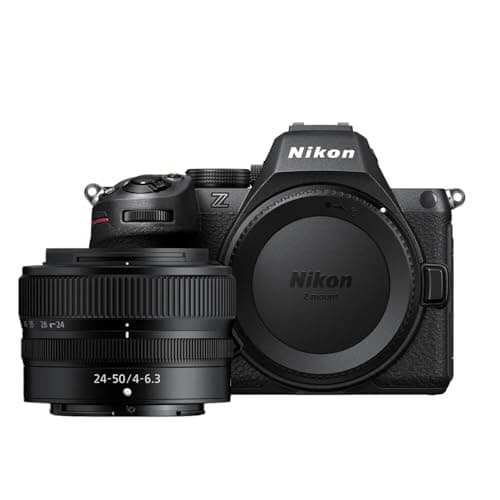
Ask a conservator what they fear and the answer is not bad color, it is lost files. The Z5 II's dual card slots write every frame to two cards at once, which converts the worst failure mode in documentation (a corrupted card discovered after the lights are packed) into a non-event. That single feature is why serious archival shooters cluster around bodies like this.

The rest of the package supports the mission: stabilized handheld shooting for collection walkthroughs, clean high-ISO for dim install spaces, and a Z-mount macro lineup that flat-out excels at reproduction distances. If documentation is a service you provide, or an archive you cannot afford to lose, this is the responsible spend.

The Belt-and-Suspenders Body

The archival choice: dual card slots so no documentation session exists in only one place, in-body stabilization for handheld collection and install shots, and Nikon's neutral, correction-friendly color. Add the superb Z-mount 50mm macro and it is a reproduction instrument.

Buy this if the files themselves are the asset: artists maintaining a legal or insurance archive, documenting other people's work, or anyone who has ever lost a card. Simultaneous dual-slot recording means the session survives a card failure, a professional habit worth adopting the day the work starts mattering.

What we don't like

Body only at this price; the lens budget is additive and the Z 50mm macro you want adds real cost. Nikon's neutral rendering is a feature for correction workflows but means out-of-camera JPEGs look flatter than Canon's.

Best Pro All-RounderThe 33MP Flagship Pick

Sensor

33MP full-frame Exmor R

Files

10-bit HEIF, 14-bit RAW

Tethering

Pro-grade (Capture One, Imaging Edge)

Mount

Sony E, deepest pro lens pool

Pros

  • 33MP archival resolution with pro handling
  • Best-in-guide tethering and studio integration
  • One body covers documentation and everything else

Cons

  • Serious total system cost
  • Overkill for occasional own-work shots

Some readers of this guide are quietly becoming their local art scene's documentation photographer, and this is their camera. The a7 IV is the standard-issue body of working hybrid professionals for good reason: resolution that satisfies archives, files that grade cleanly, tethering that makes client sessions smooth, and a lens ecosystem with a right answer for every reproduction problem, including the superb FE 90mm macro.

The honest framing mirrors our 6K monitor advice: nobody needs this to document their own paintings well, and the R50 at 40% of the price produces submission files no juror will distinguish. What the a7 IV buys is professional depth, the capacity to say yes to every job around the work. Price it against the invoices it enables, not the canvas on the easel.

The 33MP Flagship Pick

The ceiling of this guide: 33MP full frame, 10-bit files, flagship tethering, and the depth of Sony's pro ecosystem. For an artist-photographer hybrid or a small studio documenting many artists' work, it is one camera that does everything at professional grade.

Buy this if documentation is part of a larger professional practice: you also shoot commissions, content, or other artists' work for pay. 33MP splits the difference between archival resolution and manageable file sizes, and the tethered workflow via Imaging Edge or Capture One is as good as this price class gets.

What we don't like

Body only; the lens system you build costs as much again. For pure own-work documentation it is more camera than the job requires, which is exactly what our $799.99 top pick exists to say.

Best Copy Stand RigThe Flat-Work Machine

Column

36 inch, pro-duty rigidity

Lights

Dual LED arms at copy angle

Holds

Any camera in this guide

Best for

Works on paper, small paintings, batches

Pros

  • Perfect parallel alignment, every single time
  • Batch digitizing becomes an assembly line
  • Included LEDs kill the two-lamp juggling act

Cons

  • Permanent footprint in the studio
  • Size ceiling around two feet of original

The dirty secret of flat-art photography is that the camera is the easy part; holding it perfectly parallel to the artwork is the hard part. A degree of tilt turns rectangles into subtle trapezoids and throws one edge softly out of focus, and correcting it in software costs resolution and truth. A copy stand deletes the problem: the camera platform and baseboard are machined parallel, forever.

This Smith-Victor rig, column plus positioned LED arms, is the classic studio answer, and for anyone with stacks of works on paper the throughput is transformative: align once, then it is place-shoot-place-shoot at gallery quality. For occasional single pieces, a good tripod from our tripod guide and a bubble level do the job for less; our dedicated copy stand guide covers smaller and cheaper rigs too.

The Flat-Work Machine

The dedicated instrument for works on paper: a rigid 36 inch column that holds any camera here perfectly parallel to the baseboard, with two LED arms fixed at the correct copy angle. For prints, drawings, and small paintings, it replaces an hour of tripod fiddling with repeatable seconds.

Buy this if you digitize flat work in batches: printmakers, illustrators, watercolorists, and anyone archiving a body of works on paper. Parallel alignment, the hardest part of flat-art photography, becomes a property of the equipment instead of a per-shot skill, and the fixed lights end glare roulette.

What we don't like

It is a big permanent studio citizen, not a fold-away accessory, and 36 inches of column caps original size around 24 inches across depending on lens. Wall-sized work stays on the tripod-and-easel method.

Best Color Accuracy ToolThe Truth Card

Patches

24 reference colors, industry standard

Workflow

Shoot once per session/lighting setup

Software

Builds camera+light profiles in RAW tools

Works with

Every camera in this guide

Pros

  • Objective color truth for under $100
  • Fixes every brand's color quirks at the source
  • One frame per session is the whole workflow

Cons

  • Requires the profile step in software
  • Patches are consumable over years of use

Every camera in this guide lies about color a little, each in its own accent, and this card is the polygraph. Photograph the ColorChecker once at the start of a session, feed that frame to profiling software, and it measures exactly how your camera-plus-lights combination bends each of 24 known colors, then builds the correction that unbends them. Apply it to the session and cadmium red photographs as cadmium red.

For artwork this is not perfectionism, it is the actual job: a collector buying from a phone screen, a lab printing your giclee run, and a juror comparing submissions are all trusting your file's color. At $99.00 it is the highest accuracy-per-dollar purchase on this page, which is why it belongs in the kit before any lens upgrade.

The Truth Card

The industry's reference: 24 scientifically formulated patches that let software build an exact color profile for your camera under your lights. One frame with this card in it, and every file from the session can be corrected to objective truth rather than taste.

Buy this the moment color accuracy carries consequences: print reproduction, gallery submissions, insurance documentation, or selling work online where the buyer expects the canvas to match the screen. It converts color correction from squinting adjustment into a one-click calibration, on any camera brand.

What we don't like

The patches age with heavy light exposure; store it closed and replace it when the reference stops being one. Software step required (free and paid options both work); the card alone corrects nothing.

Best $8 UpgradeThe White Balance Fix

Cards

Grey (18%), white, black set

Use

Custom WB in camera, or click-correct in RAW

Size

Pocketable, lanyard included

Cost

$7.99

Pros

  • Kills color casts for the price of coffee
  • Works in-camera, no software required
  • The habit that upgrades every future photo

Cons

  • One-dimensional versus a full color target
  • Budget cards vary slightly from true neutral

If your paintings photograph slightly orange indoors and slightly blue by the window, this is the eight-dollar reason why it stops. Cameras guess at the color of your light, and in mixed home lighting they guess wrong. A grey card ends the guessing: photograph it under your setup, set custom white balance from that frame (or click it later in RAW), and the light's cast is measured and removed.

The upgrade path is tidy: start here, and when print reproduction or gallery sales raise the stakes, add the ColorChecker for full-spectrum truth. Together they cost less than a kit lens filter set and improve every artwork photo you will ever take.

The White Balance Fix

The gateway color tool: an 18% grey card that sets custom white balance in-camera or one-click-corrects it in RAW. It is not the full ColorChecker treatment, but it eliminates the color cast that ruins most amateur art photos, for eight dollars.

Buy this with whichever camera you choose, immediately, even if the ColorChecker comes later. Mixed household lighting (window plus lamp plus overhead) casts every artwork photo; one frame of this card per setup and the cast is gone. It fits in the camera bag pocket and works forever.

What we don't like

White balance is one dimension of color truth; the grey card cannot correct hue shifts in individual pigments the way the 24-patch target does. Cheap cards can drift from true neutral; treat this as the excellent starter it is.

Head-to-Head

How the top picks compare

The two forks artists actually face: how much camera the job needs at the entry level, and which full-frame body deserves the upgrade money.

Canon R50 vs R100: Is the Top Pick Worth $300 More?

Canon versus Canon at the entry: identical sensor class, very different bodies.

Canon EOS R50 Kit

Canon

Winner

Canon EOS R50 Kit

Articulating screen, fast AF, mic input, one-camera flexibility

$799.99
Check Price →
Canon EOS R100 Kit

Canon

Canon EOS R100 Kit

Same documentation files for $300 less

$499.00
Check Price →

Our verdict

Winner: Canon Canon EOS R50 Kit. The R50 wins because almost no artist buys a camera for documentation alone, and the moment the camera leaves the tripod the differences compound: the articulating touchscreen that makes copy-stand and awkward-angle work pleasant, autofocus that handles openings and studio visits, and a mic input for process video. On the stand, shooting a static painting at f/8, the R100 truly is its equal, which is exactly the finding that makes it our budget pick. Decide with one question: will this camera ONLY ever photograph artwork on a tripod? Honest yes: save the $300 and buy the ColorChecker and a light. Anything else: the R50's flexibility is the better spend.

Buy the Canon

the camera will also shoot process video, events, and studio life.

Buy the Canon

it will live on a stand photographing flat work, full stop.

Canon R8 vs Nikon Z5 II: The Full-Frame Fork

The two smartest full-frame upgrades for art documentation, $100 apart.

Canon EOS R8 Kit

Canon

Canon EOS R8 Kit

Canon color, lighter body, lens included

$1,499.00
Check Price →
Nikon Z5 II (Body)

Nikon

Winner

Nikon Z5 II (Body)

Dual card slots and IBIS for archival work

$1,596.95
Check Price →

Our verdict

Winner: Nikon Nikon Z5 II (Body). The Z5 II wins the documentation-specific argument on one professional feature: dual card slots recording simultaneously, which means a corrupted card no longer costs a session. Add in-body stabilization for handheld collection and install shots and a Z-mount macro lineup that excels at reproduction distances, and it is the body built for treating files as assets. The R8's case is real: Canon's pigment-faithful color out of camera, a lens in the box at a lower total price, and stronger video for artists feeding social channels. If documentation is becoming a service or an archive, take the Nikon; if it is one part of a content-hungry practice, the Canon.

Buy the Canon

you want Canon color, video strength, and a kit lens included.

Buy the Nikon

the files are irreplaceable and backup-in-camera matters.

How we
chose

How we picked these eleven, and why you can trust the list:

  • Fidelity-first criteria. We ranked for what reproduction demands: color science and RAW quality, resolution for print-size output, and workflow fit (tethering, dual slots, copy-stand ergonomics). Sports-and-wildlife specs carried zero weight.
  • The system, not just the body. Documentation quality lives in the setup, so the guide includes the copy stand and the two color tools alongside cameras, and every camera review names its real lens upgrade path rather than pretending kit glass is the destination.
  • Verified live prices and stock. Every product was checked against Amazon's live catalog data at publish time: real price, in stock, real product images. No list-price fiction.
  • Honest tiering. Where a cheaper body documents identically on a stand (R100 vs R50), we say so; where a premium body buys something real (dual slots, 40MP texture), we name the artist it serves rather than upselling everyone.
  • Scanner honesty. Flat small work is often a scanner's job; the guide says so up front and links our scanner coverage instead of pretending cameras are always the answer.

Share this guide

Share

Common Questions

Frequently Asked Questions

Have art
to sell?

Austin Gallery specializes in selling inherited art, estate collections, and fine art with zero upfront fees. Get a free evaluation today.